
Enterprise SaaS SEO: What Breaks at Scale
Enterprise SaaS SEO breaks where small sites never go: competing products, hreflang, subdomains, migrations, and approvals. How to spot and fix each one.
Originally published: November 6, 2026 Last updated: November 6, 2026
Enterprise SaaS SEO is search optimization for software companies whose sites span several products, regions, and teams. The keyword work looks familiar. What changes is the structure underneath it: product pages that compete with each other, regional versions, docs and help subdomains, migrations, and a review process every change has to pass.
Much SaaS SEO advice is written for one product on one domain. Add a second product line, a few languages, and a docs site run by another team, and the question shifts from what to write next to why a page stopped ranking after the last release.
If you’d like the fundamentals first, start with how SaaS SEO works. Writing for a buying committee and measuring long sales cycles are part of B2B SaaS SEO after product-market fit.
Key takeaways
- At enterprise scale, many SEO losses come from structure and process, so the fixes often live in templates and release cycles.
- Give every keyword cluster one owning page and one owning team, so products stop competing for the same searches.
- Hreflang works best when every regional version lists itself and every other version with full URLs.
- Migrations need a full redirect map, and Google recommends keeping redirects for at least a year.
- SEO checks in release QA and pre-approved claim language save time on every release.
What enterprise SaaS SEO is
Enterprise SaaS SEO is the practice of earning search and AI visibility for a large software company’s site, where several products, regions, and subdomains share one brand. It covers the same content and technical work as any SaaS SEO program, plus the architecture, governance, and change control a site that size needs to keep rankings stable.
You’ll also see it called enterprise SEO for SaaS, and its technical side is often called enterprise technical SEO. Enterprise SEO on its own means any very large site. The SaaS version adds a product that changes every sprint, a docs site that grows with every release, and buyers who check security and integration details before they ever book a call.
A useful test: if one SEO fix needs sign-off from more than one team, or one URL change can affect pages in more than one language, you’re doing enterprise SaaS SEO.
How enterprise SaaS SEO differs from SaaS SEO at a smaller company
Enterprise SaaS SEO differs from smaller-company SaaS SEO in scale and coordination. The site has more products, locales, and hosts, more teams can change it, and releases ship on a schedule, so most of the work is keeping a large system consistent.
| Growing SaaS company | Enterprise SaaS company | |
|---|---|---|
| Site size | Hundreds of pages on one domain | Many thousands of URLs across the main site, docs, help, and regional versions |
| Products | One product, one set of features | Several products or editions that overlap in what they do |
| Locales | One language, maybe a second | Several languages or country versions with hreflang |
| Hosts | Main site plus an app login | Separate docs, help, community, and app subdomains, often on different platforms |
| Who approves a change | The founder or a marketing lead | Product marketing, brand, legal, security, and engineering |
| How changes ship | Edit and publish the same day | Tickets wait for a release cycle and QA |
| What usually breaks | Thin content, slow pages, missing basics | Cannibalization between products, hreflang errors, lost redirects, index bloat, and stalled tickets |

What breaks first when a SaaS site scales
These are the problems that tend to show up first as a SaaS site grows past one product and one region:
- Product pages that compete for the same searches
- Regional versions that rank in the wrong country because hreflang is incomplete
- Docs, help, and community subdomains that split authority and repeat the main site
- Migrations and redesigns that drop redirects
- Index bloat from filters, parameters, and old docs versions
- SEO tickets that sit in an engineering or legal queue for months
Each of these is quiet at first. Rankings slip on a few pages, or a regional page shows up in the wrong market, and nobody connects it to a release from weeks earlier.

Multiple products competing for the same searches
When a SaaS company sells several products, their pages often target the same terms, and Google ends up choosing between them. The fix is one owning page for each keyword cluster, a shared map every product team can see, and use-case pages that bring related products together.
Build a keyword ownership map
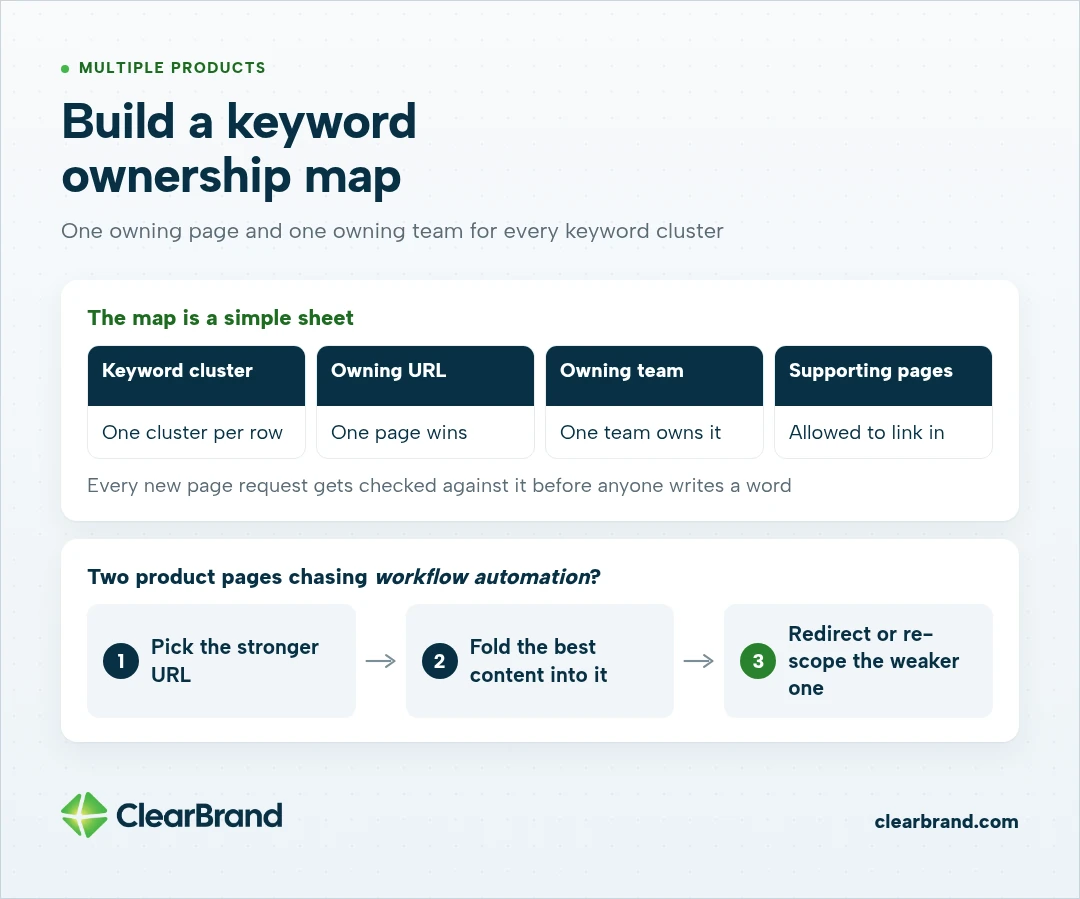
Picture 2 product teams writing feature pages that both chase workflow automation. Each page is decent. Together they split Google’s attention between 2 URLs, and neither ranks where it should.
The map is a simple sheet: keyword cluster, owning URL, owning team, and the pages allowed to support it with a link. Every new page request gets checked against it before anyone writes a word.
When two pages already compete, I’d pick the stronger URL, fold the best content from the other into it, and redirect or re-scope the weaker one. Google’s guidance on consolidating duplicate URLs covers how to signal which version should win.
Use-case pages that span products
Buyers search for the job they need done. Someone looking for expense approval for nonprofits doesn’t care which product team owns approvals.
A use-case page can answer that search once, show which products handle each part, and link down to the feature pages. And that gives every product a supporting role without 3 pages fighting for one query.
Locales, hreflang, and international SaaS SEO
International SaaS SEO breaks when regional versions don’t point to each other correctly. Each language or country version needs hreflang tags that list itself and every alternate with fully qualified URLs, plus an x-default page for visitors who match none of them.
Choosing subfolders, subdomains, or country domains
Google documents the trade-offs plainly. Subfolders (example.com/de/) are easy to set up and low maintenance because everything lives on one host.
Subdomains (de.example.com) are easy to separate and can sit on different servers. Country domains send the clearest geographic signal and cost the most to run.
For most SaaS companies, I’d lean toward subfolders, because everything stays on one host and one team can keep the templates consistent. A company with regional legal entities or separate local teams may have good reasons to choose otherwise.
Hreflang errors that quietly split rankings
Google’s rule is that each language version must list itself as well as all other language versions, and alternate URLs must be fully qualified. When tags don’t point back to each other, Google processes only the pairs that do.
What to check on every regional template:
- Every page lists itself plus every alternate
- Every alternate links back
- URLs include https and the full domain
- An x-default points to a sensible fallback, such as the language selector or global home page
- Canonicals point to the page’s own regional URL, never to the English original
The last one is easy to miss. A German page whose canonical tag points to the English page tells Google the English URL is the one to index, which works against its hreflang tags. Google’s guidance is to pick a canonical in the same language.

Docs, help, community, and app subdomains
At enterprise scale, docs, help, and community sites often run on separate platforms owned by separate teams. They can bring in valuable searches, but they need one owner for overlapping topics, consistent product facts, and links back to the main site so they support it instead of competing with it.
Docs picks a platform that suits docs, support picks a help desk, and community runs on a forum tool. None of those choices are wrong. Each one just creates a host with its own titles, templates, and idea of what the product is called.
I’d start with an inventory of every host, who owns it, what platform it runs on, and which searches it ranks for in Search Console. Overlaps show up fast, like a help article and a feature page both explaining SSO setup.
What to align across hosts:
- Product names, plan names, and feature names, spelled the same everywhere
- Which host owns each topic, recorded in the keyword ownership map
- Navigation and links from docs and help back to the relevant product page
- Old docs versions, set to point at the current version or kept out of the index
Moving docs from a subdomain into a subfolder can help, and it’s also a migration with real risk. If the subdomain is consistent and well linked, cleaning it up in place is often the better first step.
Migrations and replatforms
SaaS site migration SEO comes down to a complete redirect map, a clean launch, and patient monitoring. Map every old URL to its closest new match, keep the redirects for at least a year as Google’s site move guidance recommends, and expect rankings to move around while Google recrawls the site.
Large SaaS sites have plenty of reasons to migrate: a rebrand, a new CMS, a merged product line, or a docs platform switch. Each one puts years of rankings at risk in one release.
Before launch
- Export every indexable URL from Search Console, your sitemaps, and a full crawl, including docs and regional versions.
- Map each old URL to its closest new equivalent, one to one where possible.
- Carry over titles, meta descriptions, structured data, hreflang, and canonicals for the pages that earn traffic.
- Test the redirect map on staging and check for chains and loops.
After launch
- Crawl the old URL list and confirm every one returns a single 301 to the right page.
- Submit the new sitemaps and watch the page indexing report in Search Console.
- Compare traffic and rankings for your top pages each week against the pre-launch baseline.
- Fix broken redirects within days, while Google is still recrawling.
If a CMS move is on the table, platform limits matter as much as redirects, whether you’re weighing Webflow for enterprise SEO or another CMS.

Crawl budget and index bloat on large SaaS sites
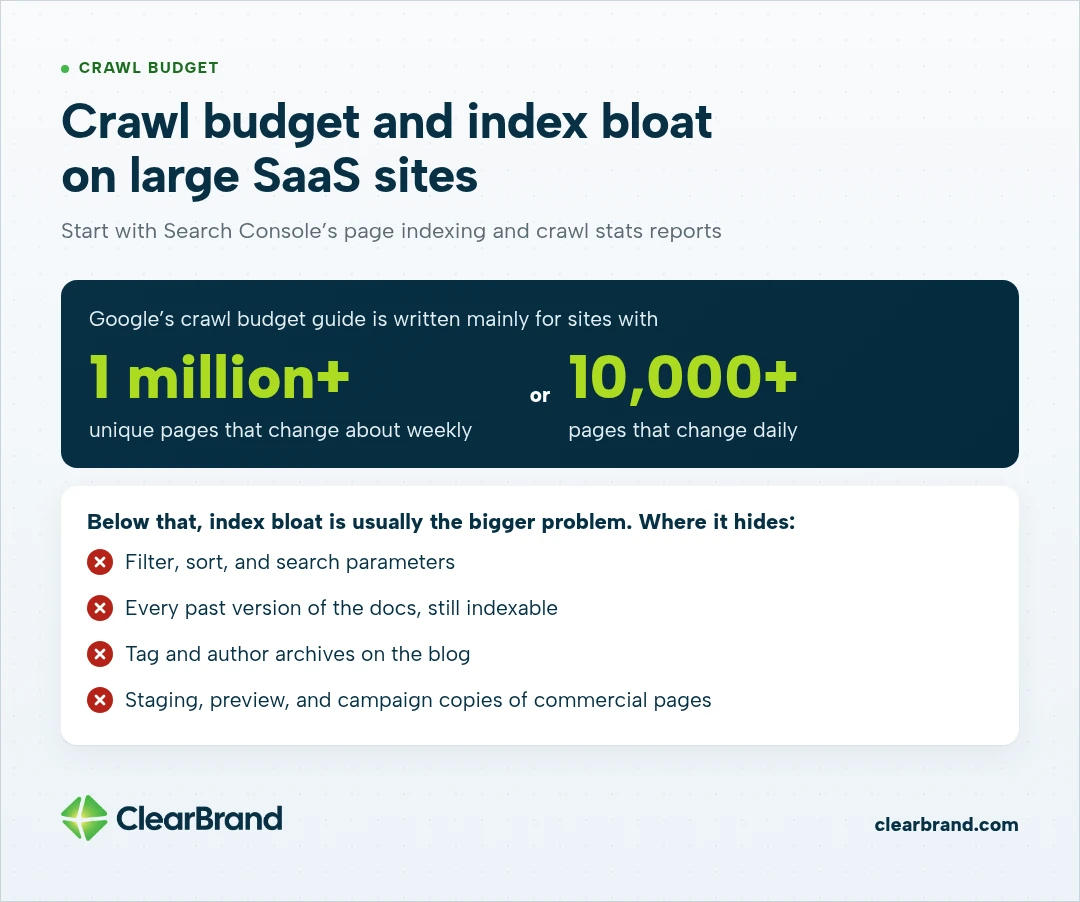
Crawl budget matters for SaaS sites with very large or fast-changing URL counts. Google’s crawl budget guide is written mainly for sites with 1 million or more unique pages that change about weekly, or 10,000 or more pages that change daily. Below that, index bloat is usually the bigger problem.
Index bloat is a separate problem. Filter and sort parameters, tag archives, old docs versions, and near-duplicate pages fill the index with URLs nobody searches for. On the largest sites, Google says crawling lots of duplicate URLs also wastes crawl time that could go to the pages you care about.
Where bloat hides on SaaS sites:
- Filter, sort, and search parameters on templates and resource libraries
- Every past version of the docs, still indexable
- Tag and author archives on the blog
- Staging, preview, and campaign copies of commercial pages
Search Console’s page indexing and crawl stats reports are the place to start. Teams at this size often add an enterprise SEO platform such as Botify, Conductor, or BrightEdge, but the report you act on is still the list of URLs that shouldn’t exist.
Getting SEO changes through legal, brand, and engineering
SEO changes at a large SaaS company ship faster when they fit the way the company already ships. Build SEO checks into release QA, batch requests into the release calendar, pre-approve claim language with legal, and fix problems at the template level so one change covers thousands of pages.
- Add SEO checks to release QA. A short checklist (titles, canonicals, robots tags, hreflang, and redirects) catches problems before launch, when they’re cheapest to fix.
- Batch requests into the release calendar. One clear ticket per release, with the affected templates and example URLs, moves faster than a stream of small asks.
- Pre-approve claim language. Security, compliance, and integration pages carry claims legal has to review. Agree on approved wording once, so new pages reuse it without a fresh review each time.
- Fix problems at the template level. A title pattern or schema fix on a template covers every page that uses it.
- Keep a change log. Record what changed, when, and on which templates. When rankings move, the log gives you a short list of recent changes to check first.
Setting the overall plan and deciding who owns it is part of a broader SaaS SEO strategy.

Security, trust, and integration pages built by hand
Enterprise buyers check security and integration details early, so those pages need clear, specific answers. Write a dedicated page for each integration customers use most, and give security pages direct statements about the certifications and policies the company actually holds.
A security page answers what a buyer’s security reviewer is asking when it names the certifications the company holds, such as SOC 2 or ISO 27001, explains how data is handled under GDPR, and says where the full documentation lives.
Integration pages work the same way. I’d write one by hand for each tool customers ask about most: what the integration does, how to set it up, and a real workflow it supports. A smaller set of detailed pages does more than a long directory of near-identical ones.
These pages also feed AI answers. When a buyer asks an assistant whether a tool connects to Salesforce or holds a SOC 2 report, a clear sentence on your own page gives it something accurate to repeat.
Preparing an enterprise SaaS site for AI search
Enterprise SaaS sites prepare for AI search the same way they prepare for Google: clear, consistent facts on well-structured pages. Google says there are no additional requirements to appear in AI Overviews or AI Mode, so the work is keeping product facts aligned across every host and locale and tracking where your brand gets cited.
Scale makes consistency harder. If the main site, the docs, and the German pages each describe a product’s limits differently, an AI answer can pick up any of them.
What I’d do first:
- Write a short, direct answer near the top of each product, security, and integration page
- Use the same product names and facts on every host and in every language
- Track citations in Google AI Overviews and ChatGPT alongside rankings
When you build the report, it helps to know that not every one of the AI search visibility metrics for SaaS is worth including.
Where I’d start an enterprise SEO strategy for a large SaaS site
I’d start with a full map of the site before writing anything new: every host and locale, which page owns each keyword cluster, where redirects and hreflang are broken, and how a change gets approved. That map shows which fixes protect existing rankings, and those come first.
- Inventory every host, locale, and platform, with an owner for each.
- Build the keyword ownership map and flag pages that compete.
- Audit hreflang, canonicals, and redirect history.
- Measure index bloat against the pages that matter.
- Agree on the change process with engineering, brand, and legal.
- Then plan new content, starting with use-case, security, and integration pages.
I use the same order with growing SaaS companies, protecting the rankings they already have before adding new pages. KleerCard, a fintech SaaS company, had its first pages ranking within a month of starting that work, and search now brings in half of its new customers at a 24:1 ratio of lifetime value to acquisition cost. Read the story.
If you’d like help with that map, see how we work with software companies or reach out and we’ll start with a conversation about your site.
Enterprise SaaS SEO FAQ
What is enterprise SaaS SEO?
Enterprise SaaS SEO is search optimization for large software companies whose sites span several products, regions, and subdomains. It includes the usual content and technical work plus the architecture, governance, and change control that keep rankings stable on a site that size.
How is enterprise SaaS SEO different from regular SaaS SEO?
Enterprise SaaS SEO adds coordination to the usual work. The site has more products, locales, and hosts, more teams can change it, and fixes ship on a release schedule, so problems like cannibalization, hreflang errors, and lost redirects matter more than finding new keywords.
What breaks first when a SaaS site scales?
The first things to break are usually product pages competing for the same searches, incomplete hreflang, docs and help subdomains that repeat the main site, redirects lost in migrations, and index bloat from parameters and old docs versions. SEO tickets stuck in a review queue often make each one last longer.
Should SaaS docs live on a subdomain or a subfolder?
SaaS docs can rank well on either a subdomain or a subfolder. A subfolder keeps everything on one host and is easier to keep consistent, while a subdomain is easier for a separate team to run. If docs already sit on a well-linked subdomain, cleaning them up in place is often a safer first step than migrating.
How do you get SEO changes shipped at a large SaaS company?
SEO changes ship fastest when they follow the company’s existing release process. Add SEO checks to release QA, batch requests into the release calendar, pre-approve claim wording with legal, and fix issues at the template level so one change covers every affected page.
How should enterprise SaaS companies prepare for AI search?
Enterprise SaaS companies prepare for AI search with the same fundamentals that work on Google, applied consistently across every host and language. Google says there are no special requirements for AI Overviews, so keep product facts aligned, put clear answers near the top of key pages, and track AI citations alongside rankings.
Let’s look at what’s breaking on your site
On a large SaaS site, SEO trouble usually shows up as a handful of small problems spread across products, regions, and teams. Together they add up.
If you’d like a second set of eyes on your site, we’d love to hear what you’re working on and help you find the best place to start. Get your free SEO audit