
SaaS SEO: A Practical Guide for Pipeline, Not Traffic
SaaS SEO ranks software companies for the searches buyers already run, then turns visits into trials, demos, and MRR. Covers page types, measurement, and timelines.
Originally published: September 14, 2026 Last updated: September 14, 2026
SaaS SEO is the practice of ranking a software company’s pages for the searches its buyers already run, on Google and inside AI assistants, so those visits become trials, demos, and recurring revenue.
If you run the product, you already know the other version. Publish a pile of category posts. Watch sessions move. Wonder why nobody starts a trial. Keywords, pages, technical access, and measurement only matter if they change that last part.
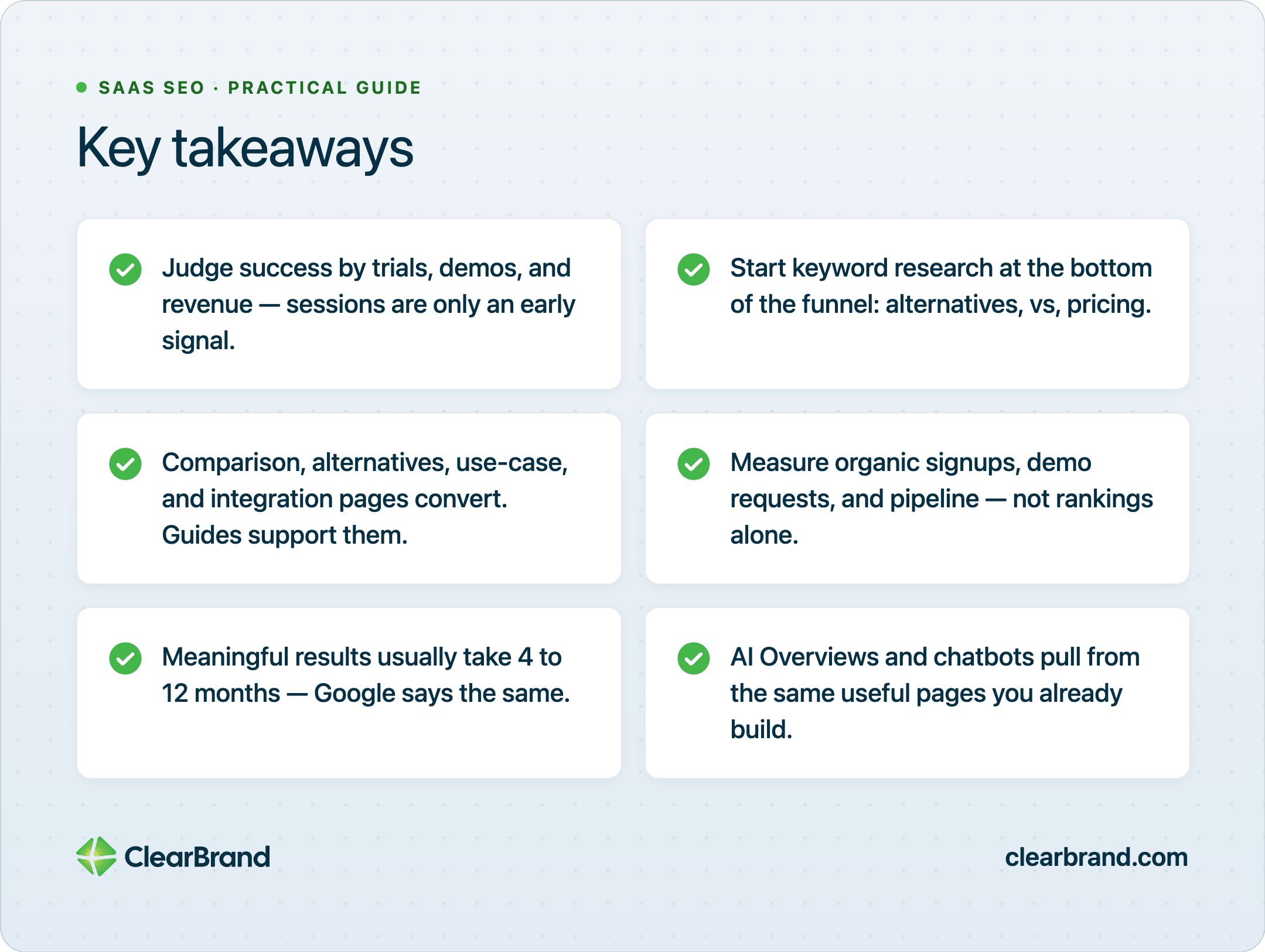
Key Takeaways
- Judge SaaS SEO by trials, demos, and revenue. Sessions are an early signal.
- Start keyword research at the bottom of the funnel: alternatives, vs, pricing, best [category], and [category] for [job].
- Comparison, alternatives, use-case, and integration pages convert. Guides support those pages.
- Measure organic signups, demo requests, and pipeline. Rankings and traffic are early signals only.
- Meaningful SaaS SEO results, like trials and demos, generally come by about month 6. Google’s own guidance allows four months to a year.
- AI Overviews and chatbots pull from the same useful pages. Those pages do the AI job too.
What SaaS SEO is
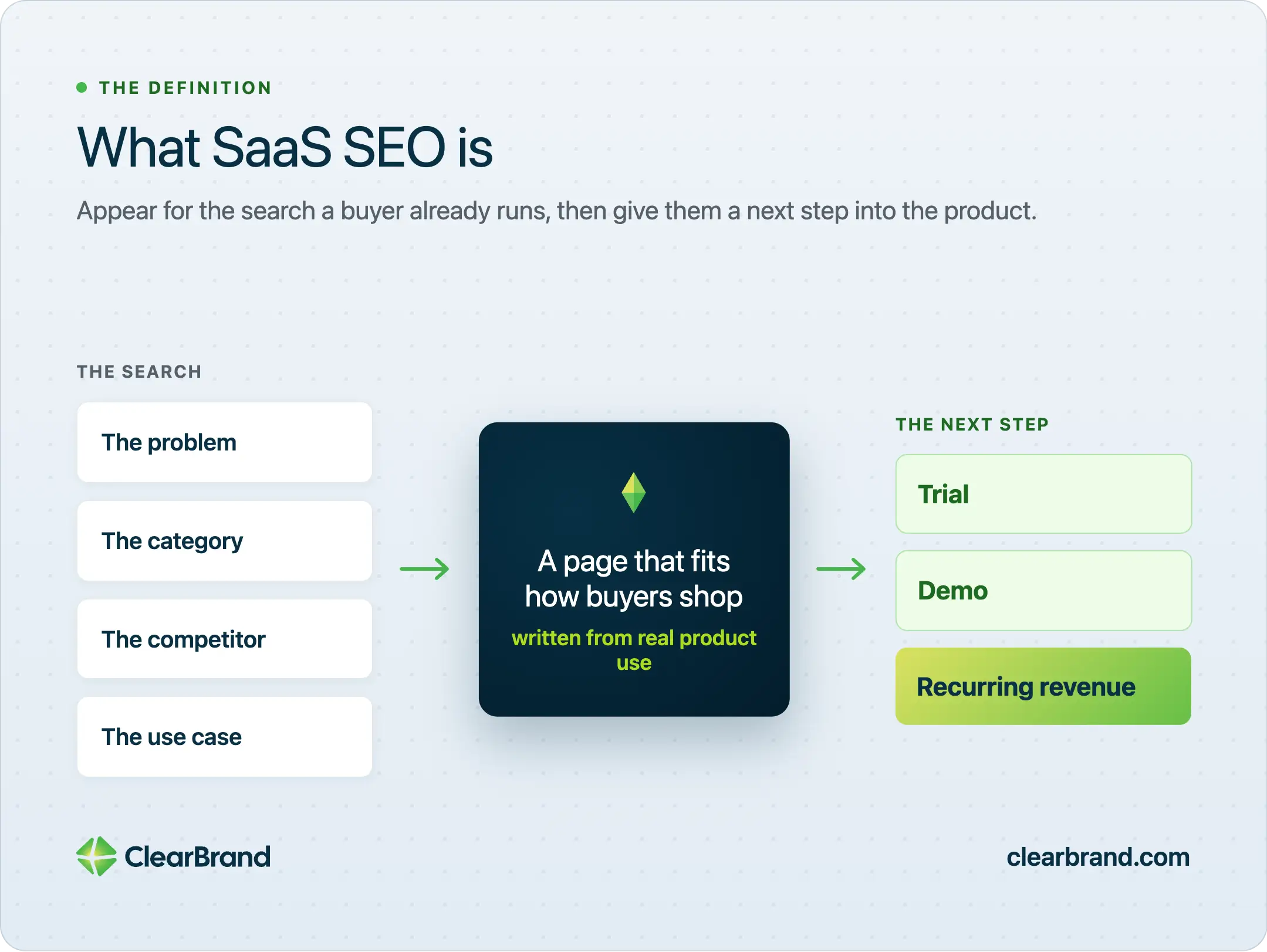
SaaS SEO is built for software the customer pays for every month. You show up for the problem, the category, the competitor, or the use case. Then you give that person a next step into the product.
The tasks won’t surprise you: keyword research, on-page and technical work, content, links, and authority. Judge them by whether a visit becomes a trial, a demo, or revenue. A guide that ranks and never produces a signup still has unfinished work.
Authority in SaaS SEO means other sites naming the product for the job it sells. Partner pages. Integration directories. Original studies. Reviews a buyer already trusts. Those citations come from pages other writers can use.
B2B SaaS SEO usually means a longer cycle and more people in the room. A champion finds you. A finance lead compares pricing. Someone in IT asks about integrations. Each of them may search a different phrase for the same product. Your site has to answer more than one of those phrases without sending everyone to the homepage.
B2C SaaS can convert on the same visit, especially with a free trial and a short setup. Comparison, use-case, and integration pages still apply. What changes is how long you wait between the first visit and the first payment.
Why SaaS SEO is different from regular SEO
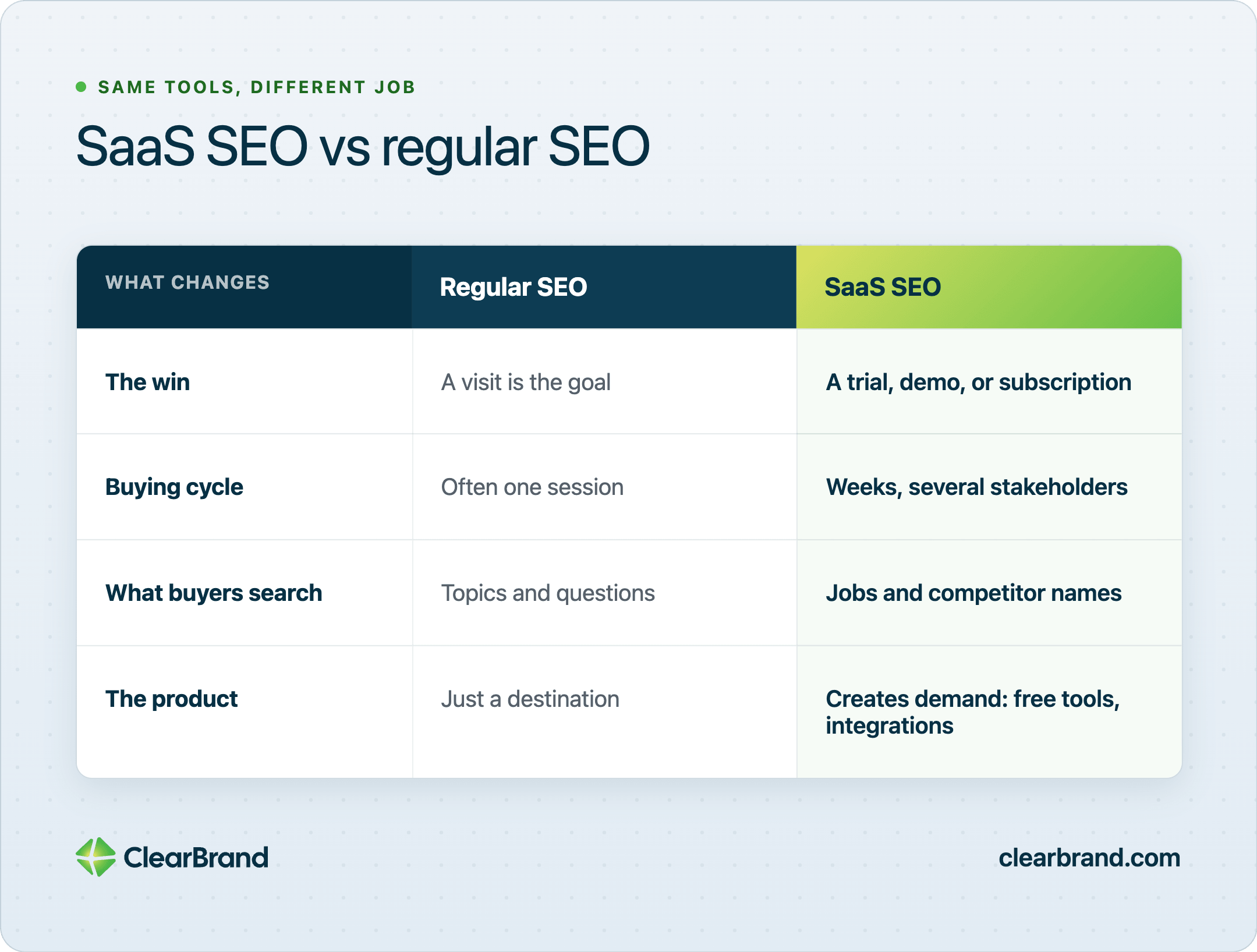
Regular SEO can treat a visit as the win. SaaS SEO has to survive a long evaluation, a product that’s sometimes hard to explain in one headline, and a customer who pays every month.
Four things change the work:
| Difference | What it changes |
|---|---|
| Recurring revenue | A ranking that produces a few high-LTV customers can pay for a year of content. |
| Long, multi-stakeholder cycle | You need pages for the first problem search and for the later vs and pricing search. |
| Buyers search jobs | Rank for “invoice follow-up software,” not only your feature labels. |
| The product can create demand | Free tools, templates, and integration pages become search assets. |
Ahrefs, Zapier, and Canva didn’t win search by publishing more opinion posts. They built pages that solve a job and sit next to the product. Ahrefs turns reports and free tools into search traffic. Zapier built a library of integration pages for the tools people already pay for. Canva ranks for template queries that lead straight into the editor.
You don’t need a domain as strong as theirs. You need pages that match how a buyer shops for software, written by someone who has used the product and can describe the job without a feature list.
Most of a B2B software audience isn’t ready to buy on the day they search. They’re collecting options, forwarding tabs to a colleague, or coming back three months later when budget opens. That’s why branded pages and comparison pages still matter long after the first visit. For the longer cycle, the B2B SEO strategy guide covers the 95 percent of buyers who aren’t in market yet.
SaaS SEO keyword research starts at the bottom of the funnel
Build the keyword list from the searches that already imply a purchase. Then work upward only as far as you can support.
If you start at the top of the funnel, you’ll find plenty of volume. “What is project management” looks attractive in a keyword tool. It also attracts students, job-seekers, and people who will never pay you. The searches that produce pipeline sound narrower: a competitor name, a pricing query, a job plus a category.
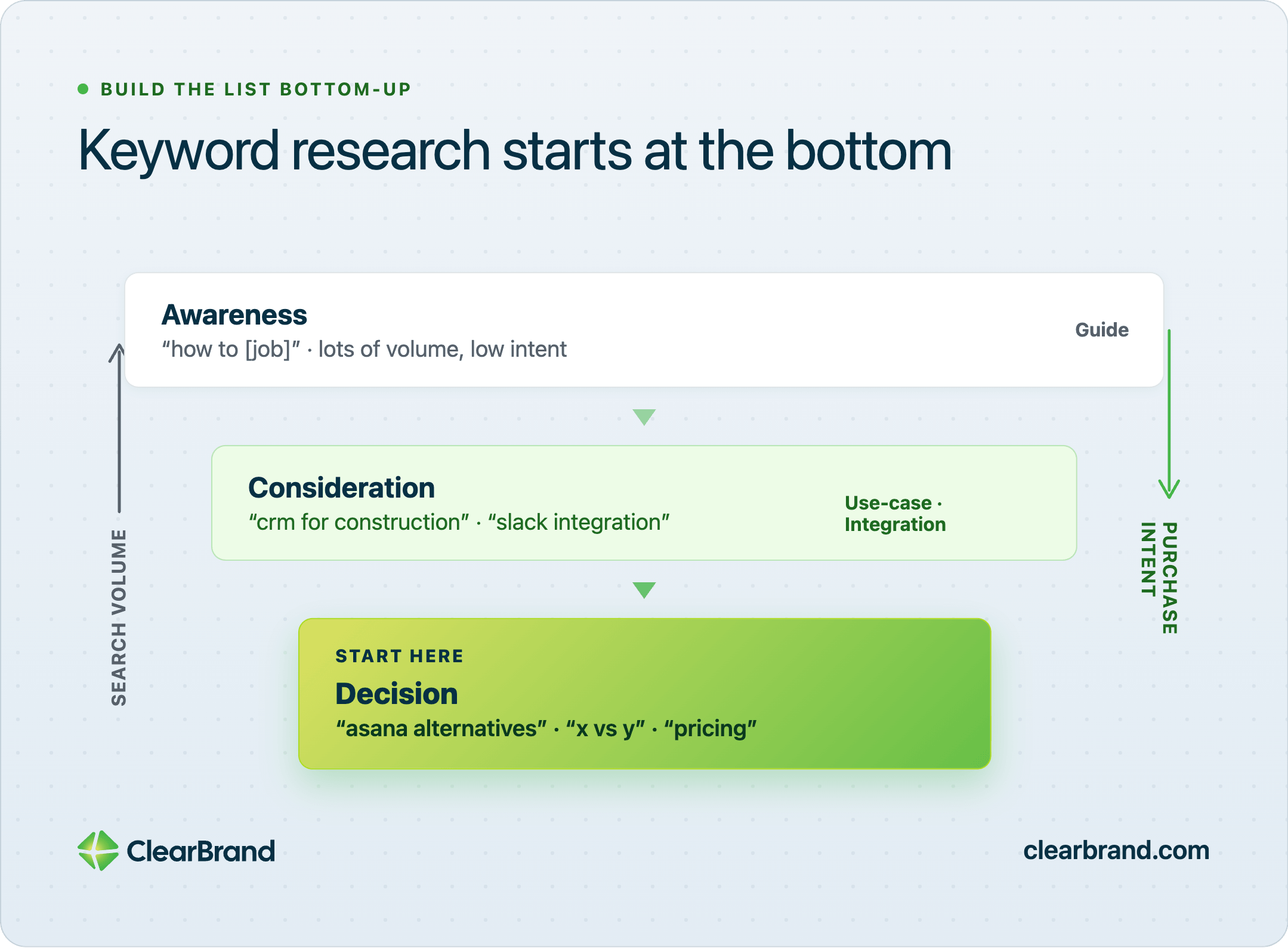
| Funnel | Search pattern | Example | Page to build |
|---|---|---|---|
| Decision | [competitor] alternatives, [A] vs [B], [product] pricing | “asana alternatives” | Alternatives or comparison page |
| Decision | best [category], [category] software | “best project management software” | Category or “best” page you can defend |
| Consideration | [category] for [job or industry] | “crm for construction” | Use-case page |
| Consideration | [product] + [tool] | “hubspot slack integration” | Integration page |
| Awareness | how to [job], [problem] | “how to reduce churn” | Guide that points to a use-case or product page |
Awareness terms with thousands of searches often bring people who will never start a trial. An alternatives query with far fewer searches can still produce demos because the searcher is already choosing a tool.
How to build the list:
- List the jobs your product does in the buyer’s words. Sit with a sales call recording or a support ticket and write the phrases people actually use. “Stop losing invoices in email” is more useful than your feature name for the same thing.
- List the tools they already use and the tools they compare you against. Those names are keywords. Buyers type them when they’re close to a decision.
- Search those phrases and note who ranks: vendors, review sites, or publishers. If G2 and a comparison blog own the page, you still need your own URL for the same query. Review sites won’t send the visitor into your trial.
- Keep terms you can rank and that a visitor a sales team would take a meeting with. A keyword with 40 searches a month and a short path to a demo beats a 4,000-search term that never converts.
Do this in a spreadsheet before you open a blank document. One row per query. Columns for the pattern, the page you’ll build, the current ranking URL, and whether anyone on your team can write it with real product knowledge. If you can’t describe the difference between you and the competing tool in a paragraph, you aren’t ready to publish that comparison page.
When you search a term yourself, notice what actually occupies page one. For a category query you’ll often see vendor homepages, “best of” listicles, and review sites. That mix tells you the page type Google already rewards. If every result is a comparison article, a 2,000-word thought-leadership post will struggle. Build the page type that’s already winning, then make it more useful than the current version.
Work the list from the bottom up. Ship the alternatives and use-case pages first. Add guides only when those commercial URLs exist and have a place to send the reader. A guide published into a site with no comparison URL leaves the ready-to-buy visitor on an educational page and hopes they hunt for a pricing button. For how to score and sequence that list across a 90-day, 6-month and 12-month plan, see our SaaS SEO strategy framework.
The SaaS SEO page types that convert
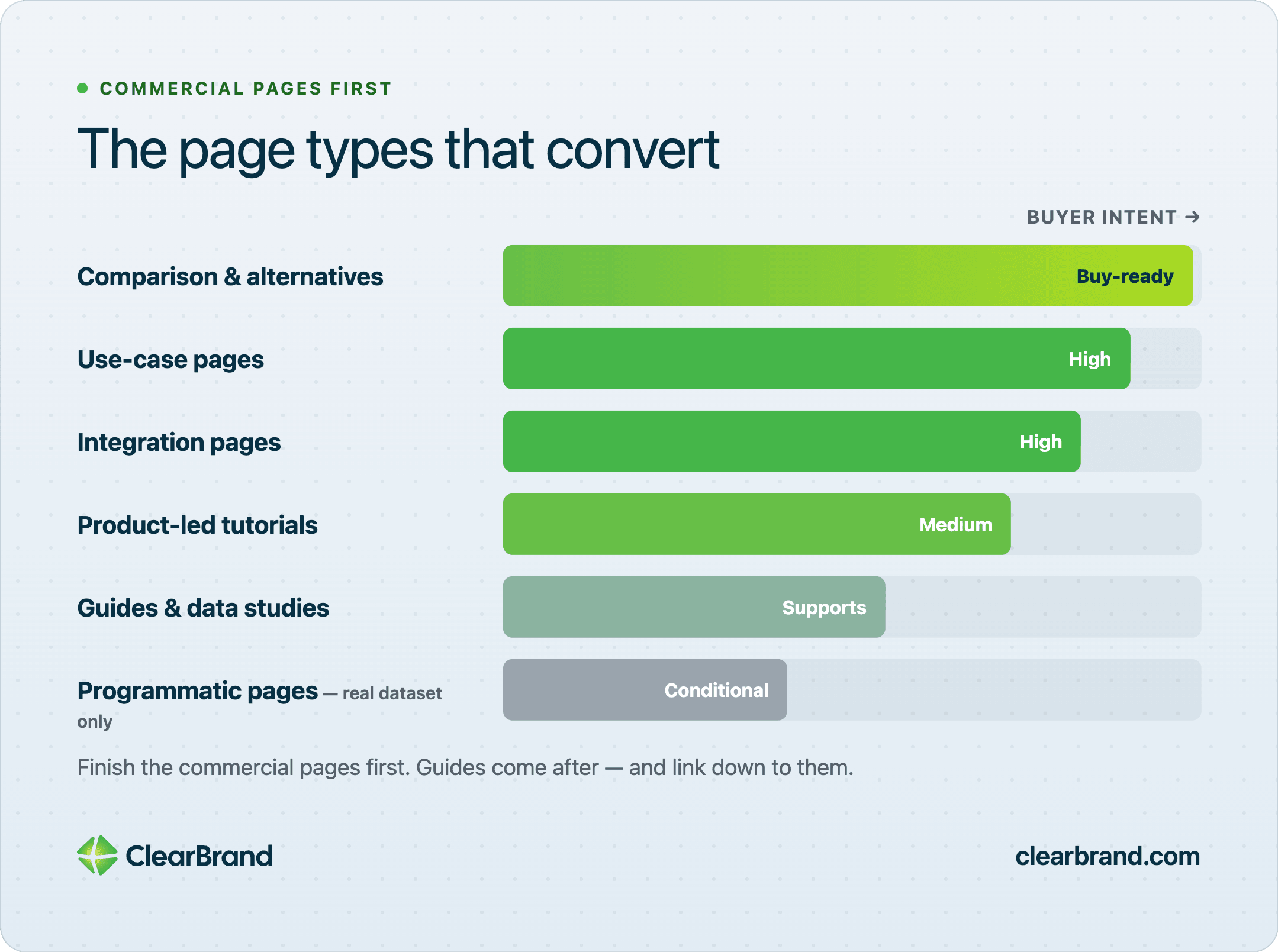
Finish commercial pages first. Blog posts come after those URLs exist, or they support commercial pages that already exist.
Comparison and alternatives pages
Buyers who type “[competitor] alternatives” or “[your product] vs [theirs]” are already in a purchase. They want a clean account of who each option fits.
Write the honest differences. Name the team size, the workflow, the price band, and the thing each product does poorly. Include pricing when you can. If you hide the number, the buyer will leave and find it on a third-party site that doesn’t care whether they come back to you.
“We are better” pages lose to pages that help the buyer choose. A good comparison page can recommend the other tool for a specific case and still win the visitor who matches your case. That’s the page they send to a colleague. Other writers cite it for the same reason.
Keep one URL per comparison. “Us vs everyone” pages get long and vague. “Us vs Asana” can be specific.
A workable structure looks like this: who each product is for, where the workflows diverge, a pricing band if you can publish one, and a short “choose this if” close. Tables help when the differences are factual. Paragraphs help when the difference is a workflow you have to show. Don’t invent a feature the other product lacks if a buyer will discover it in a trial the same afternoon.
Use-case pages
Write each use-case page for one job and one audience, then send that reader to one next step. “Analytics for product teams” outperforms a generic features page because the search already named the job.
Open on the outcome the searcher wants. Then show how the product does that job. Features belong here only as proof. A screenshot of the workflow beats a list of modules.
If you sell to more than one role, give each role a page. Sales managers and RevOps leads don’t search the same way, even when they share a contract. The same product can support both pages if the copy stays inside that job.
Industry pages follow the same rule. “CRM for construction” is a different search from “CRM for agencies.” The product may be identical. The objections, screenshots, and proof are not. Write the page for the searcher who already named their industry.
Integration pages
Zapier’s integration library is the clearest SaaS version of an integration page. If your product connects to tools buyers already pay for, each pairing is a page with a real query behind it.
The page needs more than a logo grid. Say what the integration does, what the buyer can stop doing by hand, and how to connect it. A short setup path and a screenshot are enough. Thin pages that repeat the same two sentences with a different tool name don’t hold rankings.
Start with the ten integrations your customers actually use. Expand only when you can write something specific for the next pairing. A sales engineer can usually tell you which ten matter. A keyword tool can’t.
Product-led tutorials
A product-led tutorial shows the workflow inside the product. The page should complete a task, then offer a trial or demo.
A changelog and a help article behind login don’t replace a product-led tutorial. The reader arrives from search, finishes the task on the page, and sees how they’d do it in the product next time.
Ahrefs does this with reports and free tools that run without a paid plan. You can do a smaller version: one tutorial per core job, written in the same language the buyer used in the search.
Could a stranger finish the task from the page alone, then understand why they’d do it inside your product next time? If the page only describes the feature, rewrite it as a walkthrough.
Guides and data studies
Guides and original studies cover the problem in full and give other writers a reason to link to you. They should still point down to a use-case, comparison, or product page.
Publish guides after the comparison and use-case URLs exist, and link those guides down to them. The editorial system for that supporting work lives in the SaaS content marketing guide.
If you publish a study, publish the method and the numbers. Vague “we surveyed users” posts don’t earn links. A table with a date and a sample size does.
Programmatic pages, only with a real dataset
Template galleries and integration directories work when each URL has unique, useful content. Canva and Notion can generate thousands of pages because each template is a different file a person might want.
Thin city pages, synonym pages, and auto-generated “best X in Y” URLs rarely keep rankings. If you can’t write a unique paragraph for the page, don’t generate it. We don’t ship programmatic SaaS catalogs. Comparison pages and integration pages that a person can actually use are the ones we keep building.
Review profiles on G2 and Capterra aren’t pages you write, but buyers search them. Keep those listings accurate and complete. They show up in the same research path as your comparison URLs, and AI tools read them when someone asks which product to use.
Technical SEO problems that stall SaaS sites
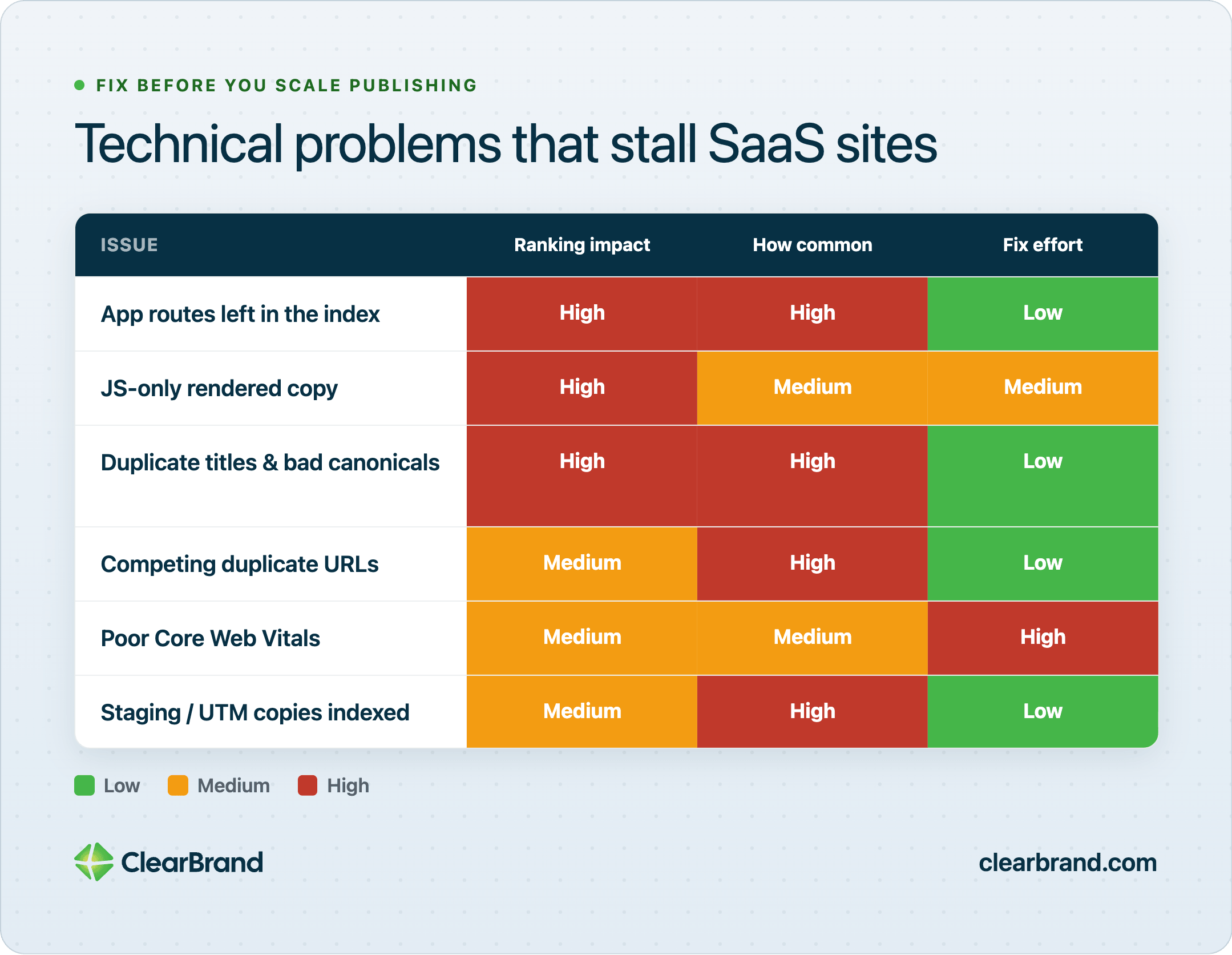
Content can’t fix a site Google can’t render or trust. I’ve watched SaaS sites look healthy in a content calendar and broken in Search Console.
Check these before you scale publishing.
Keep the marketing site and the app separate. Login, billing, account settings, and app routes belong out of the index. If Google is spending crawl budget on authenticated URLs, it’s spending less time on the pages you want ranked.
JavaScript-rendered marketing pages still need to return the important copy to a crawler. If the headline, the first paragraph, and the primary links only appear after a client-side render, you’re betting every crawler will execute your stack the same way your laptop does. View the page as Google sees it. Confirm the copy is there.
Template pages for integrations, templates, and alternatives need unique titles, unique copy, and correct canonicals. One shared title tag across 200 integration URLs is how a directory fails. One accidental canonical back to the parent hub is how 200 URLs collapse into one.
Duplicate blog and resource URLs shouldn’t compete with each other. Trailing slashes, parameter URLs, and “updated” copies of the same article split signals. Pick one version and redirect the rest.
Core Web Vitals on key landing pages need to be good enough that the page is usable on a phone. A comparison page that shifts while the buyer tries to tap a pricing table will lose that buyer. It’ll also give you a weaker quality signal on the URL that matters most.
Documentation is a special case. Help-center articles can rank for “how do I connect X to Y” queries, and those visitors are often already customers. That’s useful. A help article and a marketing integration page have different jobs. If both URLs exist, give them different titles so they don’t compete.
Staging, preview, and UTM copies of commercial pages should stay out of the index. I have seen pricing pages indexed with ?ref= parameters sitting next to the clean URL. Google then has to guess which one to rank. Don’t leave that guess to the crawler.
You can grow blog traffic and still have flat signups when the commercial URLs are noindexed, canonicalized to the wrong page, or buried under a subdomain the crawler barely uses. Fix the indexation first. New articles won’t repair a commercial URL that Google can’t trust.
How to measure SaaS SEO
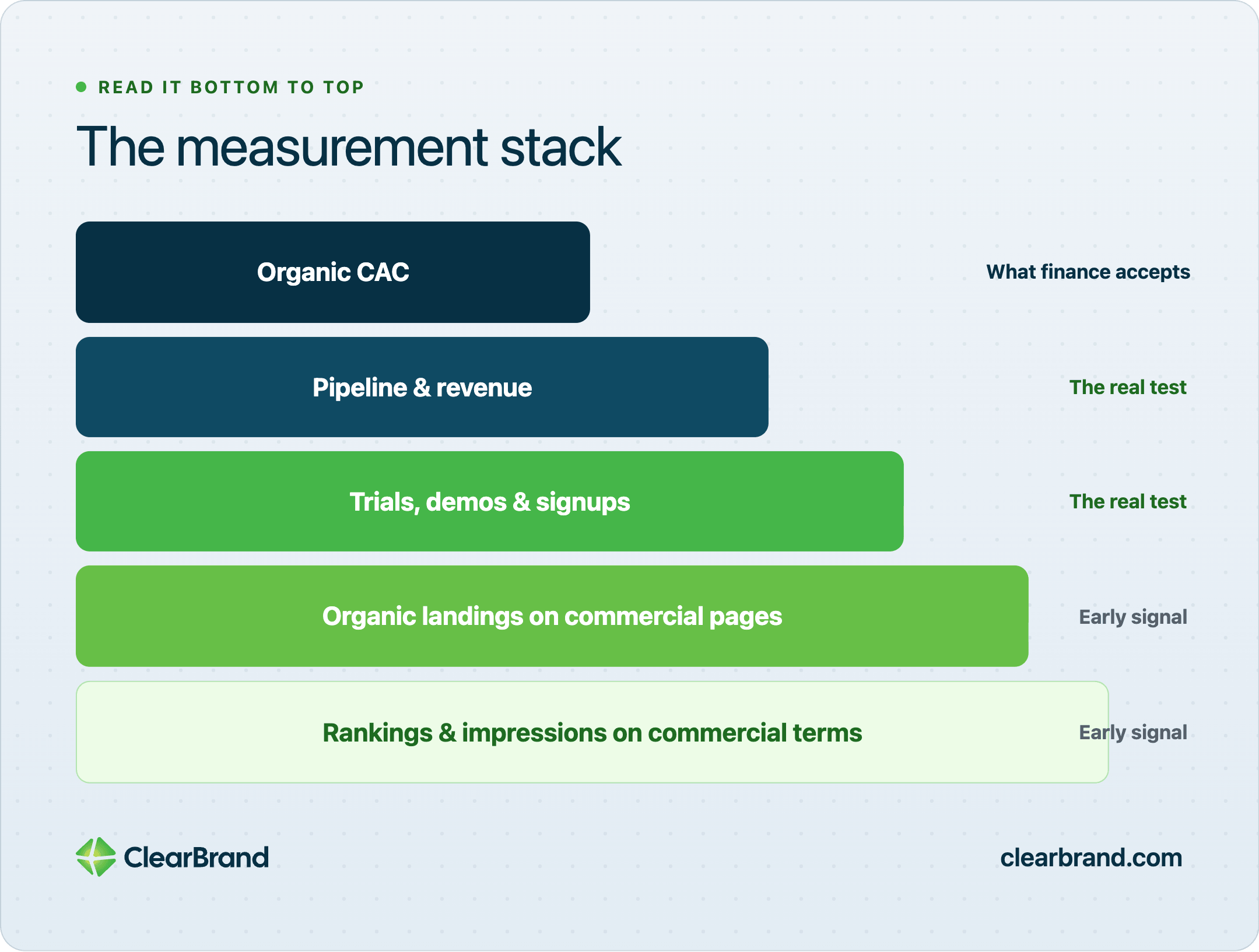
If the dashboard is sessions and average position, you can’t tell whether SaaS SEO is working.
Track this stack:
- Rankings and impressions on the commercial terms you chose
- Organic landings on comparison, alternatives, use-case, and pricing pages
- Trial starts, demo requests, and signups that look like real buyers from those landings
- Pipeline and revenue your CRM can attribute to organic, knowing last-click will undercount
- Organic CAC once you have enough closed revenue to make the number honest
Read the stack in that order. Rankings and commercial landings are early. Signups and pipeline are the test. Closed revenue is what finance will accept, and last-click will still miss part of the path.
On KleerCard, a SaaS spend product, clicks stopped being the story. Organic search now brings in half of all their new customers. The numbers we review with them are applications and closed deals.
Last-click attribution will undercount this channel. A buyer who reads an alternatives page in March, comes back from a branded search in June, and signs a contract in July will often show up as direct or branded. That doesn’t mean the alternatives page did nothing. It means your report is missing the first step. Look at the pages that show up early in deals you actually closed, even when they weren’t the last click.
A page that ranks and never converts needs a better offer or a better match to the query. The title promised a comparison and the page delivered a brand story. Or the trial button sits below a 2,000-word preamble. Fix the page before you decide the keyword was wrong.
A page that converts and sits on page two is the one to support with links and internal anchors. That URL already proved the searcher will act. Moving it from position 12 to position 4 usually beats publishing a new article on a related topic.
Paid search will look cheaper in month one. You can buy the click tomorrow. Judge SaaS SEO from about month 6 against lifetime value. Last week’s CPC is the wrong comparison. Once a comparison page ranks, you keep the visit without paying for it again. That’s the math that makes the slower start worth funding, if you can fund it.
Set the report up before you publish the first new page. If demo request is the conversion, that event has to fire on the thank-you state and pass into the CRM with the landing page URL attached. If you wait six months to connect the report, you’ll have traffic and no way to defend the spend.
A week where impressions rise and clicks fall isn’t a trend. It can be seasonality, a competitor, or an AI Overview that wasn’t on that query last month. One week is a reason to look. Months of falling clicks while leads stay flat or rise is still a working channel. Months of falling clicks and falling leads is the problem.
How long SaaS SEO takes, and what it costs
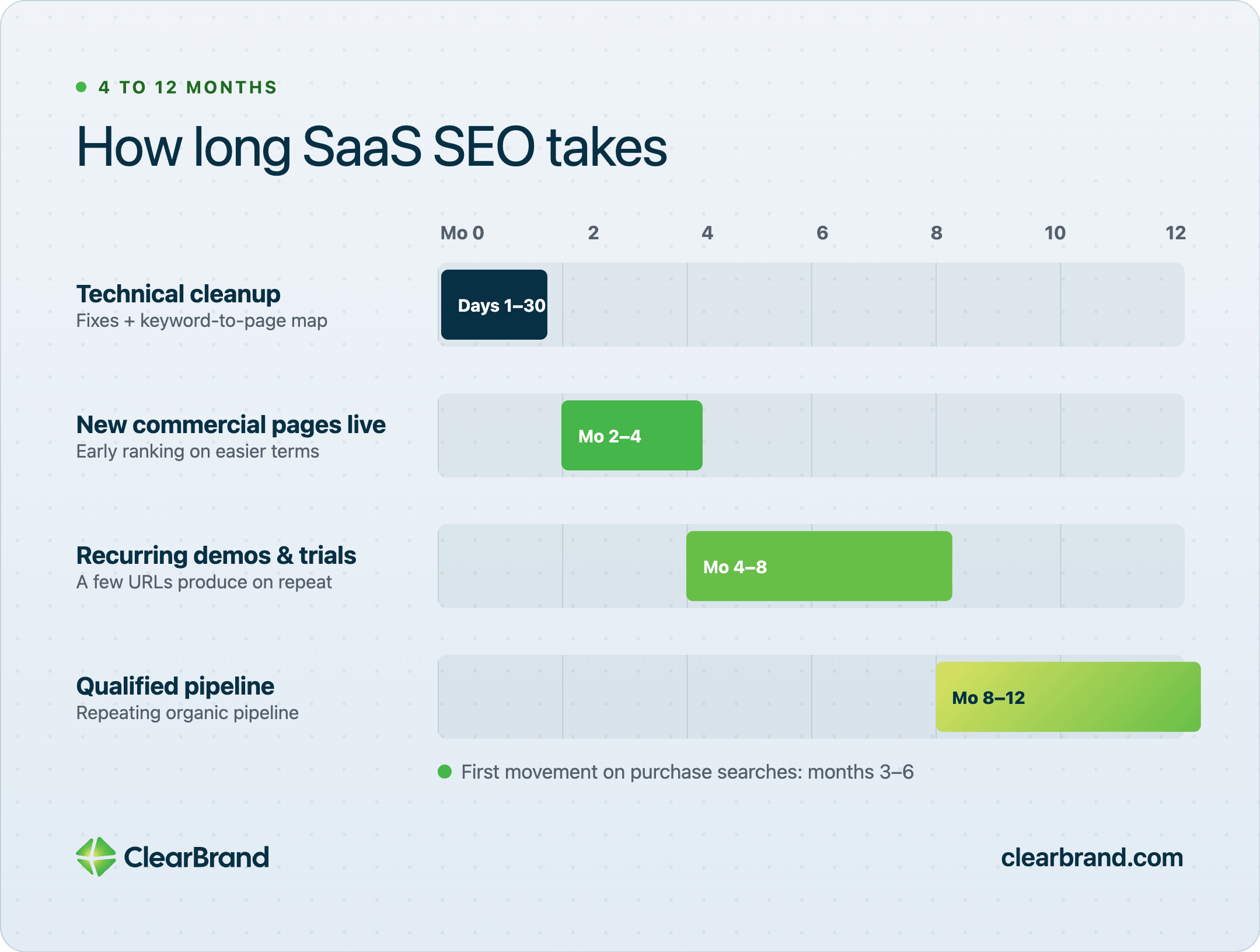
Google’s own guidance says most sites need four months to a year from the first changes before the benefit shows up. SaaS companies usually see the first movement on purchase searches in 3 to 6 months. Pipeline compounds closer to month 12.
Month 3 is leading indicators: impressions, clicks, and maybe an early lead. Month 6 is about when the work should generally turn into trials, demos, and ARR. That assumes Google can crawl and index the site, and you’re publishing pages that match real queries.
| Stage | What “working” looks like |
|---|---|
| Days 1–30 | Technical issues fixed. Keyword-to-page map written. Existing commercial URLs improved. |
| Months 2–4 | New comparison, use-case, or integration pages live. Early ranking movement on easier terms. |
| Months 4–8 | Recurring organic demos or trials from a few URLs. Related pages linked to each other. |
| Months 8–12 | Organic search produces qualified pipeline on a repeating basis. |
Month one is cleanup. You’re removing the reasons new pages would fail: a marketing directory marked so Google won’t index it, a page that points its canonical tag at another copy of itself, a blog that competes with a use-case URL. You’re also rewriting the commercial pages you already have. Those URLs have some history. They move faster than a brand-new domain page.
Months two through four are when the new commercial pages go live. Don’t expect a flood of demos. Expect the pages to get indexed, pick up impressions, and start ranking for the long-tail versions of the queries you targeted. If nothing is indexed by month three, the problem is technical or the pages are orphaned.
By months four through eight, a few URLs should be producing a demo or a trial on a repeating basis. One week of demos isn’t enough to call the channel proven. A comparison page that sends two qualified conversations a month, then three, then four, is the pattern you want.
If month six arrives with no impressions on the commercial terms you chose, the issue is usually the page type, those crawl and index problems, or a query you can’t win yet. Publishing four more blog posts won’t diagnose it. Open Search Console, look at the exact queries on those URLs, and see whether Google thinks the page is about the job you targeted. Title, H1, and first paragraph should name that job in the buyer’s words.
Cost follows how many pages you can finish and keep current. A founder writing two commercial pages a month and fixing metadata is a different program than a team shipping programmatic integrations. Tools, writers, and promotion all scale with how many URLs you need to hold. Stage-by-stage ranges are in the SaaS marketing budget benchmarks. Decide whether to fund SEO at all before you set the budget: national reach, cash to fund the wait, and acquisition cost under lifetime gross margin. That filter is in Is SEO worth it in 2026?.
If no one on the team can finish and update the commercial pages, you need more hours. The pages you’d publish don’t change. SaaS-specific execution lives on the SEO page for SaaS companies. That’s a different purchase from this guide.
Where AI search fits in SaaS SEO
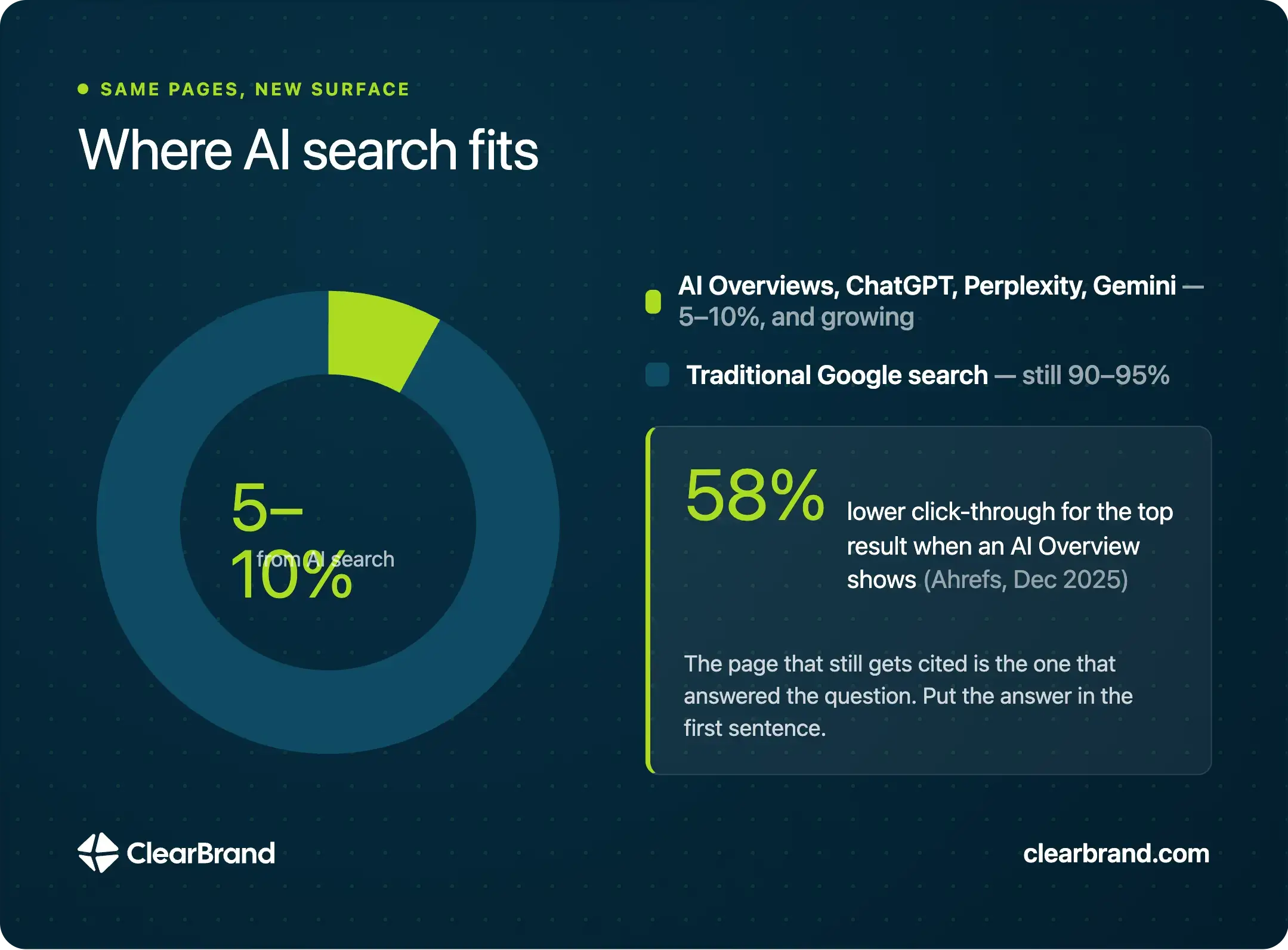
Buyers already ask ChatGPT, Perplexity, Gemini, and Google’s AI Overviews which tool to use. Those systems quote pages that already explain the job clearly. In the accounts we see, AI search still accounts for roughly 5 to 10 percent of the clicks and customers Google brings in. That share is growing. It isn’t the whole market.
Don’t build a separate AI site. Write answers that ChatGPT or an AI Overview can quote from the same comparison, use-case, and guide pages. Put the answer in the first sentence under the heading. Keep the facts visible: pricing bands, who the product is for, what it doesn’t do. Add structured data where it matches the page, such as FAQ markup on a page that actually asks and answers questions.
Ahrefs restudied AI Overview click-through rates in December 2025 and found that the presence of an AI Overview now correlates with a 58 percent lower average click-through rate for the top-ranking page. That’s correlation, not a claim that every Overview steals half the clicks. Some of those searches will never send a visit. The page that still gets cited is the page that answered the question. A citation won’t start a trial by itself. It’s often how a buyer hears the product name before they visit.
How to get cited inside AI answers is covered in the generative engine optimization guide. If a page would help a human choose software, it’s also the page an answer engine can quote.
SaaS SEO FAQ
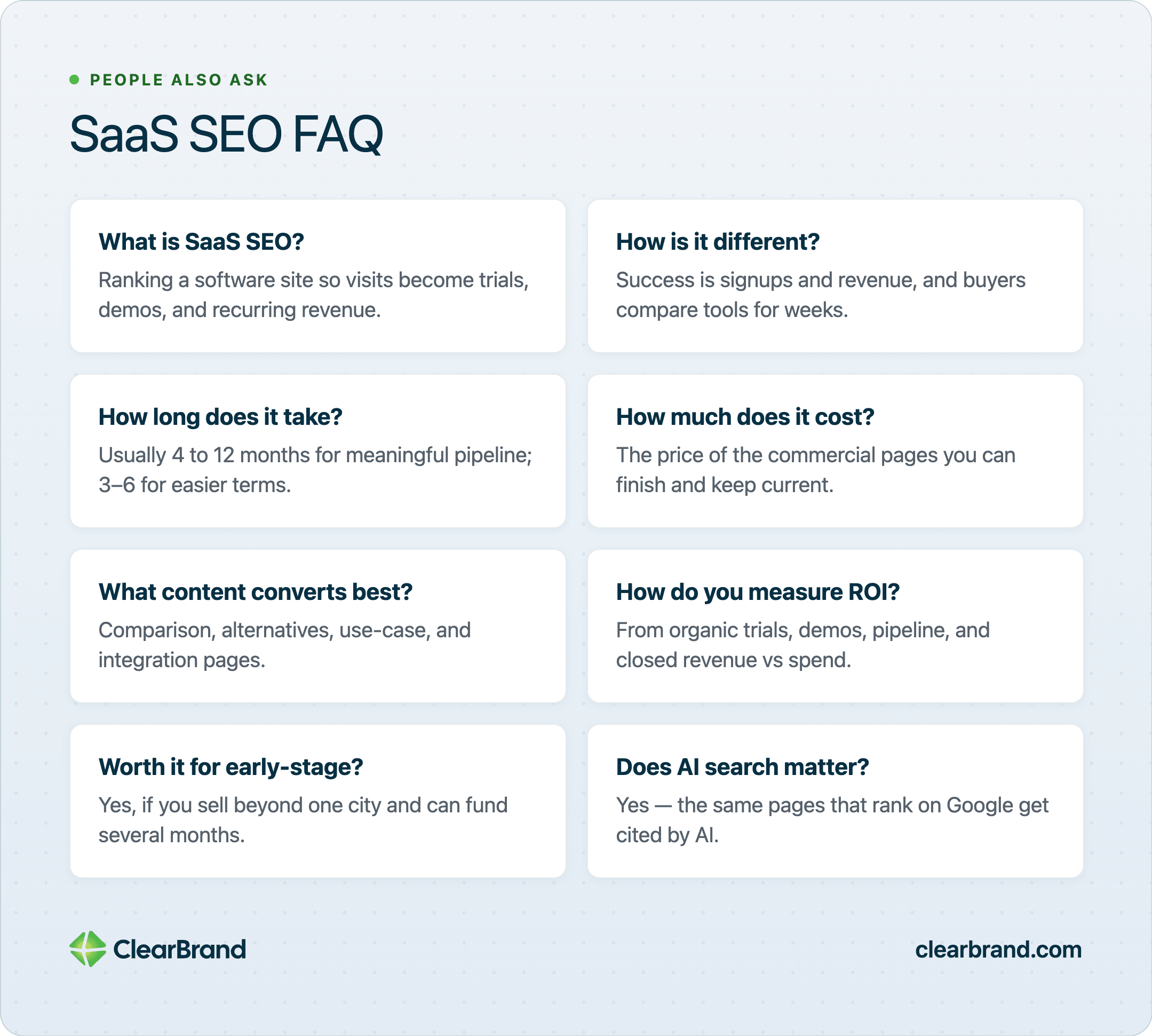
What is SaaS SEO?
SaaS SEO is the practice of ranking a software company’s website for the searches its buyers run so those visits turn into trials, demos, and recurring revenue. It uses the same technical and content tools as other SEO. The conversion you want is a subscription.
How is SaaS SEO different from regular SEO?
SaaS SEO is different because success is measured in signups and revenue, and because buyers compare tools for weeks before they talk to sales. That’s why comparison, alternatives, and use-case pages sit at the center of the program.
How long does SaaS SEO take to work?
When SaaS SEO is working, meaningful pipeline generally comes by about month 6. Lower-competition commercial pages can move in 3 to 6 months. Google’s own guidance for SEO work uses a four-month to one-year window.
How much does SaaS SEO cost?
SaaS SEO cost is the price of the commercial pages you can finish and keep current for at least 6 months, plus the tools to research and measure them. It also depends on whether you already have writers who understand the product. Early teams often fund research tools plus a few pages a month. Growth-stage teams fund a set of those pages, plus technical work and promotion. The number only makes sense against lifetime value and the months you can fund before revenue shows up. Count the pages you can finish this quarter. Ignore retainer quotes that aren’t tied to those pages.
What type of content converts best for SaaS?
Comparison pages, alternatives pages, use-case pages, and integration pages convert best for SaaS SEO. Guides help when they feed those URLs. Top-of-funnel posts without a path to the product mostly produce traffic.
How do you measure SaaS SEO ROI?
Measure SaaS SEO ROI from organic trials, demos, pipeline, and closed revenue against what you spent to produce the pages. Rankings and sessions show you are visible. Add pipeline and closed revenue before you decide the channel pays.
Is SEO worth it for early-stage SaaS?
SEO is worth it for early-stage SaaS when you sell beyond one city, can fund several months of work, and keep acquisition cost below lifetime gross margin. If those three fail, paid tests or sales-led work will teach you faster.
Does AI search matter for SaaS SEO?
AI search matters for SaaS SEO because a growing share of software buyers start research in a chatbot or an AI Overview. The same commercial pages that rank on Google are the pages those systems cite.
Broader SEO and AI-search execution, when you want a team to run it, is on the SEO and AI search page.