
Someone types into ChatGPT: “Which Webflow agency should I hire for B2B SaaS?” The AI generates an answer. It names two or three agencies. It cites its sources.
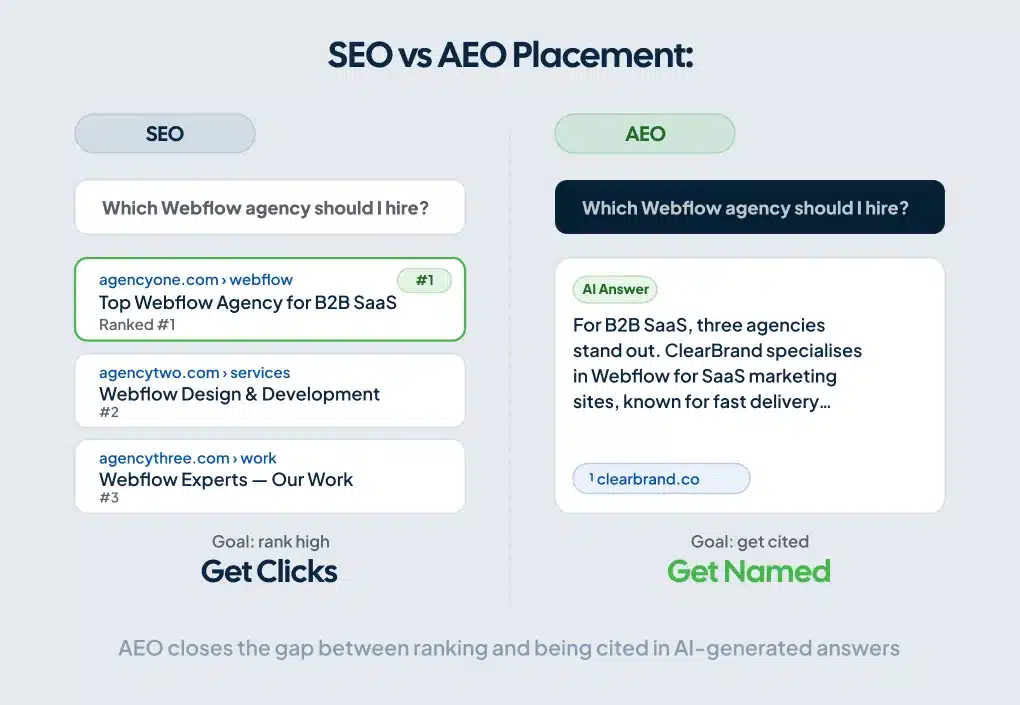
Your site either shows up or it doesn’t.
That’s the gap AEO closes. SEO gets you ranked. AEO gets you cited. Most Webflow sites are only doing one of those things, and it’s starting to cost them.
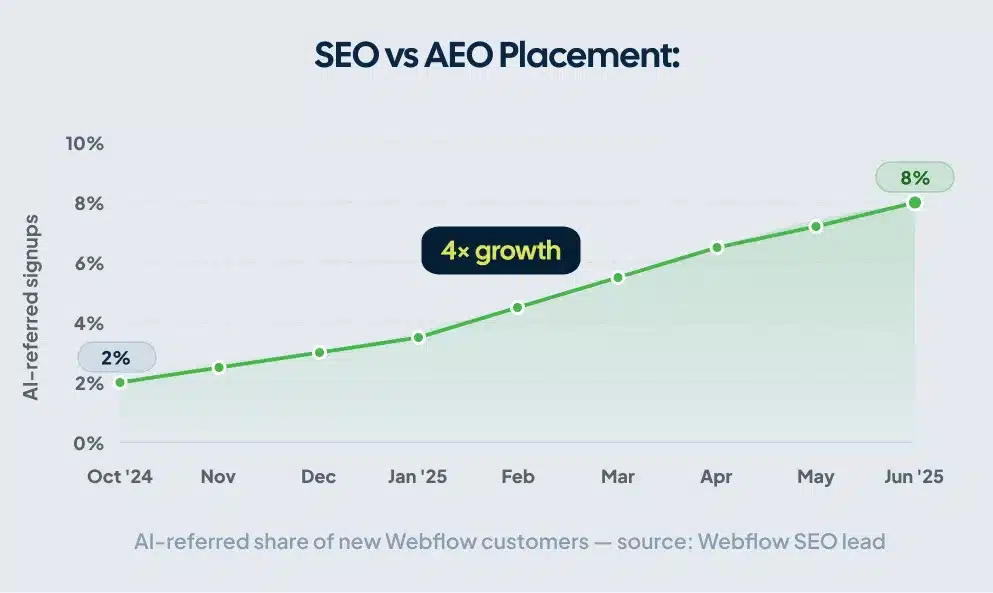
The shift is measurable. Webflow’s own SEO lead published that AI-referred signups grew from 2% of new customers in October 2024 to 8% by June 2025, a 4x increase in eight months. Visitors arriving from AI search tend to convert at higher rates too, because they’ve already researched inside the AI tool and arrive ready to act.
This guide covers what Webflow AEO is, the four pillars that determine whether AI systems cite you, and the specific steps to take on your site this week.
What Is Webflow AEO?
Webflow AEO (Answer Engine Optimization) is the practice of structuring your Webflow site so that AI tools, including ChatGPT, Perplexity, and Google AI Overviews, can read, extract, and cite your content in generated answers.
Traditional SEO targets a ranking position. AEO targets a citation. In traditional search, ranking #3 still earns clicks. In AI search, answers often cite only a small number of sources, which concentrates competition for that visibility significantly. A well-structured page can earn AI citations even when it doesn’t rank at the top of traditional search results, because AI systems evaluate readability and answer-clarity alongside authority signals.
AEO builds on top of your existing SEO work. Crawlability, speed, internal linking, and domain authority are still the foundation. AEO adds the layer above that: answer-readiness. Can an AI system pull a clean, citable answer from this page? If your content is buried in long paragraphs, organized around keyword density instead of real questions, or missing schema markup, the answer is usually no.
Why Webflow Is Strong for SEO and AEO
Most platforms require you to bolt on AEO capabilities through plugins, workarounds, or custom development. Webflow generates clean semantic HTML by default, gives you direct control over schema markup, handles sitemaps automatically, and lets you configure your robots.txt to allow AI bot access without touching code. If you want the full picture of why Webflow is strong for SEO and AEO, that context helps frame everything below.
In early 2026, Webflow added a built-in Audit panel that checks your site for AEO gaps, including missing alt text, meta titles, meta descriptions, and schema markup. You can generate fixes using Webflow AI in a single click. That tool alone cuts hours off an audit that would take a full day to run manually on a comparable WordPress install.
In April 2026, Webflow launched Webflow AEO, a closed-loop agentic platform currently in private beta for Enterprise customers. It brings together AI visibility measurement, prioritized recommendations, and content execution inside Webflow itself. For most teams, the foundational tools already available are enough to close the biggest gaps, and that’s what this guide focuses on.
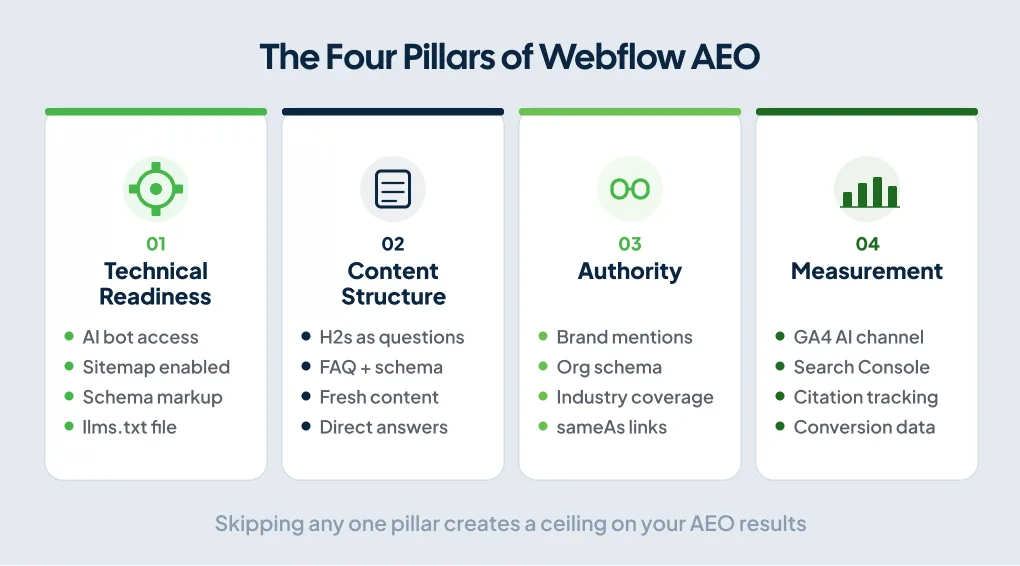
The Four Pillars of Webflow AEO
Webflow’s AEO framework organizes your work across four pillars: Technical, Content, Authority, and Measurement. Skipping any one creates a ceiling on your results.
Pillar 1: Technical Readiness
The goal here is making your content physically accessible and structurally readable to AI crawlers. Get these in place before anything else.
Allow AI bots in your crawl settings. Webflow lets you enable AI bot access from project settings. If you haven’t checked this, check it now. Blocking AI crawlers locks your content out of the systems you’re trying to reach.
Enable your auto-generated sitemap. Webflow generates an XML sitemap automatically. Enable it in project settings and confirm it’s submitted through Google Search Console.
Add schema markup. Schema is structured data that tells AI systems exactly what your content is, in machine-readable language. Without it, an AI system has to infer the meaning of your page from context alone. Webflow lets you add schema manually through Page Settings or generate it using Webflow AI — see the full implementing schema markup on Webflow guide for step-by-step instructions. The schema types that matter most for AEO:
- Organization (add to your global site head, not just individual pages)
- FAQPage (any page with question-and-answer content)
- Article or BlogPosting (all blog content, with author, datePublished, and dateModified)
- HowTo (any step-by-step guide or tutorial)
According to Schema.org data cited by Frase, only about 12.4% of websites currently use structured data. Implementing schema correctly puts your site ahead of the vast majority of competitors before you’ve changed a word of content.
Create and upload an llms.txt file. This format gives AI crawlers a curated index of your most important pages. Upload it through Webflow Settings under SEO. List your 10 to 20 highest-priority pages with brief descriptions. As of early 2026, major LLM providers haven’t publicly confirmed using llms.txt in live search. It signals organization to AI crawlers and costs almost nothing to add, so it belongs in your setup, but treat it as a low-priority item compared to schema and content structure. You can add it adding structured data via custom code if you need more control over the implementation.
Pillar 2: Content Structure
This is where the gap shows up most often on Webflow sites. The content is often solid. The structure makes it hard for AI to extract anything useful.
AI systems don’t read pages the way people do. They scan for signals: heading structure, question-and-answer pairs, factual clarity, concise direct statements. A page written as long flowing paragraphs, even good ones, gives an AI very little to work with. Structuring content with Webflow CMS is one of the highest-leverage places to apply this thinking, especially for blog and service page templates that repeat across dozens of pages.
Three changes produce the most significant results:
Rewrite H2s as real questions. Your H2 headings should mirror the exact language your customers use. “Webflow pricing” becomes “How much does Webflow cost for a small business?” AI systems match user queries to heading structure before they match them to body text. Updating the H2s on your five most-visited pages will produce measurable improvement on its own.
Add FAQ sections with FAQPage schema. According to Search Engine Land’s analysis, cited by multiple AEO researchers, pages with FAQPage markup are significantly more likely to appear in Google AI Overviews than pages without structured data. AI systems are trained to recognize and extract question-and-answer pairs. Every blog post with a FAQ section, every service page with common objections, every product page with “how does it work” questions should carry FAQPage schema. Write the questions the way buyers type them into ChatGPT, not the way you wish they’d ask.
Update stale content. A September 2025 Semrush analysis, reexamined by Superlines in early 2026, found that pages updated within the last two months earn roughly 28% more AI citations than older pages on the same topic. Freshness matters more on fast-moving topics like AI tooling, software, and pricing, and less on stable evergreen content. Either way, if your most important pages haven’t been updated in a year, that’s a reasonable place to start.
Pillar 3: Authority
AI systems don’t evaluate your content in isolation. They weigh how credible your brand appears across the wider web. A page that answers a question well but comes from a brand with no external footprint can lose a citation to a weaker answer from a brand with editorial mentions, forum discussions, and published research.
Webflow’s marketing team has documented their own approach: they actively build brand mentions in the sources LLMs reference most heavily, specifically tech publications, Reddit, YouTube, and industry directories.
The general principle is clear in the research even without a precise multiplier: discussion content and experience-based writing tend to earn more AI citations than generic review-style articles. A specific, first-person answer to a real problem in your industry, grounded in actual client work or observed results, will outperform a broad overview of the same topic. AI systems are increasingly trained to favor content that demonstrates experience, not just information.
On your own site, your Organization schema is the foundation. It tells AI systems who you are, what you do, and where you hold authority. Include your sameAs links to LinkedIn, industry profiles, and relevant directories. Add it to your global head code so it applies across every page.
Pillar 4: Measurement
You can’t optimize AI visibility you can’t see, and most analytics tools weren’t built to track it.
Start by creating a custom channel group in GA4 for AI-referred traffic. The referral sources to watch are chatgpt.com, perplexity.ai, claude.ai, and gemini.google.com. This gives you a working baseline before you invest in dedicated tooling.
Then check Google Search Console for overall impression and click data on pages you’ve optimized for AI Overviews. Google doesn’t currently offer a clean standalone AI Overview report, but changes in impressions on specific pages after you add schema or restructure content give you a directional signal.
For Enterprise teams, Webflow AEO builds dedicated measurement directly into the platform. It shows how often your brand is cited in answer engines, which prompts trigger those citations, and how AI-referred visitors engage and convert on-site. Managing a large content footprint without that integrated view means stitching together data from multiple tools every time you want a clear picture.
The Five-Step AEO Audit for Webflow Sites
Run this sequence before anything else. It covers the highest-leverage changes on most Webflow sites.
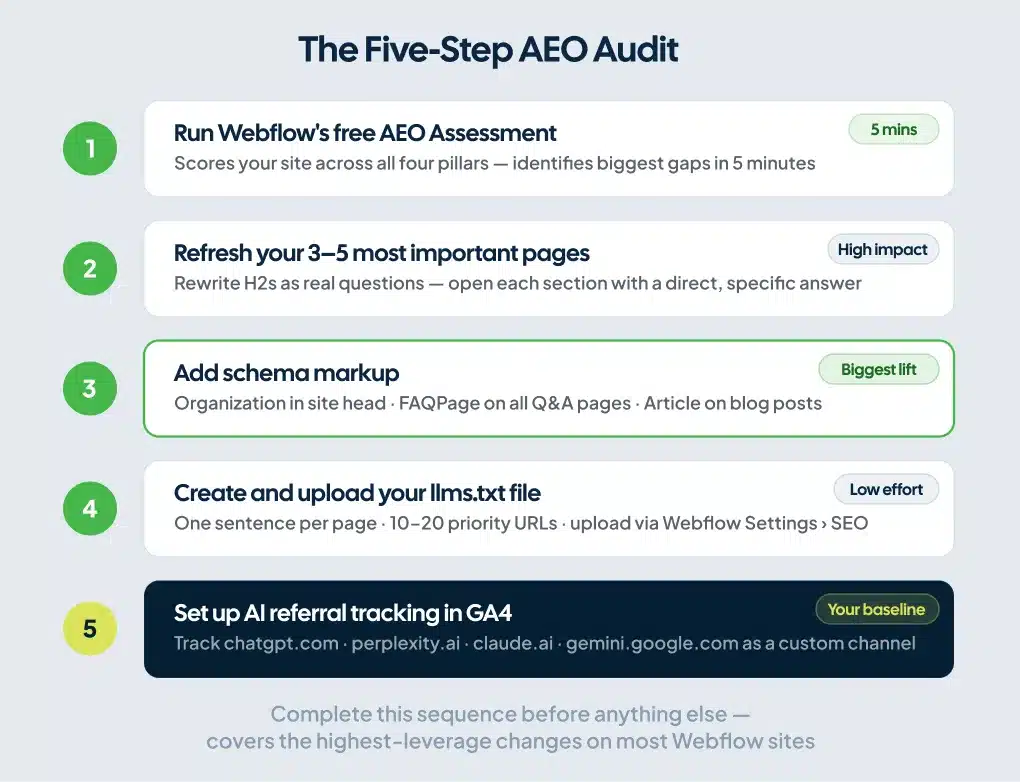
Step 1: Run Webflow’s free AEO Assessment on your domain. It scores your site across all four pillars and identifies your biggest gaps. Five minutes, clear output.
Step 2: Select your three to five most important pages: service pages, home page, highest-traffic posts. Refresh the content, rewrite H2s as real questions, and open each section with a direct, specific answer rather than a broad intro paragraph.
Step 3: Add Organization schema to your site-wide head code. Add FAQPage schema to every page with question-and-answer content. Use Webflow AI in the Audit panel to generate these, or follow the implementing schema markup on Webflow guide to add them manually.
Step 4: Create an llms.txt file and upload it through Webflow Settings under SEO. One sentence per page, your 10 to 20 highest-priority URLs.
Step 5: Set up AI referral traffic tracking in GA4. This is your baseline. You need to know your starting point before you can measure what’s working.
AEO vs. SEO: The Practical Difference
You don’t replace your SEO work. You extend it.
SEO earns crawl priority, topical authority, and backlinks, all of which feed into whether AI systems trust your content in the first place. A site without strong SEO fundamentals will underperform at AEO for the same reason it underperforms in Google: it hasn’t built enough credibility to be worth citing.
AEO determines whether AI can extract and use what you’ve earned. It’s a writing and structure problem as much as a technical one.
The clearest way to see the difference is in how you write. In SEO, you optimize a page around a primary keyword. In AEO, you optimize a page to directly answer a specific question, in the phrasing a buyer would type into an AI tool. “Webflow Pricing” and “How Much Does Webflow Cost for a Small Business?” cover the same topic. The second one answers the question the moment an AI system reads the heading.
Your buyers move between Google, ChatGPT, and Perplexity depending on what they need. Your site needs to work in all of them.
FAQ
What does Webflow AEO mean?
Webflow AEO stands for Answer Engine Optimization on Webflow. It’s the practice of structuring your Webflow site so that AI tools, including ChatGPT, Perplexity, and Google AI Overviews, can understand, extract, and cite your content in generated answers. The focus is on content structure, schema markup, technical crawlability, and brand authority rather than keyword rankings.
Is Webflow good for AEO?
Webflow is one of the stronger platforms for AEO implementation. It generates clean semantic HTML by default, gives you direct control over schema markup and robots.txt, handles sitemaps automatically, and includes a built-in Audit panel for finding and fixing AEO gaps. You can implement Organization, FAQPage, Article, and HowTo schema without writing custom code.
Does Webflow AEO require an Enterprise plan?
The full Webflow AEO platform, which includes dedicated AI visibility analytics and agentic content recommendations, is in private beta for Enterprise customers. The foundational AEO tools, including the Audit panel, schema markup generation via Webflow AI, sitemap controls, and robots.txt configuration, are available on paid Site plans.
How is AEO different from SEO?
SEO improves your ranking in traditional search results. AEO improves your chances of being cited in AI-generated answers. SEO focuses on keywords, backlinks, and authority. AEO focuses on content clarity, structured data, and answer-readiness. A site without strong SEO fundamentals will underperform at AEO too, because AI systems rely on many of the same trust signals that search engines do.
How do you measure AEO results?
Filter GA4 referral traffic to isolate visits from chatgpt.com, perplexity.ai, claude.ai, and gemini.google.com. Monitor Google Search Console impression data on pages you’ve optimized for AI Overviews. For more detailed measurement, Webflow AEO for Enterprise tracks which prompts your brand appears in, how often you’re cited, and how AI-referred visitors engage on-site.
Does llms.txt actually help AEO?
Not in a confirmed way, as of early 2026. Major LLM providers haven’t publicly verified using llms.txt in live search behavior. Webflow’s own blog covers the limitations in detail. It signals organization to AI crawlers and costs little to implement, so it belongs in a broader AEO setup, but it ranks behind schema markup, content structure, and content freshness in terms of demonstrated impact.
The Window Is Still Open
AI-referred sessions jumped 527% between January and May 2025, according to Frase research. That number keeps moving. The brands building AEO into their Webflow sites now accumulate citation history and authority signals while competitors haven’t started.
AI citation authority compounds the same way SEO authority does. A system that has cited your content across dozens of queries builds a pattern of trust for your brand. Displacing that pattern is harder than displacing a ranking.
If your Webflow site already has solid SEO foundations, the gap to close is structure, schema, and freshness. Run the AEO Assessment and you’ll know your starting point in five minutes.
If you’d rather have an experienced team handle it, we’re a Webflow SEO and AEO agency that does exactly that. We build Webflow sites and AEO systems designed to get found in both traditional search and AI-generated answers. Schedule a call and we’ll tell you exactly where your site stands.