
Most Webflow landing pages look great and do almost nothing. The design is polished, the animations fire on scroll, and the conversion rate sits at 2%.
Median industry rates hover around 5-7%, with wide variation by sector, according to Unbounce’s large-scale landing page analysis. Optimized pages routinely hit 10%+. That gap rarely comes from the platform. Webflow gives you every tool you need to build a page that ranks and converts. The question is whether you’re using those tools in the right order, for the right reasons.
After building and auditing Webflow sites that have doubled client conversions and driven up to 15x organic traffic growth, we’ve mapped where most landing pages break down. This playbook covers page structure, copywriting decisions, Core Web Vitals, SEO configuration, and the Webflow features most teams leave untouched.
What a Webflow Landing Page Is (and Why It’s Different From the Rest of Your Site)
A landing page serves one goal. One offer, one audience, one action. It strips out every exit ramp except the CTA, which makes it structurally different from your homepage or service pages.
Webflow handles this well for two reasons. First, Webflow generates clean semantic HTML, which browsers parse faster and search engines read more accurately than the bloated markup that WordPress page builders or Wix produce. Second, Webflow’s page building feature separates designer control from marketer execution: designers lock down the structure and brand guardrails, marketers update copy and swap content without touching the design system or filing a developer ticket.
That second point has a compounding effect. When your marketing team can launch a new campaign page in an afternoon, they run more tests. More tests produce faster learning about what converts your specific audience.
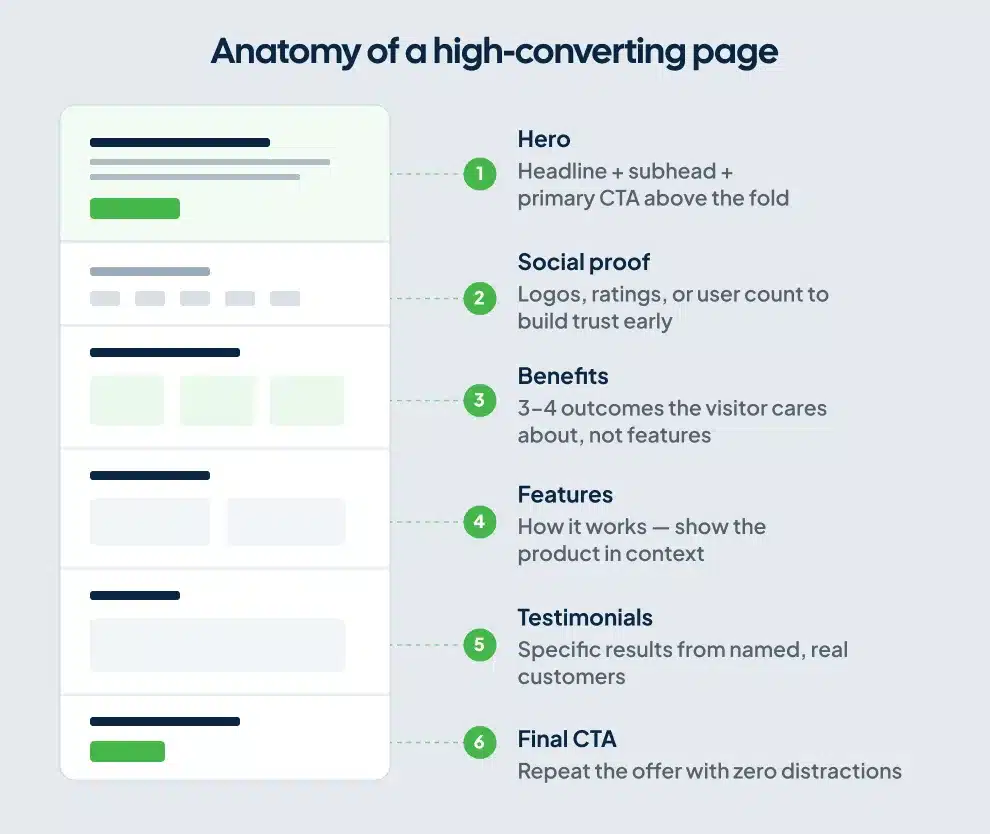
The Anatomy of a High-Converting Webflow Landing Page
Each section below appears in the order it should sit on the page, with the job it needs to do.
First: Remove the Navigation
Your site’s global nav gives visitors 6-10 places to go that are not your CTA. On a campaign landing page, those links are traffic leakage you paid to acquire.
Remove the navigation entirely, or replace it with a stripped version: your logo on the left, a CTA button on the right. Most Webflow landing page templates keep the full nav by default. Change it before you do anything else.
The same logic applies to the footer. Strip it down. Keep the legal text if you need it, but remove the link clusters.
Hero Section: One Claim, One Action
Your hero has three jobs: state the outcome you deliver, show who it’s for, and tell the visitor exactly what to do next.
Outcome-focused headlines convert more reliably than feature-focused ones. “Get 3x More Qualified Leads From Your Website” outperforms “The All-in-One Marketing Platform” because it answers the visitor’s first question: what’s in it for me?
Keep your headline under 10 words. Your subheadline carries the specifics. Your CTA button should name the outcome, not the action. “Get My Free Audit” outperforms “Contact Us” or “Submit” on every test we’ve run with clients.
Place the CTA above the fold on both desktop and mobile. Visitors shouldn’t have to scroll to act.
Social Proof: Move It Up the Page
Most landing pages bury testimonials at the bottom. That placement treats social proof as decoration, and your highest-converting visitors need to see it before they decide whether to keep reading.
A logos row or a short stat bar placed directly under the hero addresses objections before they form. “Trusted by 400+ B2B companies” or a row of recognizable client logos does more conversion work in that position than three testimonial cards sitting in section six.
Video testimonials increase conversions by roughly 20% over text-only quotes. If you have one strong client video, Webflow’s embed block handles it with minimal page weight when you load it through a YouTube or Vimeo facade: a static thumbnail that only fires the video player on click, so it doesn’t inflate your LCP score.
Benefits Before Features
Features describe what your product does. Benefits describe what the visitor gets.
“Drag-and-drop editor” is a feature. “Build a landing page in an afternoon without writing code” is a benefit. Run every bullet point and section header through that filter before you publish.
Auditing client sites, this is the copy mistake we find most often. The page explains the tool thoroughly. The visitor leaves without understanding why it matters to them.
The Form: Fewer Fields, More Conversions
Webflow’s native form block handles lead capture without third-party plugins. Keep fields to the minimum you need to qualify the lead. Pages with 1-5 form fields convert roughly 20% better than pages with 10 or more.
Collect qualification data post-conversion through a follow-up sequence, or use a multi-step form that reveals one field set at a time.
For high-ticket offers, a calendar embed, Calendly and Cal.com both connect to Webflow cleanly via custom embed, often converts better than a form. It signals you’re selective and moves the prospect closer to a real conversation in one click.
CTA Repetition
Place your primary CTA in at least three positions: above the fold, mid-page after your core value section, and at the bottom. Visitors who read all the way down are your highest-intent visitors. Give them a clear path to act without scrolling back up.
SEO Setup for Webflow Landing Pages
A landing page can rank in organic search. Many teams skip SEO on campaign pages because they assume the page only receives paid traffic. That assumption is expensive. A page optimized for both paid and organic compounds its return over time.
On-Page Fundamentals
Webflow’s SEO settings for each landing page live at the page level in the designer. For each landing page, configure:
Title tag: Under 60 characters. Include the primary keyword. Lead with the most important word, not your brand name. “Webflow Landing Pages That Convert” beats “ClearBrand | Webflow Landing Pages.”
Meta description: 150-160 characters. Include the keyword and a specific hook. Writing meta descriptions that convert means leading with an outcome, not a generic summary.
URL slug: Short, keyword-focused, no stop words. /webflow-landing-page outperforms /how-to-create-a-great-webflow-landing-page-that-converts.
H1: One per page. Match or closely mirror the title tag. Put the primary keyword in the first 100 words of body copy.
Image alt text: Describe the image accurately. Include the keyword where it fits. Don’t force it.
Webflow auto-generates your sitemap.xml when you enable it under Project Settings > SEO. Do this before your first publish. It’s off by default.
Core Web Vitals: The Technical Layer Most Teams Skip
Google uses Core Web Vitals as ranking signals. For landing pages, load speed affects both bounce rate and paid campaign Quality Score, so these metrics hurt you twice when they’re poor. A failing mobile LCP score costs you in organic rankings and drives up your cost-per-click at the same time.
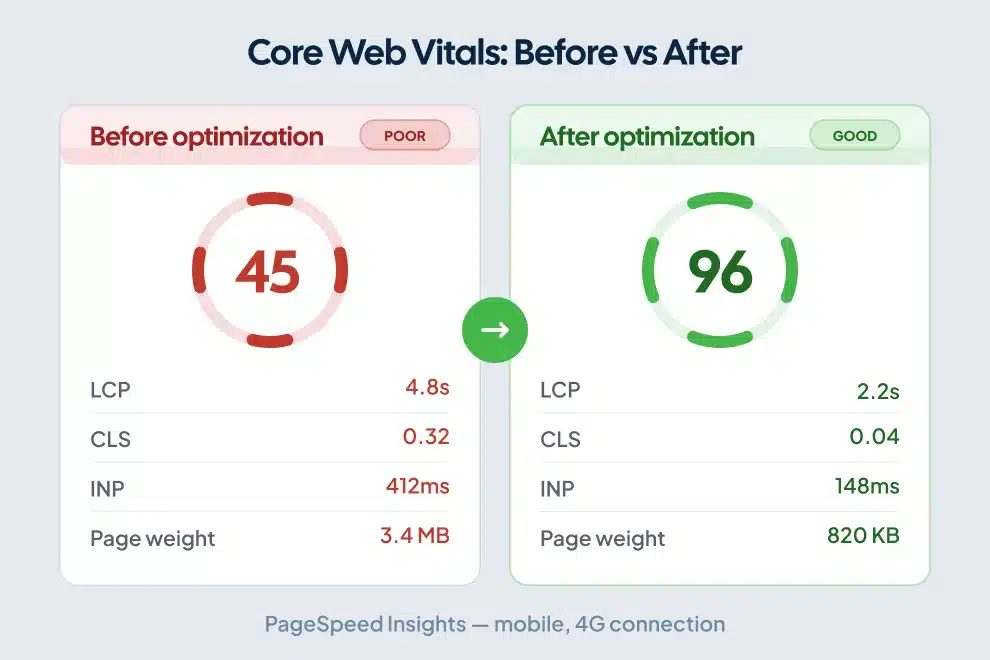
For a full breakdown of every fix, see our speed optimization for landing pages guide. The three metrics to optimize:
LCP (Largest Contentful Paint): How fast your hero image or headline appears on screen. Target under 2.5 seconds. The most common LCP problem on Webflow landing pages is an uncompressed hero image. Convert to WebP before uploading, compress to the smallest file size that holds visual quality, and set explicit width and height attributes in the element settings so the browser reserves space before the image loads.
INP (Interaction to Next Paint): This metric replaced FID in March 2024. It measures how quickly the page responds when a visitor clicks or taps. Target under 200 milliseconds. Third-party scripts are the primary culprit on Webflow pages: chat widgets, marketing pixels, and analytics tags all compete on the main thread and delay response time. Defer non-critical scripts or load them after user interaction using Webflow’s custom code footer embed, not the head.
CLS (Cumulative Layout Shift): How much the page jumps during load. Target under 0.1. Webflow animations and dynamically loaded content cause most CLS issues. Set explicit dimensions on every image and embed, and test each scroll-triggered Interaction with Lighthouse before launch.
One Webflow SaaS landing page saw LCP drop from 4.8 seconds to 2.2 seconds after compressing images, deferring third-party scripts, and configuring Webflow’s CDN correctly — moving from a failing Core Web Vitals grade to a passing one in a single optimization pass.
Run your landing page through Google PageSpeed Insights before every major publish, not just at launch.
Internal Linking From and To Landing Pages
Landing pages typically receive links from ad campaigns, email, and social. They accumulate external authority without distributing it through your site. Build contextual internal links from your landing page to relevant blog posts or service pages where the content supports it naturally.
Your blog posts should also link back to your landing pages. If you’re targeting “Webflow landing page” as a primary keyword, your articles covering Webflow design, Webflow SEO for SaaS landing pages, and conversion rate optimization should each include a contextual link to the landing page with descriptive anchor text. Google reads that two-way structure as a signal that the landing page is a topically relevant destination, not an isolated campaign asset.
Webflow Features That Most Landing Page Builders Don’t Have
CMS for Programmatic Landing Pages
If you run campaigns across multiple industries, locations, or product segments, Webflow’s CMS lets you build one landing page template and populate dozens or hundreds of pages from Collection data.
You design the structure once. Each CMS Collection item becomes a landing page with its own URL, headline, copy, and metadata. For a marketing agency targeting 12 industry verticals, that’s 12 fully optimized landing pages built in an afternoon rather than 12 separate design projects.
Each page gets indexed by Google independently, accumulates its own organic rankings, and receives campaign traffic through its own URL. When we build these systems for clients, it produces the highest return per hour of build time. Most teams don’t know it exists.
Page Building for Marketing Teams
Webflow’s page building feature gives designers control over the components: sections, templates, brand guardrails. Marketers drag those components into new pages, edit copy and images, and publish without accessing the underlying design system.
Your web team stops being the bottleneck for every campaign. Marketers ship faster, designers work on higher-leverage projects, and brand consistency holds because every component comes from an approved library rather than from a marketer making judgment calls in the CSS panel.
Animations: Use With a Purpose
Webflow’s interactions are powerful. They’re also one of the fastest ways to hurt Core Web Vitals scores on a landing page.
On campaign pages, animations should serve the message. A subtle fade-in on a testimonial section is appropriate. A parallax scroll effect on the hero adds CLS risk and slows perceived load time without adding conversion value.
Run Lighthouse on every animated element before launch. If an animation pushes CLS above 0.1 or LCP above 2.5 seconds, remove it. A slow page costs more in conversion rate than a static one costs in visual appeal.
A/B Testing Webflow Landing Pages
Webflow doesn’t include native A/B testing by default. Three approaches work well:
Third-party testing tools: VWO, Convert, and Optimizely integrate with Webflow through a custom code embed. Load the testing script in Project Settings > Custom Code in the footer section. Loading it in the head delays page render.
CMS-based variants: Build two distinct CMS pages with different headlines, structures, or CTAs. Drive paid traffic to both with separate UTM parameters and compare conversion tracking with Google Analytics in your analytics platform. No additional tools required, no additional cost.
Webflow Optimize: Webflow released its own native A/B and personalization tool in 2024. For teams on eligible higher-tier plans, it’s the cleanest option because it runs natively without external script dependencies. Check your plan’s feature set before assuming access.
Test one variable at a time. Headline copy produces the highest lift per test because it’s what the largest share of visitors read. Start there before testing button colors or section order.
The Pre-Launch Checklist
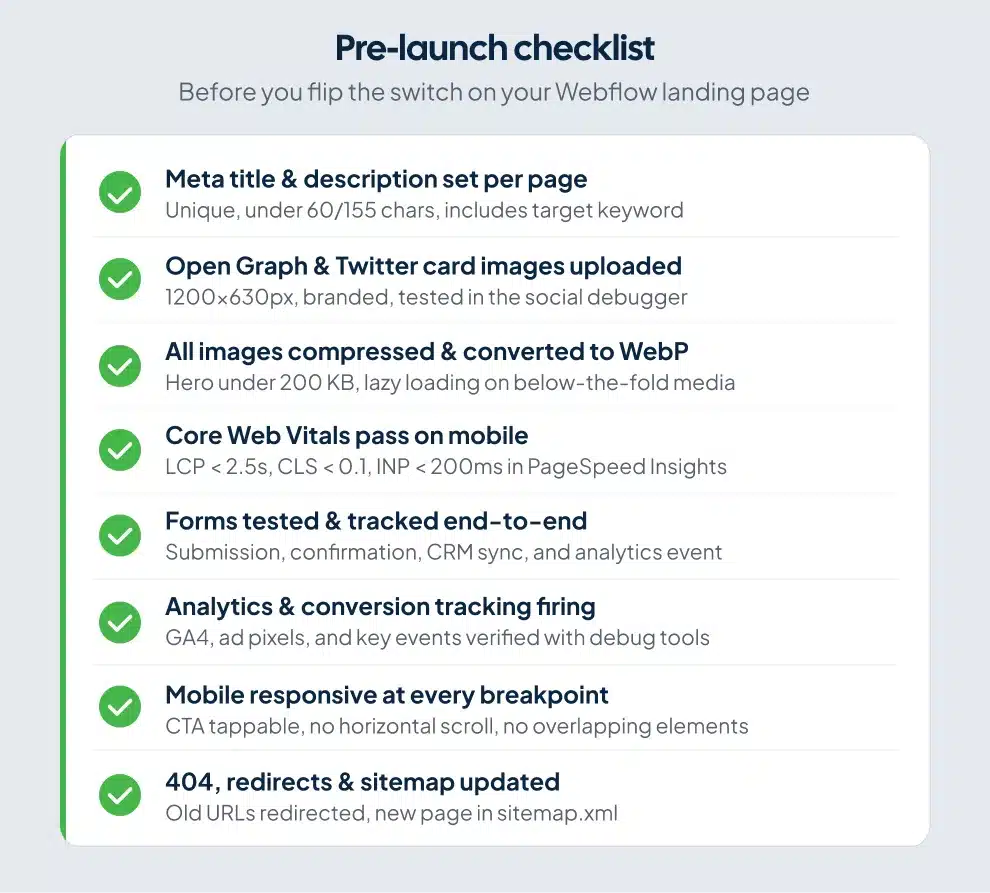
Before publishing any Webflow landing page, confirm:
- Navigation removed or stripped to logo plus CTA button only
- Primary CTA visible above the fold on mobile (test on a real device, not just Webflow’s responsive preview)
- Hero image converted to WebP, compressed, with explicit width and height attributes set
- Title tag under 60 characters, includes primary keyword
- Meta description written at 150-160 characters
- Sitemap auto-generation enabled in Project Settings
- Form fields at 5 or fewer
- PageSpeed Insights mobile score above 75
- Social proof visible in the first two sections
- All animations tested with Lighthouse for CLS impact
Frequently Asked Questions
Can a Webflow landing page rank on Google?
Webflow landing pages rank in organic search. Webflow generates clean semantic HTML, supports full on-page SEO configuration at the page level, including title tags, meta descriptions, canonical URLs, and custom schema markup, and automatically creates an XML sitemap when you enable it in Project Settings. Pages with targeted keyword optimization and strong Core Web Vitals scores compete for organic rankings alongside any other CMS. Long-form landing pages with substantive content depth earn two to three times more organic visits than thin promotional pages.
How do I improve my Webflow landing page conversion rate?
Start with three changes: remove the navigation to cut exit paths, move social proof up the page so it appears directly under the hero, and rewrite your CTA button text to name the outcome rather than the action. After those changes, run a headline test. The headline determines whether visitors read anything else, which makes it the highest-leverage element to test first.
Do Webflow landing pages load fast?
Webflow’s CDN infrastructure and clean HTML output give it a strong performance baseline compared to WordPress page builders. Speed problems on Webflow landing pages typically come from three sources: uncompressed hero images, third-party scripts loaded in the page head, and CSS animations that cause layout shift. Run PageSpeed Insights before driving any paid traffic and address LCP issues above 2.5 seconds first.
Should I use a Webflow template or build from scratch?
Templates are faster to start. Custom builds are cleaner to maintain. For most marketing teams, starting from a well-structured Webflow template and adapting the components for your brand is the right call. The risk with templates is inheriting bloated CSS or animations that hurt Core Web Vitals. Audit any template through PageSpeed Insights before you build on top of it.
How many CTAs should a landing page have?
One primary CTA, placed multiple times. Three placements cover most pages: above the fold, mid-page after your core value section, and at the bottom. Multiple different CTAs, such as book a call, download a guide, and start a trial, split visitor attention and reduce overall conversion rate. Pick one action and repeat it.
Can I build multiple landing pages in Webflow without a developer?
Yes. Webflow’s CMS lets you create a landing page template once and generate multiple pages from Collection data, each with its own URL, metadata, and indexable content. Webflow’s page building feature also lets marketers assemble new pages from pre-approved design components without accessing the underlying design system. Both methods remove the developer bottleneck for standard campaign pages.
Build Pages That Earn Their Traffic
A Webflow landing page that converts is a sequence of decisions: what your visitor sees, in what order, and what you ask them to do about it.
Structure comes first: single CTA, social proof near the top, no navigation. Technical foundation comes second: Core Web Vitals, on-page SEO, clean metadata. Copy testing comes third, after you’ve confirmed the page loads fast and the structure is sound.
If you’re sending paid traffic to a Webflow landing page and not seeing conversions, the platform is rarely the problem. Webflow gives you everything you need. The gap is in how you’re using it.
ClearBrand builds Webflow landing page SEO services with a conversion-first mindset. If your current site isn’t producing leads at the rate your traffic warrants, schedule a call and we’ll show you exactly where the drop-off is happening.