
Webflow Enterprise is a capable SEO platform. Clean semantic HTML, a global CDN on AWS and Fastly, bulk metadata automation through CMS fields, native hreflang for international sites, an AI-assisted audit panel, and no hard ceiling on CMS items. For most enterprise marketing teams, that foundation is enough to compete seriously in organic search.
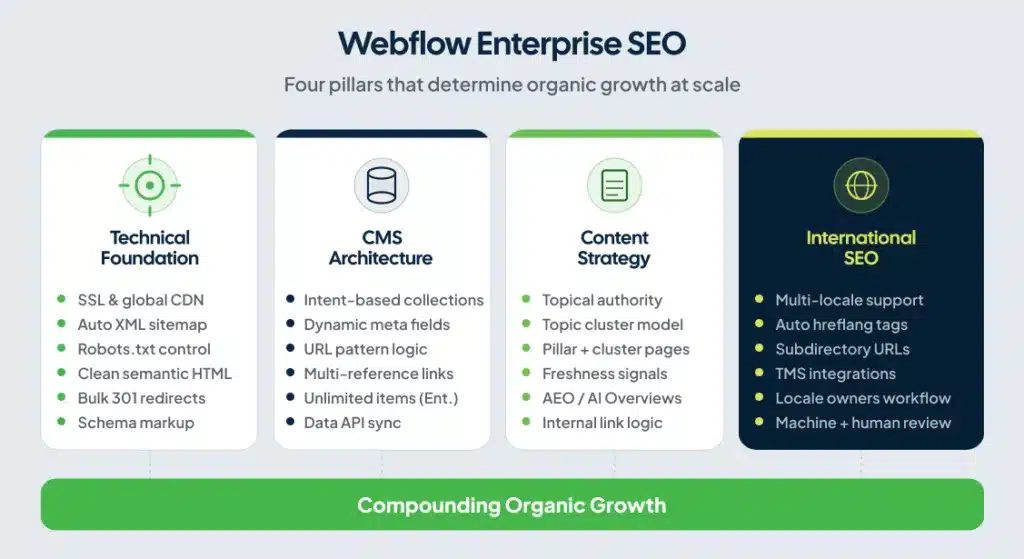
The teams that struggle on Webflow Enterprise don’t struggle because of the platform. They build on it without planning the content architecture, internal linking system, or technical conventions that make large sites rank at scale. The platform works. The strategy is what fails.
This guide covers what Webflow Enterprise gives you for SEO, where the real limits sit, and the decisions that separate growing organic programs from stalled ones.
What Webflow Enterprise Actually Gives You for SEO
Webflow Enterprise removes the constraints that create the most common SEO problems on standard Webflow plans.
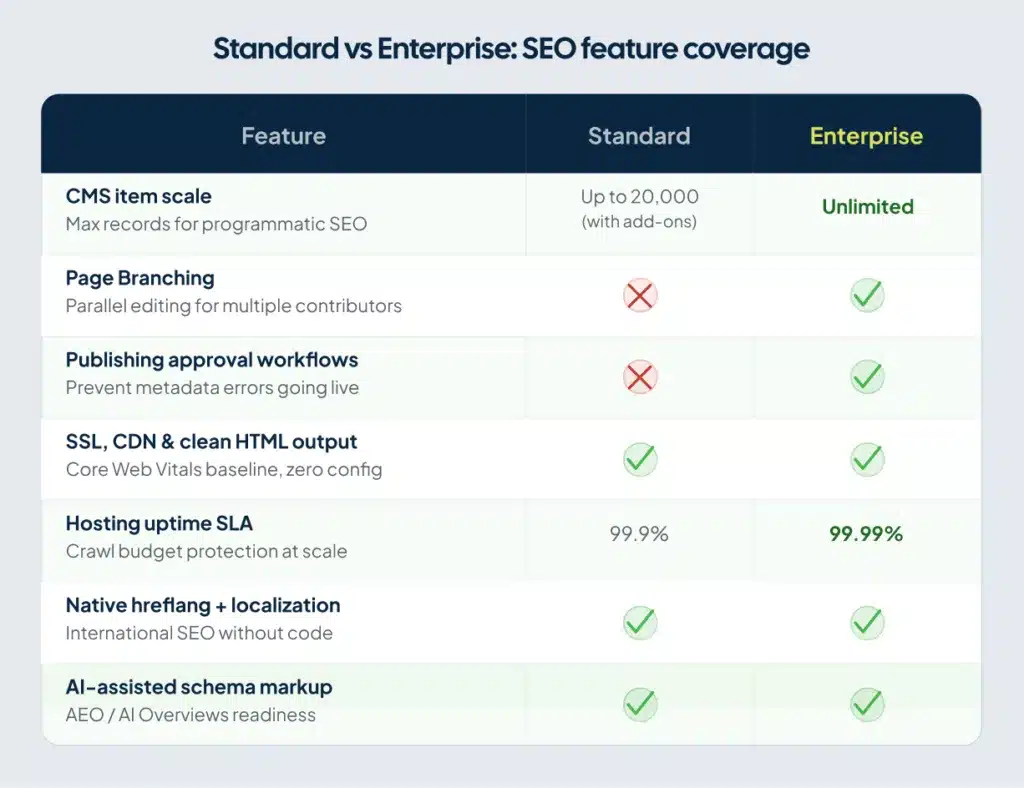
Start with CMS scale. Standard Webflow plans cap CMS items at 10,000 records on the base Business plan, with paid add-ons available to extend that to 20,000. Enterprise removes the ceiling entirely, with limits negotiated per account based on your actual needs. For teams building programmatic SEO at enterprise scale — location pages, integration directories, use-case content by vertical — this matters in ways that are easy to underestimate early and painful to discover late. A 600-page blog runs fine on a Business plan. A 5,000-page programmatic SEO build doesn’t.
Page Branching, available only on Enterprise, lets multiple team members work on isolated versions of the site simultaneously and merge changes when they’re ready. On standard plans, one person can edit the Designer at a time. In a fast-moving SEO campaign with a content writer, a developer, and an SEO lead all needing to push updates, that single-editor constraint slows publishing and delays fixes. Enterprise teams that don’t set up clear branching conventions still hit this wall, but at least they have the tooling to route around it.
Publishing workflows with approval controls mean content doesn’t go live until an SEO or editorial review happens. For teams managing brand integrity across multiple contributors, that guardrail prevents the metadata errors and duplicate content that accumulate quietly over time.
The Enterprise hosting SLA reaches 99.99% uptime. Downtime is a crawl budget problem at scale. Googlebot arrives during a maintenance window and indexes nothing.
The Technical SEO Foundation Webflow Builds for You
Most enterprise CMS platforms require a developer to configure basic technical SEO. Webflow builds the baseline into the platform.
Clean HTML output. Webflow generates semantic, well-structured HTML without plugin bloat or render-blocking scripts. Google’s crawlers read it cleanly. You don’t need a developer to audit heading hierarchy or clear out div soup caused by a theme framework.
SSL and CDN. Every Webflow site ships with HTTPS and serves through a globally distributed CDN. Page speed is a confirmed ranking factor. Webflow sites routinely pass Core Web Vitals with minimal manual optimization — a different starting point from WordPress builds that require stacking caching plugins, a CDN layer, and image compression tools before the baseline is competitive. See our Webflow page speed optimization guide for specifics on how to push performance further.
XML sitemap generation. Webflow auto-generates your XML sitemap and updates it on every publish. You configure it from the SEO settings panel without touching code. Localized sitemaps include all regional routes as individual URL entries with self-referencing hreflang tags, so Google can associate translated pages without you tagging each one manually.
Robots.txt control. You configure crawl rules from the settings panel. The critical one for enterprise teams: staging or development environments must be set to noindex before any external link points to them. Webflow’s staging domains will be indexed if you don’t block them explicitly, creating duplicate content for pages already live on your primary domain. It’s a simple setting. Teams miss it more often than they should.
Redirects at scale. Webflow’s bulk 301 redirect management lets your SEO team handle large-scale URL changes, migrations, and rebrands without filing an engineering ticket. Preserving link equity during a CMS migration is the single most consequential technical task in enterprise SEO. Karpi Studio documented a migration for dYdX covering 600+ blog posts that produced 3,722% Google Search growth post-launch. Properly managed redirects were central to that result.
Where the Real Limits Are
Webflow’s technical ceiling is real. Knowing it upfront prevents architecture decisions that take months to reverse.
No server-level access. You cannot modify Webflow’s server configuration. Controlling how specific asset types are cached, enforcing custom HTTPS redirect logic, or serving different content based on user location at the server level — none of that is available. Most enterprise marketing sites don’t need it. Enterprise applications with complex routing logic will. Confirm your use case before committing to the platform.
No Git-based version control. Page Branching solves the parallel workflow problem but doesn’t replicate Git. You can’t run CI/CD pipelines on Webflow changes or do granular code reviews on deploys. Development teams accustomed to PR-based workflows will find Webflow more constrained. This is a team workflow issue, not an SEO issue, but it slows technical SEO work that needs developer review before going live.
CMS multi-reference limits. Webflow CMS collection pages have reference limits that create architectural constraints for complex relational content. If a single collection page pulls from multiple related collections, you’ll hit those reference ceilings before you hit page count ceilings. Design your data model around this constraint before you scale, not after.
No native content grading. Webflow has no built-in content analysis tool. Your team needs an external tool — Clearscope, Surfer, or Frase — for on-page content scoring at scale. Budget for this before content production starts, not when you’re already publishing at volume.
Scale beyond the Enterprise ceiling. For sites pushing well past 20,000 CMS items toward 100,000 or more, Webflow’s Data API lets you sync content from an external database into Webflow’s CMS programmatically. Teams running very large-scale programmatic SEO builds often use this to manage content in a headless CMS or database and push it into Webflow for rendering. The architecture is more complex, but it keeps Webflow’s front-end performance and SEO foundation intact at sizes the native CMS wasn’t designed to handle.
None of these limits block a well-planned enterprise SEO program. They require deliberate decisions upfront rather than expensive discoveries mid-build.
CMS Architecture: The Decision That Determines Scale
Enterprise SEO on Webflow is a content architecture problem before it’s a technical one.
The teams that rank well build CMS collections around search intent, not content type. A company selling project management software for construction firms shouldn’t build one “Blog” collection and publish into it indiscriminately. They should architect separate collections for solution pages (“project management for general contractors”), comparison pages (their product versus competitors), and use-case pages (“subcontractor scheduling,” “RFI tracking”). Each collection gets a consistent URL pattern, consistent meta field structure, and consistent schema type.
The payoff is real. CMS collection templates let you define dynamic SEO patterns once and apply them across hundreds of pages automatically. Title tags pull from the topic and category fields. Meta descriptions pull from a summary field with a character limit you set at the CMS level. A content writer adds a new page and the metadata writes itself from the template logic. Teams that skip this architecture step end up with hundreds of pages carrying identical templated meta descriptions with no differentiating content. Google treats that as thin content at scale, and rankings follow accordingly. The Webflow CMS for SEO guide walks through how to structure collections correctly from day one.
Internal linking is the second architectural decision. On large sites, link equity doesn’t flow through navigation and sidebar links alone. Every programmatic or CMS-generated page needs contextual links from topic hub pages. A page about “construction project management software for subcontractors” should receive links from the main “construction software” pillar, from related use-case pages, and from relevant blog posts. You build this link logic into the CMS template using multi-reference fields so related pages link to each other automatically on publish, without a content editor having to remember to do it manually.
Keep related item links to 4 to 8 per page. More than that and the links dilute each other’s value rather than reinforce it.
Content Strategy at Enterprise Scale
Webflow’s platform capabilities are stronger than most enterprise teams’ content strategies. The platform won’t fix a weak content program.
Topical authority beats page volume. A site with 200 well-structured pages covering a topic comprehensively will outrank a site with 2,000 shallow pages in the same space. Webflow’s CMS generates pages quickly, and that speed makes it tempting to publish at volume. Resist this unless each page has distinct search intent, unique content, and a clear internal linking position within your cluster architecture.
Topic clusters in Webflow CMS work like this in practice. Your pillar page — “enterprise project management software,” for example — is a static page or CMS item with a comprehensive, authoritative overview. Supporting cluster pages are separate CMS collection items, each targeting a specific subtopic: “Gantt chart software for construction,” “resource allocation tools for enterprise teams.” Each cluster page links back to the pillar. The pillar links to each cluster. Cross-links between related clusters pass additional authority laterally through the content graph.
Add a “Related Pages” multi-reference field to your CMS collection template. Your content team selects related items from a dropdown when publishing. The template renders those links automatically in a “Related resources” section at the bottom of each page. No developer needed. No editorial checklist required.
Freshness also matters at scale. Google’s crawl budget prioritizes sites that update consistently. Add a “Last updated” date field to your CMS items and surface it in the template. For high-competition enterprise keywords, regular content updates keep pages in active crawl rotation rather than drifting toward reduced crawl frequency over time.
International SEO on Webflow Enterprise
Webflow’s native localization removes most of the complexity that made international SEO with Webflow painful on earlier versions of the platform.
You get multiple locales from a single project, subdirectory URL structures (site.com/de/, site.com/fr/), automatic hreflang tag generation, localized SEO metadata, machine translation with manual override, and native integration with translation management systems including Smartling, Lokalise, and Phrase.
The configuration decision that matters most: set your hreflang settings before you scale localized content. Webflow introduced dedicated hreflang configuration controls in 2025. Build 500 localized pages and then change the base URL configuration afterward, and you create hreflang inconsistencies that suppress international rankings until Google recrawls and reassigns every affected URL. Get the configuration right in week one.
Enterprise teams targeting multiple languages should assign a locale owner per market, someone responsible for reviewing pages before they publish. Machine translation produces serviceable first drafts. It doesn’t catch regional idioms, industry-specific terminology, or the intent nuances that differ between German-speaking Switzerland and Germany. Human review for high-intent commercial pages is worth the time.
AEO: The Enterprise SEO Opportunity Most Webflow Teams Miss
AI Overviews in Google, ChatGPT citations, and Perplexity answers are pulling clicks away from traditional organic results. Enterprise teams that treat AEO as a separate channel from SEO are duplicating work for no reason. AEO favors the same things good SEO has always favored: direct factual statements, clear entity relationships, comprehensive topic coverage, and fast-loading well-structured pages.
Webflow’s AI-assisted schema markup handles the structured data layer without developer involvement. You generate, add, and edit schema directly in the platform. For most B2B enterprise sites, prioritize FAQ, HowTo, Article, and Organization schema. The Webflow schema markup guide covers implementation for each type.
The content decisions that win AI Overviews are the same ones that win featured snippets. Put your clearest factual statement in the first 60 words of each section. Establish explicit entity relationships — your product, your category, your competitors — so AI systems can parse your content’s topical position. Build one authoritative page per intent. Splitting the same search intent across five thin pages means no single page owns the topic clearly enough to be cited with confidence.
Webflow’s information architecture controls — clean URL structures, consistent heading hierarchy, fast load times across 100+ CDN nodes — match what AI search systems prefer when selecting citation sources. A well-structured site with average content will outperform a poorly structured site with better content. Webflow gives you the structure. The content is your responsibility.
Webflow Enterprise vs. WordPress for Enterprise SEO
SEO professionals who’ve managed enterprise WordPress installs know the tradeoffs. WordPress offers more flexibility and a larger plugin ecosystem. It also requires more responsibility for things Webflow handles automatically.
| Factor | Webflow Enterprise | WordPress Enterprise |
|---|---|---|
| Technical SEO baseline | Built-in (SSL, CDN, clean HTML, sitemaps) | Requires plugins (Yoast, Rank Math, WP Rocket, etc.) |
| Page speed | Consistently high; few manual optimizations | Variable; needs caching, CDN, and image optimization setup |
| Metadata at scale | CMS template fields; automated | Plugin-dependent; fragile at large page counts |
| Team collaboration | Page Branching; structured approval workflows | Standard Git-based; more developer-centric |
| Server-level control | Limited | Full (if self-hosted) |
| Plugin ecosystem | Growing Webflow App Marketplace | Massive; larger security risk surface |
| CMS scale ceiling | Custom/unlimited on Enterprise; Data API for 100k+ items | No ceiling; database-dependent |
For B2B SaaS companies, professional services firms, and mid-market enterprises running marketing sites up to several thousand pages, Webflow Enterprise is a better fit than WordPress for teams without dedicated web developers. The time-to-publish advantage and reduced engineering dependency let marketing move faster. For a deeper comparison, see Webflow SEO vs WordPress.
For media companies, large directories, or sites requiring tens of thousands of CMS items and complex relational database logic, WordPress or a headless CMS is the more honest recommendation.
How to Build a Webflow Enterprise SEO System That Compounds
Start with CMS architecture. Map your search intent categories before you build a single collection. Define URL structures, meta field logic, internal link conventions, and schema types before the first page goes live. A week of planning upfront prevents six months of cleanup later.
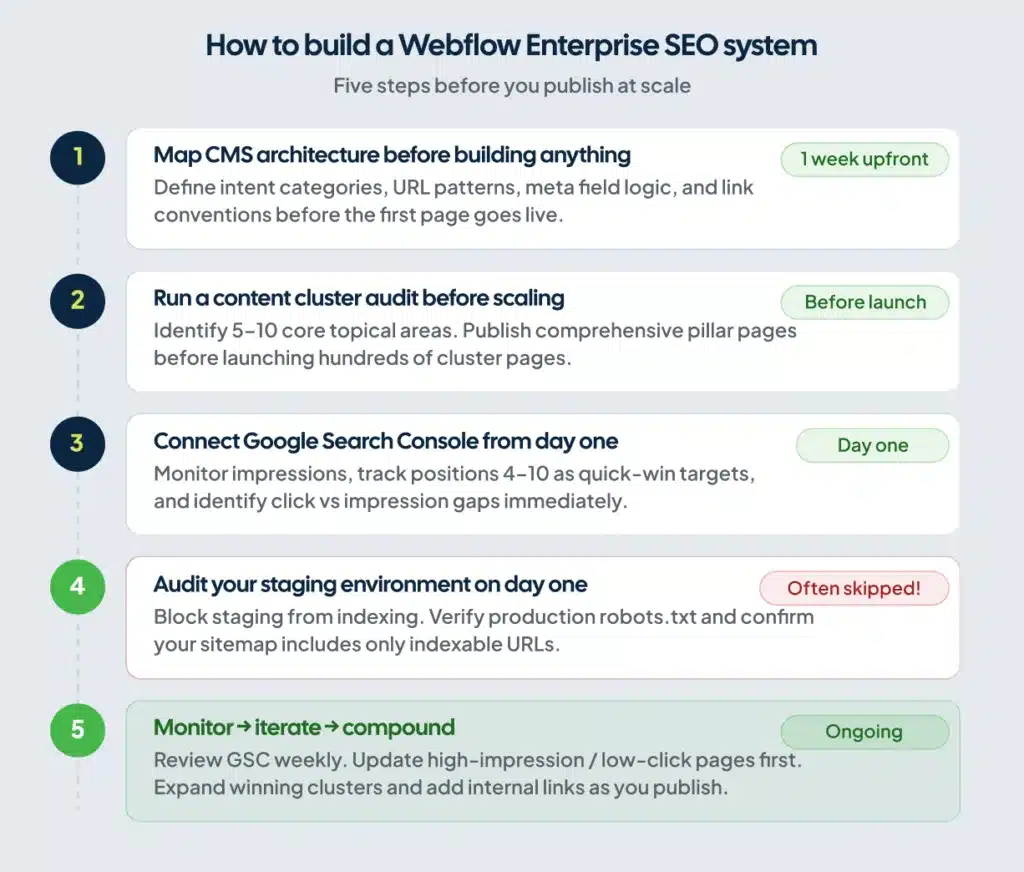
Run a content cluster audit before scaling. Identify your five to ten core topical areas and publish genuinely comprehensive pillar pages before launching hundreds of supporting cluster pages. Google indexes pillar pages faster when they already carry authority. Cluster pages that don’t link back to an established pillar waste crawl budget.
Set up Google Search Console before publishing content at scale. Traffic data without search performance data tells you nothing useful. You need to see which pages gain impressions, which rank in positions four through ten (your quick-win targets), and which generate clicks versus impressions only. The guide to connecting Webflow to Google Search Console walks through the setup.
Audit your staging environment configuration on day one. Confirm the staging domain is blocked from indexing. Confirm your production robots.txt permits crawling of the pages you want indexed. Confirm your XML sitemap includes only indexable URLs. These are five-minute checks that teams skip and spend weeks diagnosing later.
If your Webflow site isn’t building ranking momentum, the problem is usually one of three things: CMS architecture not planned around search intent, content published at volume without topical depth, or internal linking that doesn’t route authority to the pages that need it. If you want an outside perspective on which of those three is holding back growth, ClearBrand offers Webflow enterprise SEO partnerships built for exactly that.
Frequently Asked Questions
Is Webflow good for enterprise SEO?
Webflow Enterprise is strong for enterprise SEO. The platform generates clean semantic HTML, includes a global CDN, automates metadata through CMS fields, supports bulk 301 redirects, and handles international hreflang natively. Enterprise plans remove the CMS item ceiling and add Page Branching for team collaboration. The primary limits are server-level access and Git-based version control, which affect engineering workflows more than marketing-led SEO programs.
Does Webflow support technical SEO at enterprise scale?
Webflow covers standard technical SEO requirements without developer involvement: XML sitemaps, canonical tags, robots.txt configuration, SSL, redirect management, and structured data via schema markup. For advanced technical requirements — custom caching rules, server-side rendering logic, or redirect rules based on request headers — you’ll hit platform limits. Most enterprise marketing sites don’t need those capabilities.
Can Webflow handle large content sites?
Webflow Enterprise handles large content sites. The base Business plan supports up to 10,000 CMS items, with add-ons available to extend that further. Enterprise plans negotiate custom limits and remove the hard ceiling. For sites requiring 20,000 records or more, the Webflow Data API lets you sync content from an external database into Webflow’s CMS programmatically, scaling to 100,000+ items without abandoning the platform’s SEO and performance advantages.
Is Webflow Enterprise worth it for SEO specifically?
The SEO value of Webflow Enterprise depends on your team size and content velocity. The core SEO features — CMS automation, redirects, hreflang, schema — are available on lower plans. Enterprise adds the collaboration infrastructure (Page Branching, publishing workflows, granular permissions) that makes large content programs manageable without chaos. If multiple contributors are publishing simultaneously and speed is a strategic priority, the Enterprise plan reduces errors and accelerates publishing enough to justify the cost.
How does Webflow compare to WordPress for enterprise SEO?
Both platforms rank well in search when configured correctly. Webflow’s advantage is a stronger technical baseline out of the box, requiring fewer plugins to maintain. WordPress’s advantage is flexibility — deeper server control, a larger plugin ecosystem, no hard limits on site complexity. For marketing-led enterprise teams without dedicated web developers, Webflow is the faster path to consistent organic growth. For engineering-led organizations that need fine-grained control over every technical layer, WordPress or a headless stack is the stronger fit.