

Most guides on Webflow Localization read like a feature list with the price slapped on the end. You finish them knowing the buttons exist. You don’t know whether to click them.
I’ve audited dozens of Webflow sites running multiple locales. The same five mistakes tank international rankings. The same two pricing surprises blow budgets. The same one limitation kills ecommerce migrations halfway through.
This guide covers what Webflow Localization actually does, what it costs once you stack the locales, where it quietly breaks, and the two situations where you should pick something else.
What is Webflow Localization?
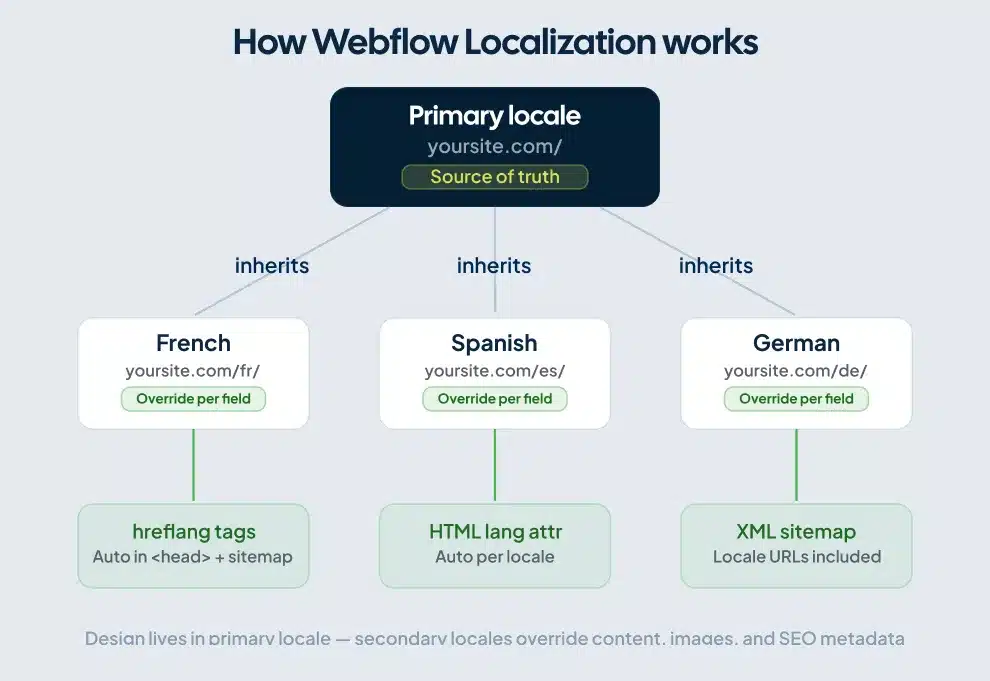
Webflow Localization is a native add-on that lets you publish multiple language and regional versions of a single Webflow site from one project. You build the primary locale, add secondary locales as overrides, and Webflow handles the URL structure, hreflang tags, and sitemap automatically. It runs at the platform level, so you can localize content, design, images, alt text, and SEO metadata without writing code, according to Webflow’s official localization overview.
That definition matters because Webflow Localization does two jobs at once. It runs translation. It also runs international SEO. Most teams underestimate the second job until their German pages start ranking for the wrong country.
How Webflow Localization actually works
Your site has one primary locale and as many secondary locales as your plan allows. By default, secondary locales inherit everything from the primary: content, styles, assets, presentation. You override the bits that need to change.
Think of the primary locale as the canonical truth. Every secondary locale sits on top as a layer of edits. Reset an override, and that element snaps back to inheriting from the primary.
A few rules worth knowing before you set anything up.
The design lives in the primary locale. As Webflow’s documentation on localizing content and styles makes clear, you cannot add or remove elements while in a secondary locale view. Layout is determined by primary. If a French headline runs 40% longer than the English one and breaks your hero, you fix it in primary or you live with the override per locale.
URLs default to subdirectories. Your Spanish version sits at yoursite.com/es/. Webflow generates hreflang tags and a sitemap with hreflang entries automatically. Subdirectories also keep your domain authority consolidated, which is the right call for SEO almost every time.
Right-to-left scripts work without configuration. Webflow auto-applies RTL on published sites for Arabic, Persian, Hebrew, Urdu, and Yiddish locales. If you don’t want that for a specific element, override with dir="ltr".
Webflow Localization pricing in 2026
The pricing has three tiers and one trap: you pay per locale, per month, on top of your Site plan.
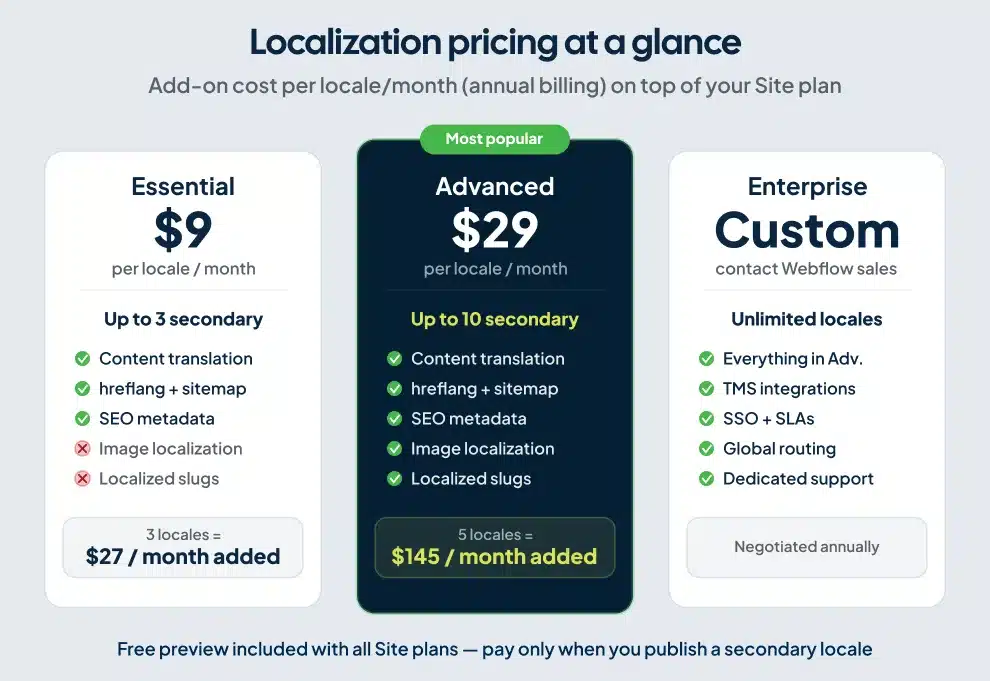
Locale caps are how the tiers are consistently sold and documented, and they match what every agency I’ve worked alongside reports. Pricing details come from Webflow’s localization feature page and recent breakdowns in the 2026 Webflow pricing analysis from Flow Ninja. Confirm current pricing on Webflow’s site before committing, since add-on pricing has shifted twice in the past 18 months.
The math nobody runs upfront: at three locales on Essential, you add $27 per month. At five locales on Advanced, you’re at $145 per month on top of your Site plan, before factoring in human translation. For a 50-page B2B SaaS site I audited last quarter, the platform fee was $174 per month. The translation budget was $11,400 for the first pass. The platform fee is the cheapest part.
The Essential plan has a real ceiling. It does not allow you to localize images or change page slugs per language. Both matter for SEO and conversion. If your hero image contains text, or you want /about to become /a-propos in French (you do, for ranking), you need Advanced.
A free preview ships with every Site plan. You can build localized versions for free and only pay when you publish a secondary locale. Use the preview to scope work before committing.
Setting up Webflow Localization step by step
The setup is faster than the planning. Lock in the URL structure, locale codes, and translation workflow before you click anything. Our Webflow SEO settings for localized pages walkthrough covers the global SEO panel that controls the rest of your site.
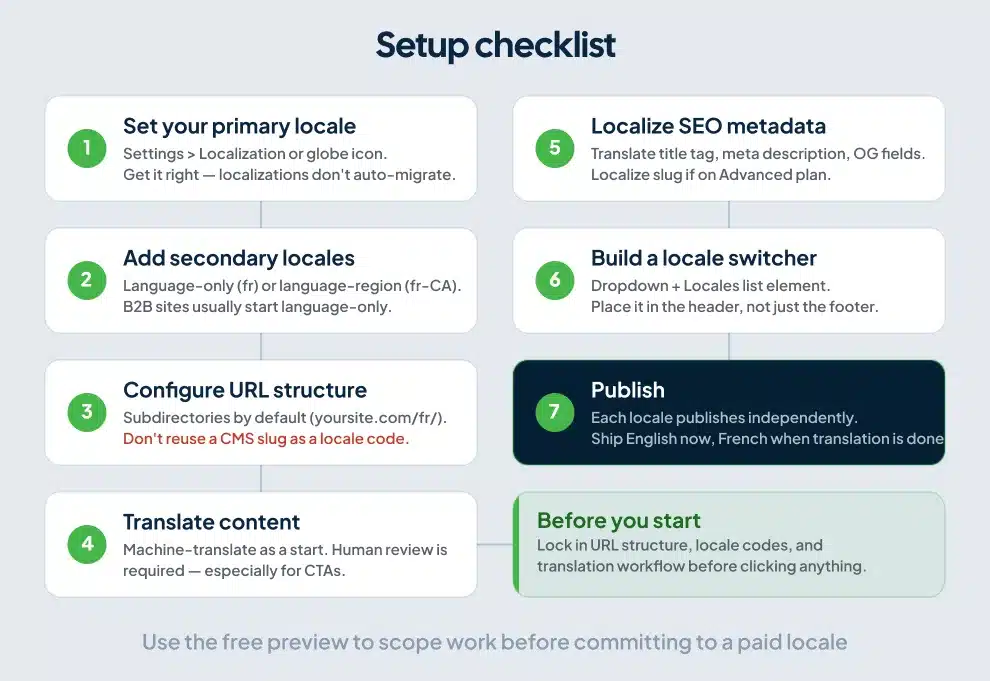
Step 1: Set your primary locale. Open Settings panel > Localization, or click the globe icon in the top bar. Pick the language and region you’ll use as the source of truth. This is changeable later, but localizations don’t auto-migrate when you switch primary, so get it right the first time.
Step 2: Add secondary locales. Choose between language-only (fr for French anywhere) or language-region (fr-CA for French Canadian). Use language-region when content varies by country. Vocabulary, imagery, compliance, pricing. Use language-only when you can serve all speakers with one version. Most B2B sites I work with go language-only for the first launch and add regional variants once data justifies the work.
Step 3: Configure URL structure. Subdirectories are the default and the right choice for SEO. Webflow will serve French at yoursite.com/fr/. One landmine: do not use the same slug for a CMS Collection, folder, or page as a locale subdirectory. The locale wins and your collection 404s. I’ve cleaned up this exact mistake on three client sites.
Step 4: Translate content. Switch the Designer to a secondary locale view. Right-click the Body element and select “Translate to (locale language)” to machine-translate the entire page. Or translate field by field for control. Both approaches need human review. Machine translation handles 60% of the work and gets the other 40% wrong in ways that hurt conversion. CTAs translated literally lose 15-20% of their click-through rate against a properly localized version.
Step 5: Localize SEO metadata. Open page settings inside each locale view. Translate the title tag, meta description, and Open Graph fields. Localize the slug if you’re on Advanced. Webflow auto-generates hreflang tags and includes them in the sitemap, so you don’t add code by hand.
Step 6: Build a locale switcher. Drop in a Dropdown element and a Locales list element. The Locales list works like a Collection list and shows every locale that has publishing enabled, per Webflow’s locale switcher documentation. Add flag images in the locale settings if you want them in the dropdown.
Step 7: Publish. Each locale publishes independently. You can ship the English site while French is still in draft, then publish French separately when translation is done.
Webflow Localization for international SEO
The SEO mechanics are the strongest part of the product. Here’s what Webflow handles automatically and what you still own.
Webflow handles HTML lang tags, page-level hreflang in the head, hreflang entries in the auto-generated sitemap, locale-specific meta titles and descriptions, subdirectory URL structure, and canonical relationships between locales.
You still own the work that actually moves rankings. Localized keyword research, where translating “Best CRM Software” to “Meilleur logiciel CRM” misses what French buyers actually search for (closer to “logiciel CRM gratuit”). Localized internal linking. Professional translation quality. Submitting each locale to Google Search Console.
The hreflang implementation is worth a closer look. Webflow’s April 2025 update added flexibility with custom base URLs and a disable option for advanced cases, as theCSS Agency documents in their hreflang implementation guide. Most teams should leave automatic mode on. Manual control matters when you’re coordinating multiple Webflow projects under one domain or running a custom CDN setup; in those cases, adding hreflang via custom code gives you the granular control you need.
One mistake I see across audits: teams localize page content but forget the schema. Product pages, FAQs, and articles all benefit from translated structured data per locale. Localizing meta titles is good. Localizing schema markup is what makes your French product pages eligible for French rich results. The implementation lives in custom code, and our guide to schema markup for multi-language sites covers the patterns we use on client builds.
The limitations Webflow won’t put on the feature page
Five things will frustrate you if nobody warned you.
Ecommerce doesn’t work with Localization. If your Site plan includes Ecommerce, products, categories, and pages can’t be localized. Webflow has been signaling compatibility “soon” for two years and it still hasn’t shipped. Plan around this if you sell online. Hybrid setups (Webflow marketing site plus Shopify checkout) are the most common workaround I’ve implemented.
Internal links break across locales by default. A button in your French page that links to /about will send the visitor to the English /about, not /fr/about. The fix is straightforward: use the page reference picker (which Webflow rewrites correctly per locale) instead of typing URLs as text. Audit your existing site for hardcoded internal URLs before flipping Localization on. On a recent migration of a 120-page site, I replaced 340 hardcoded internal links to make the locale routing work.
Translations happen one locale at a time. If you have five locales, you switch locale views five times to translate each item. There is no bulk translate-everything action across locales, as Sygnal documents in their localization limitations writeup. For a 50-page site in five languages, budget time accordingly or use a TMS integration like Lokalise or Phrase.
Translator access is all-or-nothing. Webflow has no dedicated “translator” role. Anyone editing translations needs Designer access at $39/month per Full Seat, as Weglot’s comparison guide notes. Limited Seats at $15/month let editors work in the in-context editor, which works for content updates but not the full Designer workflow some translators expect. Weglot’s separate dashboard solves this if collaboration security matters.
Text expansion will break your layout. German and French text typically runs 30-40% longer than English. Buttons that fit “Get Started” don’t fit “Jetzt loslegen”. My practical rule: design hero buttons with 25% extra horizontal padding from day one if you know German or French is on the roadmap. Retrofitting per-locale style overrides costs more than the prevention.
Webflow Localization vs Weglot: when to switch
Both tools translate Webflow sites. They make opposite tradeoffs.
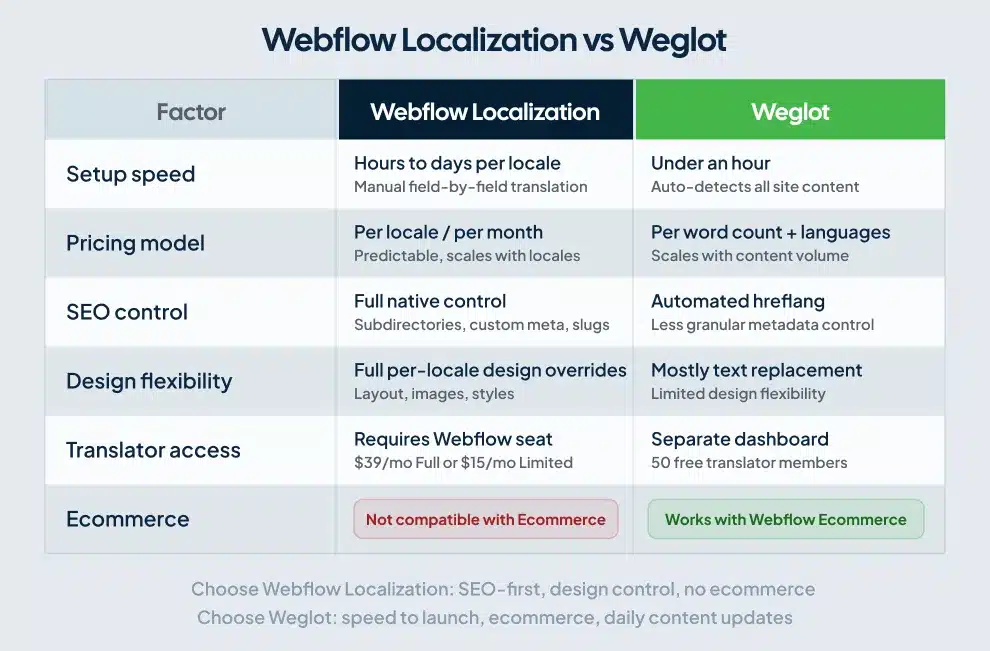
Pick Webflow Localization when SEO is central to your strategy, your content team owns translations long-term, and you want every locale to feel like a native build.
Pick Weglot when speed to launch matters more than design control, you have an ecommerce store, or your content updates daily and you can’t manually trigger each translation.
Localazy and Lokalise sit between them as connector-based options for teams using a TMS. For a deeper breakdown including pricing scenarios, our Webflow international SEO services page covers how we handle multi-locale builds end-to-end.
Common mistakes that tank international SEO
Five issues come up repeatedly in the localized Webflow audits I’ve run over the past 18 months.
Auto-translated meta descriptions and titles that nobody reviewed. Google indexes them, French or German buyers see them, conversion drops. A native speaker should review SEO copy before publishing. I caught a client serving “Pricing” as “Tarification” (correct) but with a meta description that translated “free trial” as “essai gratuit” when the local convention is “période d’essai gratuite.” Their CTR climbed 22% after the rewrite.
Slugs left in English on the Essential plan. /products/website-design in your French locale should be /produits/conception-de-site-web for ranking. If you’re on Essential, that limitation alone is reason to upgrade to Advanced.
Locale switchers placed only in the footer. Visitors who land on the wrong locale through search bounce before they find the switcher. Place it in the header, where they expect it.
No language preference detection. Enterprise and Advanced plans include automatic domain-level routing based on browser preference. Essential plan users should add a country/language detection script via custom code.
Forgetting to verify each locale in Google Search Console. Each subdirectory needs its own property submitted, with the international targeting report monitored separately. Our walkthrough on GSC international targeting covers the setup.
Should you use Webflow Localization or skip it?
Use Webflow Localization if you have a content-driven marketing site, you want full design control per locale, you have someone managing translations in-house or via a TMS, and you’re not running ecommerce.
Skip it if you sell products online (Webflow Ecommerce blocks Localization), your team can’t dedicate hours per locale to translation review, or you need a multilingual site live in a week with quality of design control as a secondary concern.
A B2B SaaS team expanding into Europe? Webflow Localization is the right tool. An ecommerce brand selling in 12 countries? Weglot or a Shopify-based stack will serve you better.
Frequently asked questions
Is Webflow Localization free?
A free preview is included with every Site plan, from Starter to Enterprise. You can build and test localized versions of your site at no extra cost. You only pay when you publish to a secondary locale, starting at $9 per locale per month on the Essential plan.
Does Webflow Localization work with Webflow Ecommerce?
No. Sites using Webflow Ecommerce features cannot localize products, categories, or ecommerce pages. Webflow has not announced a release date for compatibility. Most ecommerce teams use Weglot or a hybrid Webflow plus Shopify setup as a workaround.
How does Webflow handle hreflang tags?
Automatically. Webflow generates page-level hreflang tags in the head section and includes them in the auto-generated sitemap based on your locale configuration. The April 2025 update added options to use a custom base URL or disable automatic generation if you need manual control for advanced setups.
Can I add Webflow Localization to an existing site?
Yes, but plan for restructuring. CMS collections may need field-level localization enabled, and any hardcoded internal links need to be replaced with page references so they route to the correct locale. Test in the free preview before publishing. Most retrofits I’ve handled take 2-3 weeks of focused work for a 50-page site.
How many languages can I add?
Three on Essential, ten on Advanced, custom on Enterprise. The primary locale doesn’t count toward the limit, so Essential gives you four total locales (one primary, three secondary).
Does Webflow Localization include translation services?
Webflow includes machine-powered translation as a starting point. Human translation is your responsibility. You can edit machine output in the Designer, or integrate a translation management system like Smartling, Lokalise, Phrase, or Crowdin through Webflow Apps for professional translation workflows.
The takeaway
Webflow Localization is the right answer for most marketing teams expanding internationally on Webflow. The SEO foundation is solid. The design control beats every proxy-based tool I’ve tested. The pricing scales reasonably for sites with three to ten locales.
The traps are the ecommerce incompatibility, the per-locale translation workflow, and the cost of human translation, which always exceeds the platform fee.
If you’re scoping an international Webflow build, or your existing localized site is underperforming in target markets, our team handles international SEO and Localization setup as part of our Webflow international SEO services. We’ll audit your locale architecture, hreflang implementation, and translation quality before recommending next steps.