
Search engines process over 8.5 billion searches daily, so SEO is key to any website’s success.
Webflow is a powerful website builder that combines design flexibility with SEO capabilities, so you can create websites that look great and rank well in search.
Quick note: Our approach to SEO is “Search Everywhere Optimization” which includes AI search results. As you read this article, keep in mind that we’re including AEO (Answer Engine Optimization) and GEO (Generative Engine Optimization) throughout.
Unlike traditional drag-and-drop builders that spit out messy code, Webflow produces clean, semantic HTML and CSS that search engines (especially AI) understand and love. This fundamental advantage, combined with SEO settings and performance optimization features, makes Webflow an ideal website builder for businesses serious about organic traffic growth.
This guide will walk you through everything you need to know about Webflow SEO, from setup to advanced techniques to improve your website’s search engine rankings and user engagement.
What is Webflow SEO and Why It Matters
Webflow SEO is the practice of optimizing websites built on the Webflow platform to rank higher in search engine results. We include AI search platforms (ChatGPT, Claude, Perplexity, Grok, etc.) in the term “search engines.”
As a visual website builder, Webflow stands out by generating clean, semantic code that search engines can crawl and index, giving your Webflow site a big advantage over competitors on other platforms.
The platform generates HTML5 semantic markup automatically, so search engines can understand your page content and structure better. For example, when you create a navigation menu, Webflow uses proper <nav> tags.
Building a site with clean HTML code is especially important for LLMs because, as of right now, they can’t read javascript.
Webflow’s SEO goes beyond clean code generation. The platform gives you direct control over meta titles and descriptions, canonical tags, and even allows custom code insertion for advanced schema markup implementation and LLMs.txt files. This level of control usually requires technical knowledge on other platforms but is available in Webflow’s visual interface.
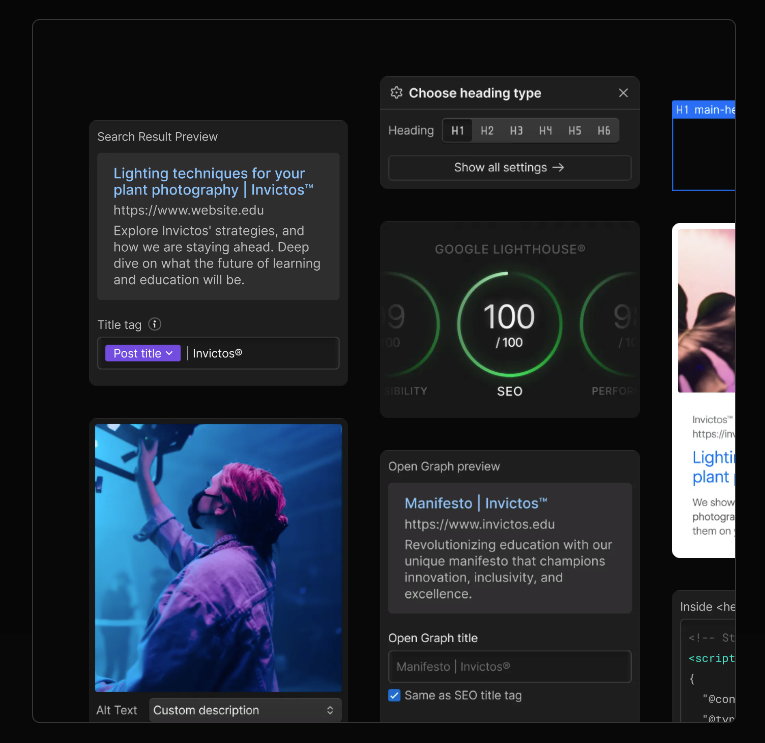
Studies show Webflow sites achieve mobile PageSpeed scores of 84 or higher when optimized, compared to the industry average of 60-70 for similar platforms. This performance advantage directly impacts search rankings, since Google made Core Web Vitals an official ranking factor in 2021.
With growing market share, Webflow is gaining popularity among SEO professionals for producing high-performing sites without requiring technical expertise. The platform’s design flexibility and technical SEO features make it a must-have for businesses looking to improve their organic search.
Webflow SEO Setup (Technical Foundations)
Setting up Webflow technical SEO foundations begins with configuring your site settings correctly. Start by enabling the SSL certificate in your site settings to make sure your website uses HTTPS, which is a ranking factor and builds trust with your visitors.
Go to your project settings and find the SEO tab where you’ll configure global SEO settings that apply to your entire Webflow website. Set your global canonical tag to prevent duplicate content issues and make sure your site’s robots.txt and llms.txt files are configured properly for search engine crawlers.
The robots.txt file in Webflow can be customized in your site settings. Include important directives like allowing access to your CSS and JavaScript files and blocking any admin or staging areas you don’t want indexed.
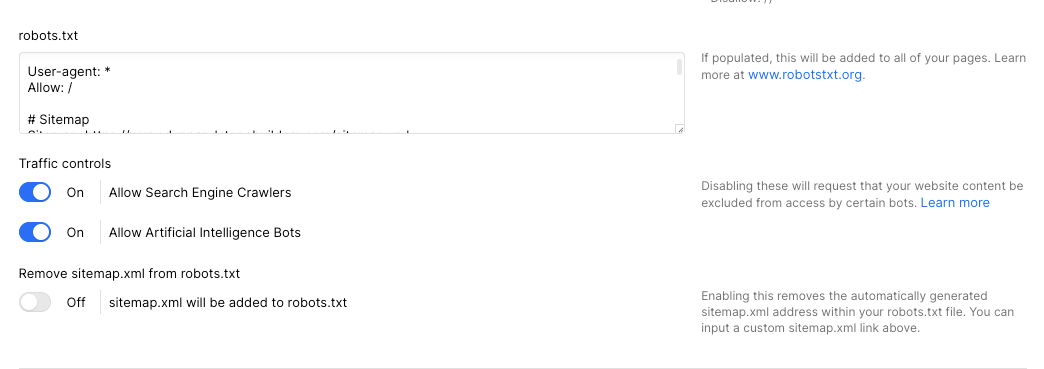
XML sitemaps are generated automatically by Webflow but you need to configure which pages to include or exclude. Go to your site settings and exclude any utility pages, thank you pages, or duplicate content that shouldn’t be in search results.
For each individual page, configure title tags and meta descriptions in the page settings. Your title tag should be under 60 characters and include your target keywords near the beginning. Meta descriptions should be compelling, under 155 characters and include a clear call-to-action to improve your click through rates from search results.
Custom URL slugs are important for SEO best practices. Instead of using Webflow’s default URLs, create descriptive, keyword-rich slugs for all your web pages. For example, instead of “/page-1”, use “/webflow-seo-guide” which clearly indicates the page’s content to both users and search engines.
Page Structure and Navigation
Creating a logical site hierarchy starts with planning your important pages at the top level of your navigation structure. Search engines give more weight to pages that are fewer clicks away from your homepage so make sure your most valuable content is easily accessible.
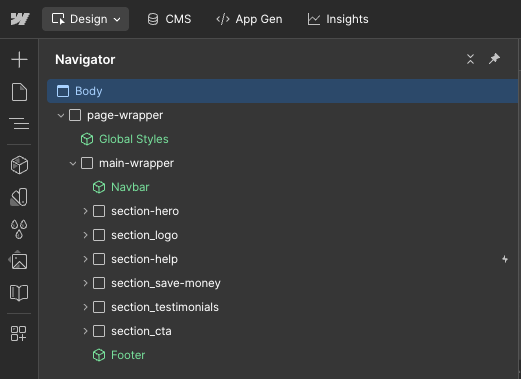
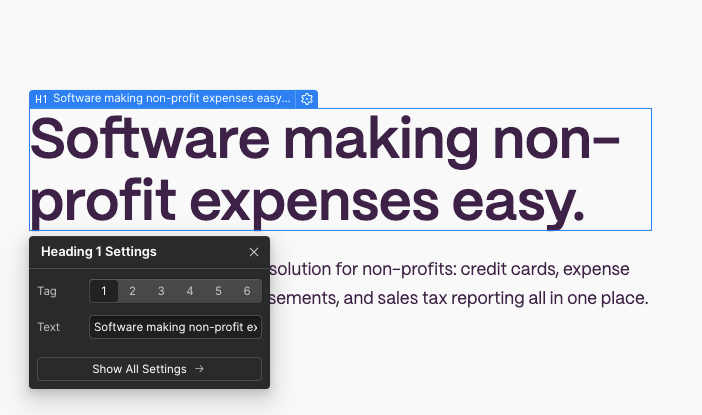
Webflow generates proper HTML5 semantic tags when you use its built-in elements. The Designer creates <header>, <nav>, <main>, and <footer> elements that help search engines understand your page structure. This semantic markup is important for both SEO and accessibility, especially for screen readers used by visually impaired users. Implement a header tag hierarchy throughout your page content. Start with a single H1 tag for your main page title, followed by H2 tags for major sections and H3-H6 tags for subsections. This helps search engines understand your content organization and can get you featured snippets.
Do not skip header tags. They must be in sequential order. For example, if you want to use an H3 tag, there must be an H2 before it. You can’t have an H1 tag followed by an H3, or an H2 followed by an H4 or H5. Most of the time people do this because they like the design of the header tag they want to use. Instead, you should use the properly sequential header tag, then change the design to fit your needs.
Navigation menus should have descriptive labels that clearly indicate what users will find on each page. Instead of generic terms like “Services,” use specific labels like “Webflow SEO Services” or “Website Design Solutions.” This improves both user experience and keyword targeting.
Don’t forget your 404 error page design. Create a custom 404 page that matches your site’s branding and has helpful navigation options to keep visitors engaged even when they encounter broken links. Include links to your most important pages and a search function if available.
On-Page SEO in Webflow
On page SEO in Webflow starts with thorough keyword research using tools like Google Analytics, Google Search Console or dedicated SEO tools like SEMrush or Ahrefs. Identify relevant keywords your target audience searches for, focusing on terms with good search volume but manageable competition.
When writing your meta titles and descriptions for each page, include your primary keywords naturally while making sure the copy is readable for humans. Your meta title should describe the page content and include the most important keywords within the first 60 characters.
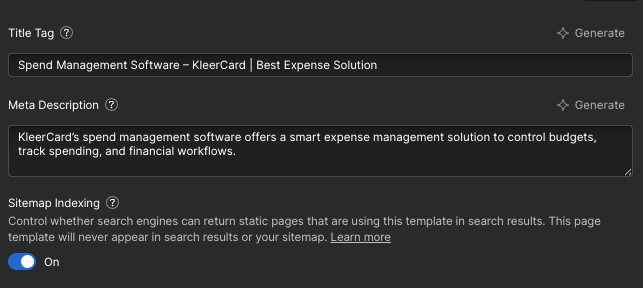
Meta descriptions, although not a direct ranking factor, impact your click through rates from search engine results. Write compelling descriptions that include your target keywords and a clear value proposition. For example instead of “Learn about Webflow SEO” write “Master Webflow SEO with our step-by-step guide and boost your organic traffic by 200%.”
Image optimization is important for both seo and page speed. Add descriptive alt tags to all images, focusing on what the image shows rather than generic descriptions. Instead of “image1.jpg” use specific alt text like “Webflow Designer interface showing SEO settings panel.” This helps with image SEO and accessibility for users with screen readers.
Internal linking with keyword rich anchor text helps search engines understand your site structure and distributes page authority throughout your website. Link to relevant content using descriptive anchor text but avoid over-optimization by varying your link text naturally.
Content optimization should focus on E-E-A-T (Experience, Expertise, Authoritativeness, Trustworthiness) principles. Create valuable content that demonstrates your expertise, cite authoritative sources and update information regularly to keep it relevant and accurate.
Content Management System (CMS) SEO
Webflow CMS gives you the power to scale your SEO across multiple pages. Set up dynamic meta titles and descriptions using CMS fields to automatically generate meta tags for each collection item, such as blog posts or product pages.
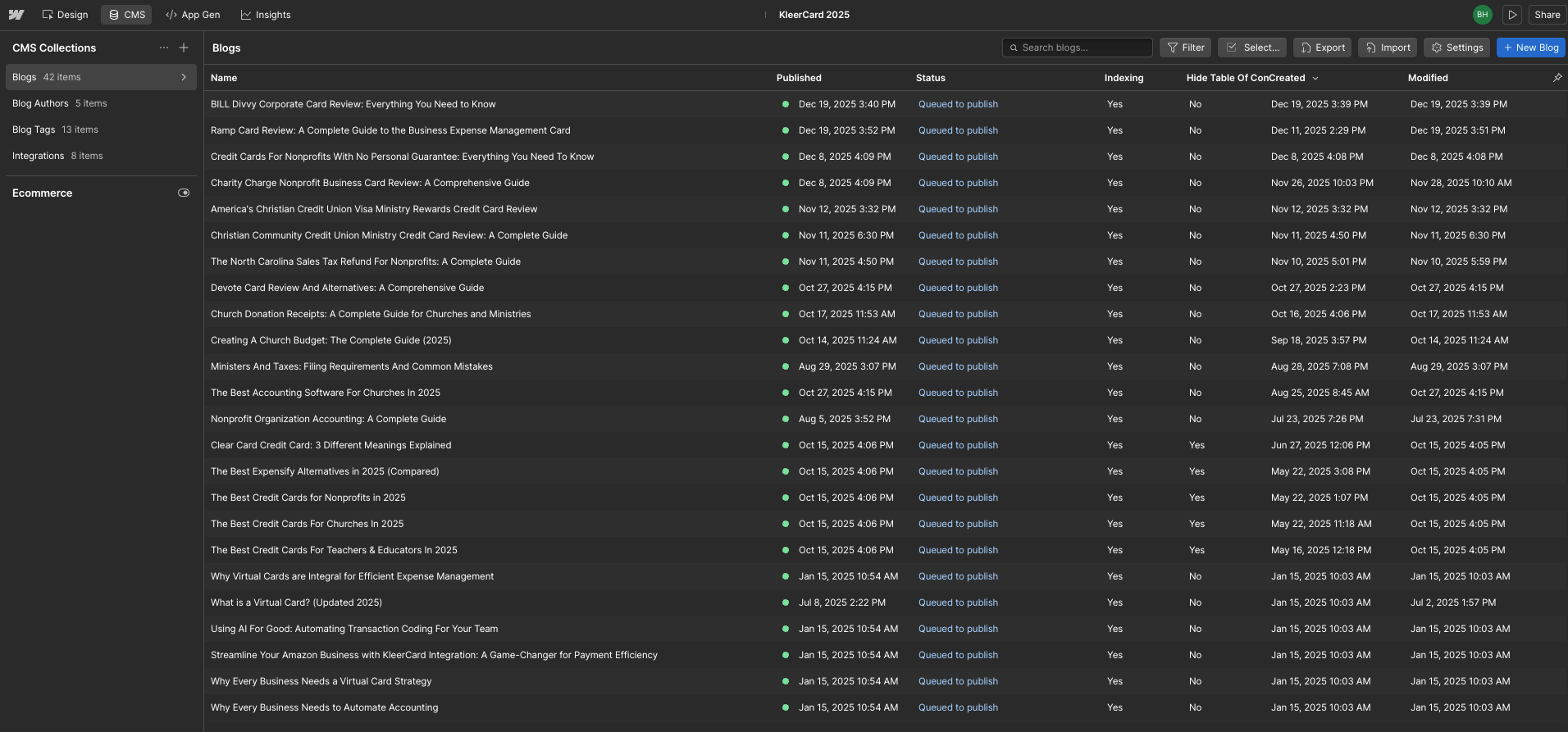
Create SEO friendly URL templates for your collection pages by using meaningful slugs that include your target keywords. Instead of generic URLs like “/post-1,” configure your blog post template to use “/blog/[post-title-slug]” which creates descriptive URLs for each piece of content.
Reference fields in Webflow CMS allow you to connect related content automatically, creating internal linking opportunities that benefit both user experience and SEO. For example, link related blog posts or connect service pages to relevant case studies to keep visitors engaged and distribute page authority.
When setting up blog post templates, implement a content hierarchy with proper heading tags. Configure your template to use the post title as an H1, major sections as H2s and subsections as H3s. This consistent structure helps search engines understand your content organization across all posts.
Set up category and tag systems to organize your content logically. These taxonomies help users find related content and create additional internal linking opportunities and can be used to create topic focused landing pages that target specific keyword clusters.
Performance and Speed Optimization
Page speed directly impacts both user experience and search rankings, so performance optimization is a crucial part of your Webflow SEO strategy. Enable CSS and JavaScript minification in your hosting settings to reduce file sizes and improve load times.
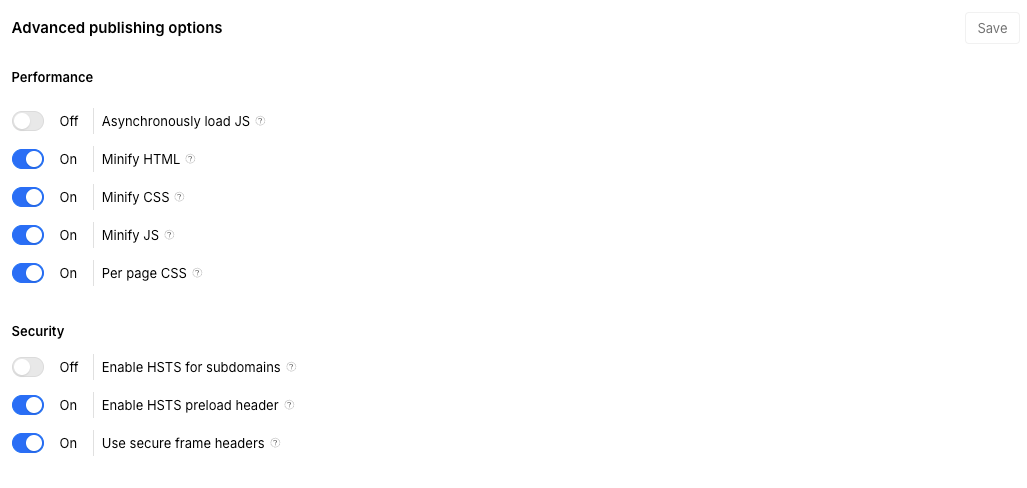
Image compression is one of the most effective ways to improve site speed. Convert all images to AVIF or WebP when possible and ensure they’re properly sized for their display dimensions. Webflow’s automatic image optimization helps but manually optimizing large images before upload gives better results.
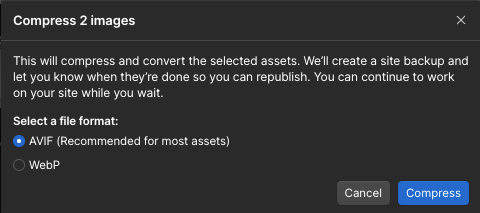
We manually change the size of images then optimize the file size with tools like TinyPNG.
The Style Manager in Webflow allows you to find and remove unused CSS styles that can bloat your site’s code. Regularly audit your stylesheets and delete unnecessary classes to keep your code lean and your load times optimal.
While Webflow’s interactions and animations can enhance user experience, too much can hurt your Core Web Vitals scores. Limit animations to essential elements and avoid complex interactions that trigger layout shifts or delay user interactions.
Core Web Vitals optimization focuses on three key performance metrics: Largest Contentful Paint (LCP), Cumulative Layout Shift (CLS) and Interaction to Next Paint (INP). Aim for LCP under 2.5 seconds, CLS below 0.1 and INP under 200ms to meet Google’s recommended thresholds.
Use Webflow’s global CDN powered by AWS and Fastly to deliver content fast worldwide. This content delivery network automatically optimizes asset delivery based on user location and significantly improves load times for international visitors.
Analytics and SEO Tracking Setup
Google Search Console integration is essential to monitor your website’s performance in search results. Verify your Webflow site ownership through the DNS verification method which is the most reliable and doesn’t require any code changes.
Install Google Analytics 4 to track organic traffic, user behavior and conversion metrics. Configure enhanced ecommerce tracking if you have an online store and set up custom events to track important user actions like form submissions or newsletter signups.
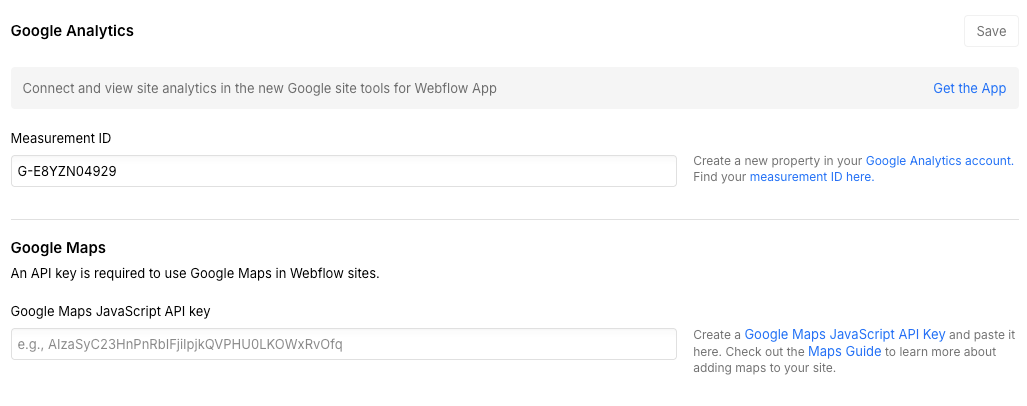
Google Tag Manager provides advanced tracking capabilities without requiring code changes to your Webflow site. Use GTM to manage multiple tracking codes, implement conversion tracking and set up advanced analytics configurations without affecting your site’s performance.
For local businesses, setting up and optimizing your Google Business Profile is crucial for local SEO visibility. Ensure your business information is consistent across your website and Google Business Profile and actively collect and respond to customer reviews.
Submit your XML sitemap to Google Search Console to help search engines discover and index your pages more efficiently. Monitor the index coverage report regularly to identify and fix any crawling issues that might prevent your pages from showing up in search results.
Consider installing Webflow SEO apps from the marketplace for more insights and automation. Apps can provide valuable insights into your site’s SEO performance and automate certain optimization tasks.
Advanced Webflow SEO Techniques
Schema markup in Webflow does not require adding custom code to your site’s head section or individual pages. Webflow has a built-in Schema section within the page settings for each page. Common schema types for most websites are Organization, WebPage and Article markup.
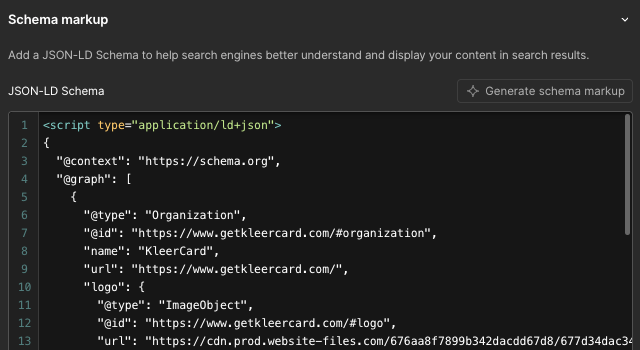
For blog posts implement Article schema with properties like headline, author, datePublished and articleBody. This structured data helps search engines understand your content better and can lead to rich snippets in search results and improve your click-through rates.
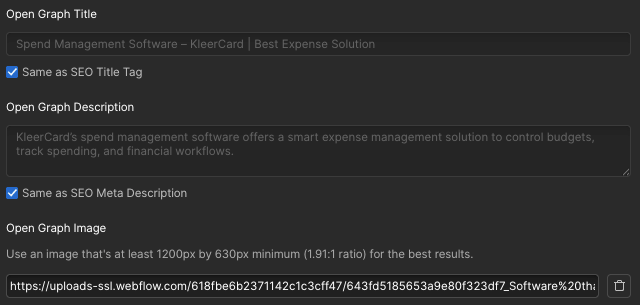
Open Graph tags control how your content appears when shared on social media. In Webflow, each page has Open Graph settings in the page settings. Use this to control social media previews and improve social engagement which can indirectly benefit your SEO efforts.
International SEO with Webflow Localization requires setting up hreflang tags to indicate language and regional targeting. Configure these tags properly to avoid duplicate content issues and ensure search engines serve the correct version of your content to users in different locations.
301 redirects in Webflow helps preserve SEO value when you move or delete pages. Set up redirects in your site settings for any URLs that have changed and regularly audit your redirect chains to ensure they’re working correctly and not creating unnecessary redirects.

Featured snippets: Optimize your content for featured snippets by creating structured Q&A sections, numbered lists and tables that directly answer common search queries. Format your content to make it easy for search engines to extract and display in position zero results.
Breadcrumb navigation with structured data helps both users and search engines understand your site hierarchy. Use Webflow’s symbol feature to implement breadcrumbs and add BreadcrumbList schema markup to enhance their SEO value.
SEO for Webflow Ecommerce
Product page optimization in Webflow Ecommerce requires unique, detailed descriptions for each product to avoid duplicate content issues. Use the CMS to create templates that automatically generate optimized meta titles and descriptions based on product attributes.
Implement Product schema markup for all your product pages to enable rich snippets showing price, availability and review ratings in search results. This structured data can significantly improve your product visibility and click-through rates from search engines.
Create SEO friendly category page structures by organizing products logically and using descriptive category names that include relevant keywords. Each category page should have unique content beyond just product listings to provide additional value to users and search engines.
Canonical tag implementation for product variants prevents duplicate content issues when you have multiple versions of the same product. Set canonical tags to point to the main product page or the most popular variant to consolidate SEO value.
Optimize your checkout flow not just for conversions but also for user experience signals that indirectly impact SEO. A smooth, fast checkout process reduces bounce rates and improves user engagement metrics that search engines consider when ranking pages.
Common Webflow SEO Mistakes to Avoid
One of the most common mistakes is leaving the webflow.io staging subdomain indexed by search engines. Always set your staging site to “noindex” in the site settings to prevent duplicate content issues and ensure search engines only index your custom domain.
Missing alt text on images is an SEO and accessibility issue. Every image on your Webflow site should have descriptive alt text that explains what the image shows. This helps visually impaired users understand your content and gives search engines more context.
Duplicate content across multiple collection pages can severely impact your SEO. Make sure each CMS item has unique content and use canonical tags when similar content exists across multiple pages.
Not using Webflow’s breakpoint system can hurt your mobile SEO. Test your site thoroughly across all breakpoints and ensure mobile friendly websites with proper touch target sizes and readable text without zooming.
Not setting up 301 redirects when restructuring your site can result in lost SEO value and broken links. Always create redirects for any URLs that change and use Google Search Console to find and fix any crawl errors.
Generic or missing meta descriptions and page titles waste opportunities to improve click-through rates from search results. Every page should have unique, compelling meta titles and descriptions that describe the page content and include relevant keywords.
Webflow Auditor
Webflow recently rolled out the Audit feature, which checks your site for SEO best practices. It compiles everything to be improved in one area and even helps solve some of the issues. For example, if it finds images that are missing alt tags, it can use AI to generate them for each image.
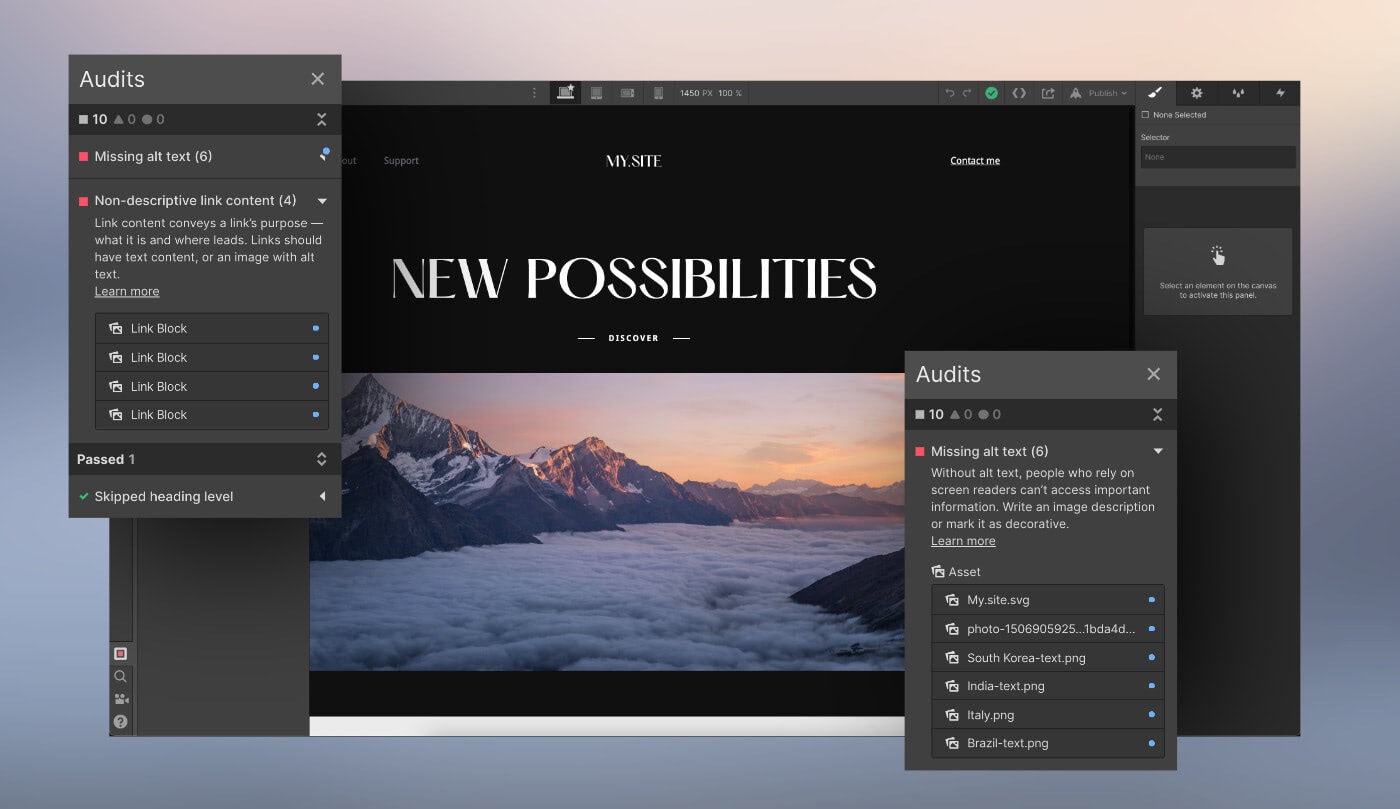
This single feature is an absolute game changer for anyone interested in implementing SEO on their site.
Webflow SEO vs Others
Webflow’s clean code generation is a big advantage over WordPress sites that rely on plugins. While WordPress has plenty of SEO plugins like Yoast or RankMath, these often add code bloat that slows down your site and complicates optimization.
Loading speed comparisons show Webflow beating Wix and Squarespace, especially on mobile. Webflow’s optimized code and CDN infrastructure means faster loading times without needing technical optimization knowledge.
Webflow’s customization flexibility is better than Shopify for content focused ecommerce sites, though Shopify is better for pure online stores with large product catalogs. Webflow’s visual interface gives more design control while keeping SEO best practices.
Webflow’s learning curve for SEO is steeper than drag-and-drop builders but less technical than custom development. This middle ground is perfect for marketers and designers who want SEO control without coding knowledge.
Webflow’s SEO features are built directly into the platform at no additional cost, which is a massive advantage over other platforms.
Measuring and Improving Webflow SEO
Track organic traffic growth through Google Analytics by setting up custom segments for organic search visitors. Monitor key metrics like sessions, page views, bounce rate and conversion rate to see how SEO improvements impact your business goals.
Use SEO tools like SEMrush, Ahrefs or Google Search Console to monitor your keyword rankings and see which optimization efforts are working. Track your target keywords and identify opportunities to improve underperforming pages.
Webflow Analyze gives you real-time insights into your website’s performance, including user behavior and conversion metrics. Use this data to find pages that need SEO improvement and how users interact with your optimized content.
Run regular SEO audits with tools like Screaming Frog to find technical issues that might impact your search performance. Crawl your site monthly to check for broken links, missing alt text, duplicate content and other technical seo issues.
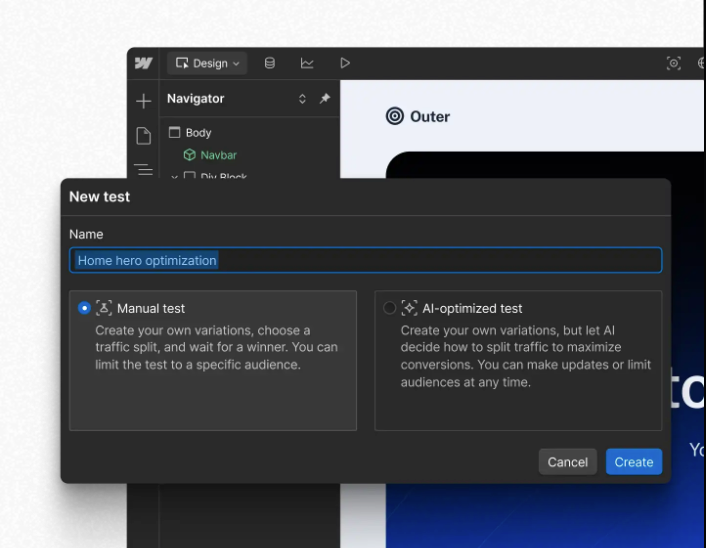
A/B testing with Webflow Optimize allows you to test different page elements to improve user engagement and conversion rates. Test headlines, call-to-action buttons and page layouts to find the best combinations for users and search engines.
Update your content based on search performance data to keep your website fresh and relevant. Use Google Search Console to find pages losing rankings and update them with new information, better keyword targeting or improved user experience elements.
Monitor your website’s Core Web Vitals through Google PageSpeed Insights and fix any issues that might impact your search rankings. Regular performance monitoring ensures your site meets search engines’ high standards for user experience.
Webflow SEO success requires a structured approach that combines technical optimization with high quality content and ongoing performance monitoring. By following the steps in this guide you’ll create a solid foundation for long term organic growth and search engine visibility.
The combination of visual design flexibility and technical SEO capabilities makes Webflow a great choice for businesses serious about their search engine performance. Start with the basics, implement advanced techniques gradually and monitor your results to achieve sustainable SEO success with your Webflow site.
Remember SEO is a long term investment that requires patience and consistency. Focus on creating value for your users, maintain technical best practices and regularly analyze your performance to find areas for improvement. With dedication and the right approach your Webflow site can get significant organic traffic growth and business results.