
Webflow gives you a head start on most website builders. You can still waste it entirely.
The platform ships with clean semantic HTML, flat-file delivery, a global CDN, and an automatic XML sitemap. Those matter. But the Webflow sites that rank have layered a deliberate strategy on top of that foundation: correct technical configuration, structured content, intentional internal linking, and a publishing plan built around how real buyers search.
This guide covers all of it — technical setup, on-page fundamentals, Core Web Vitals, CMS-driven content strategy, programmatic SEO, schema markup, and how to measure what’s working.
Is Webflow Good for SEO?
Webflow publishes flat HTML, CSS, and JavaScript files. Visitors receive pre-built files rather than dynamically generated PHP like WordPress produces. Pages load faster. Crawlers index content without waiting on database queries.
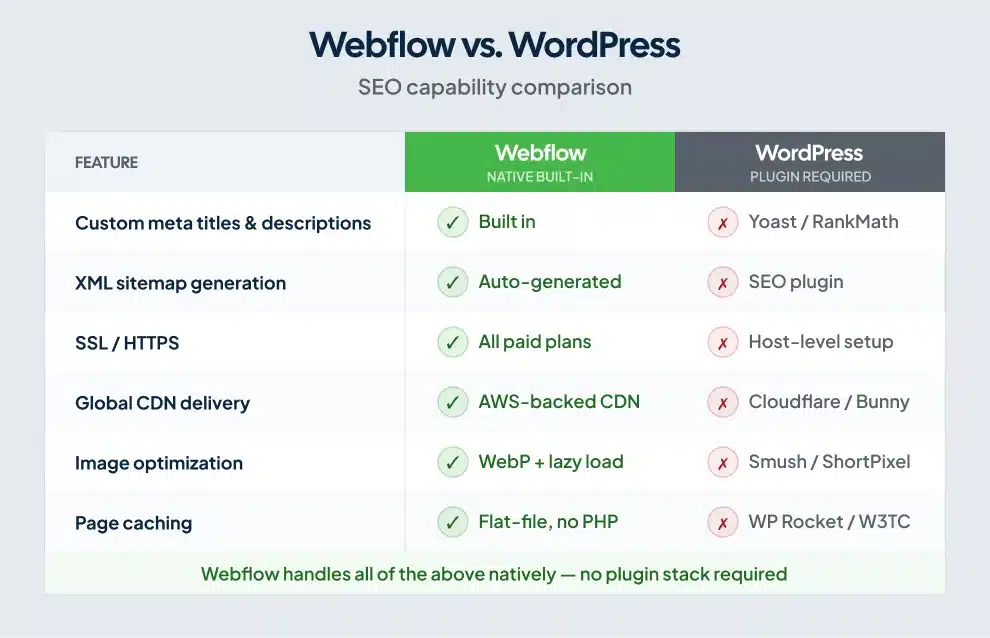
The built-in feature set covers most of what you’d spend hours configuring in WordPress: custom meta titles and descriptions, SEO-friendly URL slugs, automatic XML sitemap generation, Open Graph support, schema markup via custom code, and a CDN backed by Amazon Web Services.
In WordPress, reaching that same baseline requires a plugin stack — Yoast or RankMath, a caching plugin, an image optimizer, a CDN service. Each plugin is a dependency to maintain and a potential point of failure. Webflow handles most of it natively. For a detailed side-by-side, see our Webflow SEO vs. WordPress comparison.
One real limitation worth knowing upfront: Webflow’s CMS item limits are tiered by plan, topping out at 20,000 items on Business, with Enterprise for anything higher. For businesses running large programmatic SEO campaigns, those limits create friction. For a company publishing a blog, service pages, and case studies, they’re a non-issue.
Webflow is a strong SEO platform. You still have to use it correctly.
Technical SEO Configuration in Webflow
Configure this before you publish anything. Fixing technical mistakes on a live site with accumulated backlinks and indexed pages costs time and rankings.
SSL and HTTPS
Webflow includes SSL certificates on all paid hosting plans. Connect your custom domain and Webflow handles the certificate. Google treats HTTPS as a ranking signal, and browsers flag HTTP sites as insecure — which tanks click-through rates the moment a visitor sees the warning.
Canonical URLs and Duplicate Content
Webflow’s staging URL (yoursite.webflow.io) gets indexed by search engines if you don’t block it. Go to Site Settings, configure robots.txt to disallow the staging domain, and set your canonical URL globally in Project Settings to prevent www versus non-www duplication. Our Webflow SEO settings guide walks through every toggle in that panel.
For CMS collection pages, Webflow generates canonical tags automatically. Verify them in your published source code to confirm they point to the correct production URLs, not the staging subdomain.
One configuration that trips up multi-project setups: if you’re running multiple Webflow projects under one domain via a reverse proxy, each project generates its own sitemap. Consolidate them or submit each one separately to Google Search Console.
XML Sitemap
Webflow auto-generates a sitemap at yourdomain.com/sitemap.xml and updates it on every publish. Submit that URL to Google Search Console, then verify which pages are included. Pages you’ve marked “noindex” won’t appear in the sitemap — that’s correct behavior, not a bug. See our Webflow sitemap guide for the full submission walkthrough.
Robots.txt
Webflow generates a basic robots.txt file you can customize in Site Settings under Publishing. Block your staging subdomain, exclude any admin or internal paths, and reference your sitemap URL at the bottom of the file. More detail in our Webflow robots.txt guide.
Site Architecture and Crawl Depth
Flat architecture outperforms deep nesting. If a crawler has to follow 12 links to reach a service page, that page ranks poorly regardless of how well the content is written. Keep important pages within two or three clicks of the homepage. Navigation, footer links, and internal links create those short paths.
An SEO audit of hellobonsai.com — a Webflow-built site — found that over 3% of its URLs were orphaned with no internal links pointing to them. Orphaned pages rarely rank. Before you publish, map which pages link to which and make sure nothing is isolated.
On-Page SEO in Webflow
Meta Titles and Descriptions
Webflow lets you set custom meta titles and descriptions per page under Page Settings. For CMS collections, bind these fields to CMS data so each collection item generates unique metadata automatically.
One constraint worth knowing: you can’t set a rule where the H1 auto-populates the meta title. If the custom meta title field is blank, Webflow falls back to the page name, which is often not keyword-optimized. Fill these manually for static pages. Use CMS field binding for collection templates.
Title tag: Under 60 characters. Primary keyword near the front. Brand name at the end if space allows.
Meta description: 150-160 characters. Include the primary keyword. Give the reader a specific reason to click — not just a summary of what the page covers.
Header Tag Structure
Use one H1 per page with your primary keyword in it. H2s cover main subtopics. H3s break down subsections within H2s. Webflow’s style panel makes assigning heading levels fast, but designers regularly use heading tags for visual styling rather than content hierarchy. A page with three H1s confuses crawlers.
Check every page’s heading structure in a browser extension like Headings Map before publishing.
URL Structure
Webflow auto-generates slugs based on page names. Override them. Short, descriptive, keyword-focused slugs outperform long or generic ones. /webflow-seo-guide beats /services/blog/webflow-seo-optimization-tips-and-tricks-2024.
For CMS collections, set the slug field explicitly for each item. Don’t let Webflow generate slugs from item names that contain dates, IDs, or stop words.
Image Optimization
Name files descriptively before uploading. webflow-seo-dashboard.jpg gives crawlers context. IMG_4832.jpg gives them nothing.
Add alt text to every image. It improves rankings in Google Images, adds semantic context to surrounding content, and is what screen reader users depend on to understand the page. Compress images before uploading — Webflow supports WebP, which delivers smaller file sizes than JPEG or PNG at equivalent visual quality. Enable lazy loading for images below the fold so they don’t block initial rendering.
Core Web Vitals and Page Speed
Google’s Core Web Vitals are a confirmed ranking factor. Three metrics matter:
Largest Contentful Paint (LCP) measures time until the largest visible element loads. Target under 2.5 seconds. Slow LCP almost always traces to uncompressed hero images or render-blocking scripts loaded in the document head.
Cumulative Layout Shift (CLS) measures visual stability as the page loads. Pages that shift when fonts swap or images render get penalized. Set explicit width and height attributes on images, and avoid scripts that inject content above the fold after initial render.
Interaction to Next Paint (INP) replaced First Input Delay in March 2024. It measures responsiveness when a user clicks, taps, or types. Heavy JavaScript on the main thread slows it.
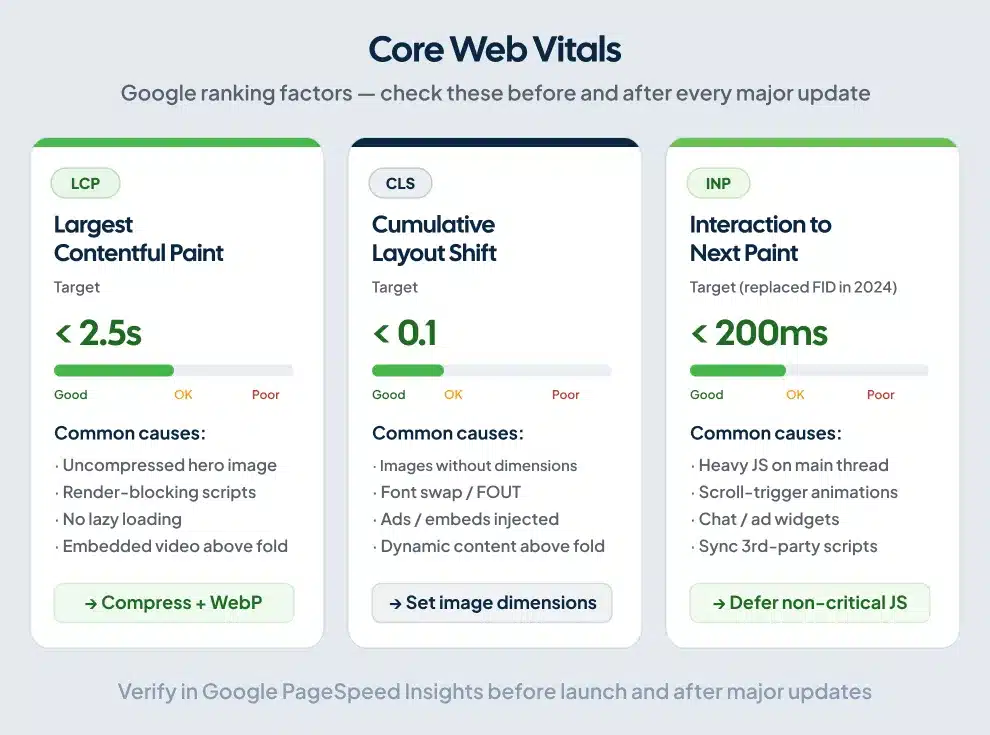
The most common culprits on Webflow sites:
- High-resolution hero images uploaded without compression
- Scroll-triggered animations running on the main thread
- Chat widgets, ad tags, and analytics scripts loaded synchronously
- Embedded videos without lazy loading
Run Google PageSpeed Insights before launch and after every major design update. Our Webflow page speed guide covers fixes for each of these. Webflow’s CDN delivers files from edge servers near each visitor — that part is built in and needs no configuration.
Webflow CMS and Content SEO
Building a Blog in Webflow
CMS Collections are Webflow’s content database. A Blog Posts collection needs fields for title, slug, author, publish date, featured image, category (a reference field), tags (a multi-reference field), and body content. Our guide to Webflow CMS for SEO covers collection architecture in depth.
Each item generates its own page from the collection template you design. In that template, bind the meta title and description fields to CMS fields so Webflow generates unique metadata for every post without manual input.
Categories and tags create their own listing pages. Link from category pages down to individual posts, and from posts back up to their categories. That bidirectional structure gives crawlers a clear path through your content.
Content Clusters and Topical Authority
Publishing one blog post about a topic doesn’t make your site an authority on it. Search engines reward consistent, comprehensive coverage of a subject.
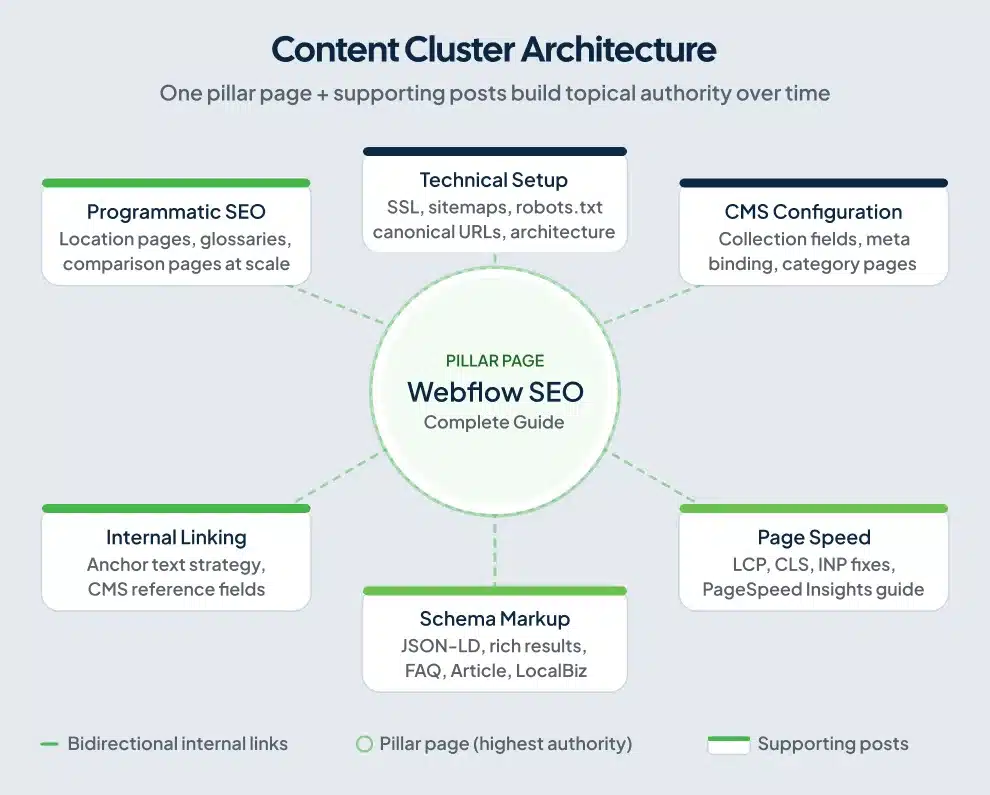
A content cluster has one long-form pillar page covering a broad topic in depth, with a set of supporting posts each covering a specific subtopic. Every supporting post links back to the pillar. The pillar links out to each supporting post.
A Webflow SEO agency building topical authority might structure a cluster with “Webflow SEO” as the pillar and supporting posts on technical setup, CMS configuration, programmatic SEO in Webflow, page speed, and schema markup. Each internal link reinforces the pillar’s authority on the topic.
Build the cluster architecture before writing individual posts. Random publishing on adjacent topics doesn’t accumulate topical authority — the structure has to come first.
Programmatic SEO in Webflow
Programmatic SEO uses Webflow’s CMS to generate hundreds or thousands of pages from a single template and a structured data source. You design the template once. A spreadsheet, API feed, or database populates each page with unique content.
One company grew from 100 to 6,000 daily search impressions in six weeks using this approach. According to Webflow’s own case documentation, a team created over 300 landing pages in a single week using CMS collections — work that previously took months. Webflow’s API supports publishing up to 4,800 pages per day.
Practical Use Cases
Location pages: A service business creates a CMS collection with one item per city, containing the city name, a localized service description, and market-specific details. The template turns those into unique landing pages targeting “[service] in [city]” searches.
Comparison pages: SaaS companies use CMS collections to build “[competitor] vs. [your product]” pages at scale, targeting high-intent searchers who are actively evaluating options.
Glossaries: Canva has individual pages for hundreds of colors and design terms. Each page targets a specific long-tail search. The volume makes the aggregate traffic significant. You can build the same structure in Webflow’s CMS.
CMS Plan Limits
Webflow’s Business plan supports CMS item counts in tiers up to 20,000 items, with Enterprise for anything higher. Exact tier breakdowns and pricing shift — check Webflow’s pricing page for current numbers. For most programmatic projects, the Business plan covers the full scope.
For campaigns that need more, the options are Webflow Enterprise (custom pricing, typically $15,000-$50,000 annually), a reverse proxy architecture stitching multiple Webflow projects under one domain, or a headless CMS setup with an external frontend. Reverse proxy architectures add less than 20 milliseconds of overhead and preserve SEO authority by serving content from subdirectories rather than subdomains.
Internal Linking for Programmatic Pages
Programmatic pages in isolation don’t rank. They need hub pages linking into the collection and cross-links between related items.
Use a hub-and-spoke structure: a static hub page (like /locations/ or /integrations/) links to all relevant CMS items through a Collection List. On each collection template page, add a “Related items” section filtered by a reference field, capped at four to eight items per page. More than that dilutes link equity without improving crawlability.
Webflow’s April 2025 update added hreflang settings that auto-generate localization tags. If you’re targeting multiple language markets with the same programmatic structure, configure those settings before you scale — changing hreflang after launch creates index inconsistencies that take months to clear.
Schema Markup in Webflow
Schema markup adds structured data in a format search engines parse directly. A page with correct FAQPage schema can display questions and answers in search results without the user clicking through. Article schema surfaces author information and publish dates. LocalBusiness schema enables map pack and knowledge panel data.
Webflow has added some AI-assisted schema generation inside Page Settings in recent updates, but for dynamic CMS-driven schema and full control over markup, custom code remains the reliable path. Add it in two places.
Page Settings > Custom Code > Head: Use a <script type="application/ld+json"> block for static pages — your homepage, contact page, service pages.
CMS collection template custom code: Use dynamic CMS field variables inside your JSON-LD block so each collection item generates unique schema automatically. Tools like Slater and Schema Flow handle this at scale. See our full Webflow schema markup guide for implementation examples.
Validate with Google’s Rich Results Test before publishing. Common schema types for business sites:
| Schema type | Use it for |
|---|---|
| Article | Blog posts |
| FAQPage | FAQ sections |
| LocalBusiness | Location-specific pages |
| Service | Service pages |
| BreadcrumbList | Site navigation context |
Open Graph and Social Sharing
Open Graph tags control how your pages render when shared on social platforms. Webflow supports OG configuration per page under Page Settings.
Set the OG title, description, and image for every page. The image needs to be at least 1200×630 pixels for clean rendering across platforms.
One gap: Webflow doesn’t generate the og:url tag automatically. Add it manually in Page Settings > Custom Code in the document head:
<meta property="og:url" content="https://yourdomain.com/page" />Skipping it means social platforms sometimes pull the wrong URL when a page gets shared, especially for CMS collection pages accessed through category filters.
Internal Linking Strategy
Internal links distribute PageRank across your site, help crawlers discover new content, and tell search engines which pages you consider most important.
Link from high-authority pages — your homepage, your most-linked posts — toward the pages you’re trying to rank. Use descriptive anchor text adjacent to the target page’s primary keyword. “Learn more” and “click here” pass link equity but waste the semantic signal.
In Webflow’s CMS, reference fields link collection items to each other. A blog post tagged under “SEO” surfaces automatically in other SEO posts if you’ve built that reference relationship into your collection template. Set it up once and every new post inherits the cross-linking structure.
Audit internal links quarterly. When you publish new content, link to it from two or three existing pages on the same day it goes live. A new page with no inbound internal links may sit uncrawled for weeks.
Tracking Webflow SEO Performance
Connect Webflow to Google Search Console during initial site setup, before you publish. GSC shows which queries drive visitors to your site, which pages Google has indexed, and where crawl errors or indexing failures exist.
Connect Google Analytics 4 for behavioral data: engagement rate, session duration, conversion paths by traffic source. Our guide to adding Google Analytics to Webflow covers the setup step by step.
Review these monthly:
| Metric | Look for |
|---|---|
| Impressions and clicks by page | Which pages drive search visibility and which don’t |
| Average position | Where pages rank for their target keywords |
| Index coverage | How many pages Google has indexed vs. excluded |
| Core Web Vitals | Which pages have performance issues at scale |
Prioritize position 5-15 pages in your update cycle. A page at position 8 is far easier to move to position 3 than pushing a page from position 50 to page one. Update content, strengthen internal links, and improve on-page signals for near-ranking pages first.
Webflow SEO Checklist
Run this before publishing any new page or collection template. The full Webflow SEO checklist has a printable version and a section-by-section breakdown.
Technical
Custom domain connected, SSL active
Staging domain (yoursite.webflow.io) blocked in robots.txt
Global canonical URL set in Project Settings
XML sitemap submitted to Google Search Console
Key pages within 2-3 clicks of the homepage
On-page
One H1 per page, contains primary keyword
Meta title under 60 characters, primary keyword near the front
Meta description 150-160 characters, specific reason to click
URL slug is short, descriptive, keyword-focused
Images have descriptive file names and alt text
Images compressed, lazy loading enabled
Content
At least 2-3 existing pages link to the new page on publish day
New page links back to its relevant pillar or hub page
CMS collection template has meta title and description fields bound
Performance
LCP under 2.5 seconds (verified in PageSpeed Insights)
CLS near 0 (explicit image dimensions set)
Non-critical third-party scripts deferred
Frequently Asked Questions
Does Webflow have good built-in SEO features?
Webflow includes custom meta titles and descriptions, clean semantic HTML output, automatic XML sitemap generation, a global CDN, SSL on all paid plans, and Open Graph support. For most businesses, those built-in features cover baseline technical requirements without plugins. The main gaps — primarily schema markup and some advanced canonical controls — require custom code or third-party apps like Slater.
How does Webflow SEO compare to WordPress?
Webflow generates cleaner code and faster load times without additional configuration. WordPress with a well-maintained plugin stack (Yoast, WP Rocket, Smush, a CDN service) can reach similar performance, but each plugin is a dependency that breaks on updates and requires ongoing maintenance. Webflow removes that burden. WordPress offers more flexibility for custom functionality and a larger third-party ecosystem. For marketing sites and content-driven blogs, Webflow is the lower-friction choice. See our full Webflow SEO vs. WordPress comparison for the detailed breakdown.
Can Webflow handle programmatic SEO?
Yes. Webflow’s CMS Collections support programmatic SEO at meaningful scale. The Business plan supports CMS items in tiers up to 20,000, with Enterprise for anything higher. You design one collection template, then populate it with structured data via CSV import, the Webflow API, or sync tools like Whalesync or Make. Each collection item generates its own indexed page with unique metadata, URL, and content.
How do I add schema markup to Webflow?
For static pages, add JSON-LD schema in Page Settings > Custom Code > Head using a <script type="application/ld+json"> block. For CMS collection pages, add the schema to the collection template’s custom code section and use dynamic CMS field variables to generate unique schema per item. Validate with Google’s Rich Results Test before publishing. Apps like Slater and Schema Flow manage schema at scale.
Does Webflow help with Core Web Vitals?
Webflow’s flat-file delivery and CDN give you a performance advantage over PHP-based platforms, but that baseline doesn’t guarantee good scores. You still need to compress images before uploading, enable lazy loading, set explicit image dimensions, audit third-party scripts, and avoid scroll-triggered animations on the main thread. Webflow sites that fail Core Web Vitals assessments almost always trace the problem to an uncompressed hero image or a synchronously loaded third-party script.
The Bottom Line
Webflow earns its reputation as an SEO-friendly platform. Clean code, fast delivery, solid built-in tooling.
The sites that rank aren’t just well-built, though. They’re strategically structured — topical content clusters built around buyer intent, programmatic pages covering long-tail variations, technical SEO configured before launch, and a publishing cadence that compounds authority over time.
At ClearBrand, we’ve helped clients reach up to 15x organic traffic growth building exactly that kind of system on Webflow. If you want to see what that looks like for your specific business, schedule a call with us.