
You’re building an online presence. You want it to look good, rank on Google, and sell products. Webflow and Shopify both promise to deliver, but they were built for different people, and picking the wrong one means a rebuild you didn’t plan for.
This comparison covers design, SEO, ecommerce functionality, pricing, and the specific scenarios where each platform wins. By the end, you’ll know which one fits your business.
Quick Comparison: Webflow vs Shopify
| Feature | Webflow | Shopify |
|---|---|---|
| Primary purpose | Website builder with ecommerce | Ecommerce platform |
| Design freedom | Pixel-perfect, no code required | Template-based; deep custom requires Liquid |
| Ecommerce depth | Up to 15,000 products (plan-dependent) | Unlimited products |
| Product variants | 50 variants per product | 2,048 variants per product (2025) |
| SEO control | Superior (custom URL structure, clean HTML) | Good, with fixed /products/ and /collections/ paths |
| Abandoned cart recovery | Not available natively (third-party integrations available) | Included on all plans |
| POS system | None | Built-in |
| App ecosystem | Smaller, growing | 6,000+ apps |
| Pricing (ecommerce, annual billing) | From $29/month | From $29/month |
| Free plan | Yes (no selling until paid) | No (14-day trial) |
| 24/7 customer support | No (email Mon-Fri) | Yes |
The Core Difference
Shopify is an ecommerce platform. Webflow is a website builder that added ecommerce.
That distinction explains most of what follows. Shopify’s infrastructure, from inventory management to payment processing to its app ecosystem, runs toward one goal: selling products at scale. Webflow’s infrastructure runs toward design and content, with selling built in afterward.
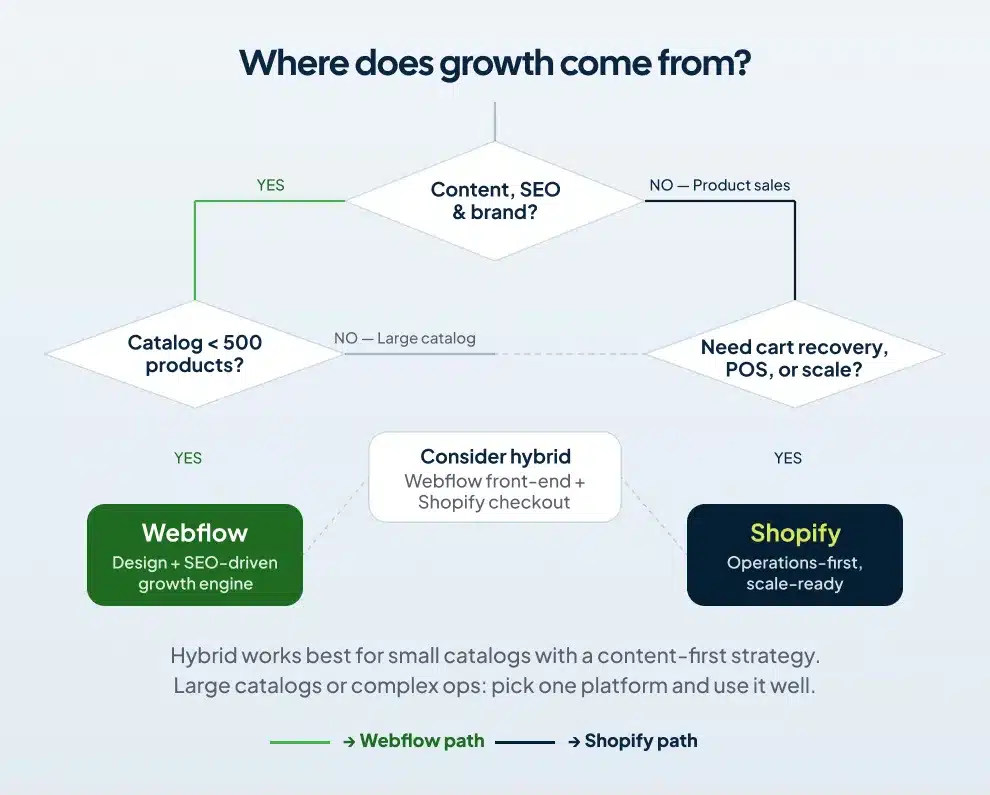
The decision turns on where your business actually lives. If customers find you through content and stay because of brand, Webflow is built for that. If customers arrive ready to buy and you need the operational tools to fulfill and scale, Shopify is.
Design and Customization
Webflow gives you control that no template-based platform can match. You work directly with HTML, CSS, and JavaScript through a visual interface. Your site can look exactly the way you want it to, down to pixel-level spacing, scroll-triggered animations, and custom interactions, without writing a line of code.
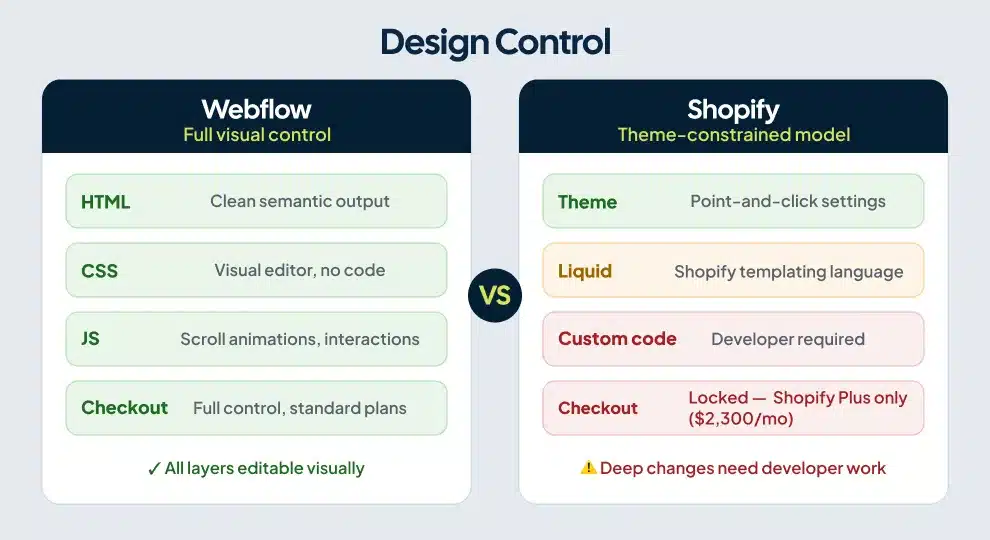
Shopify runs on themes. The themes are well-designed. But you’re working within whatever constraints that theme carries, and going beyond those constraints requires Liquid, Shopify’s templating language. Most business owners don’t learn Liquid. Most developers find it tedious for anything beyond minor adjustments.
One detail worth knowing: Shopify only lets you customize the checkout experience on its Shopify Plus plan, which starts at $2,300/month. Webflow gives you full checkout control on its standard ecommerce plans.
For brands where the site is part of the product experience, where visual identity drives purchasing decisions and content keeps customers coming back, Webflow wins this category by a clear margin. For brands where customers arrive knowing what they want and just need a fast, reliable path to purchase, Shopify’s themes do the job.
SEO
Is Webflow or Shopify better for SEO?
Webflow gives you more technical SEO control than Shopify. You can build custom URL structures, write clean semantic HTML, and optimize meta tags dynamically through the CMS. Shopify locks every product under /products/ and every collection under /collections/, and changing those paths requires redirects that add architectural complexity. For content-driven brands using blogging and landing pages to drive organic traffic, Webflow’s flexibility produces cleaner site architecture and faster rankings.
Shopify generates sitemaps automatically, handles canonical tags, and loads fast on reliable infrastructure. Stores on Shopify rank well on Google. The URL restrictions become a real constraint when you’re building topic clusters and need your product and category pages to sit within a logical content hierarchy. A furniture store ranking for “solid oak dining tables” needs that page to live at a sensible path, not forced into a predefined folder structure.
Webflow’s CMS handles content relationships that Shopify can’t replicate without apps. You can build a blog collection, a case study collection, and a product collection, each with its own custom fields, all managed from the same visual editor. For a deeper look at whether Webflow is a strong platform for search visibility overall, the evidence is consistent: for content-driven businesses, the structural advantages compound over time.
If you plan to grow through SEO, Webflow gives you the better foundation to build on.
Ecommerce Features
Shopify’s depth
Shopify was purpose-built for selling, and the gap shows at the operational level.
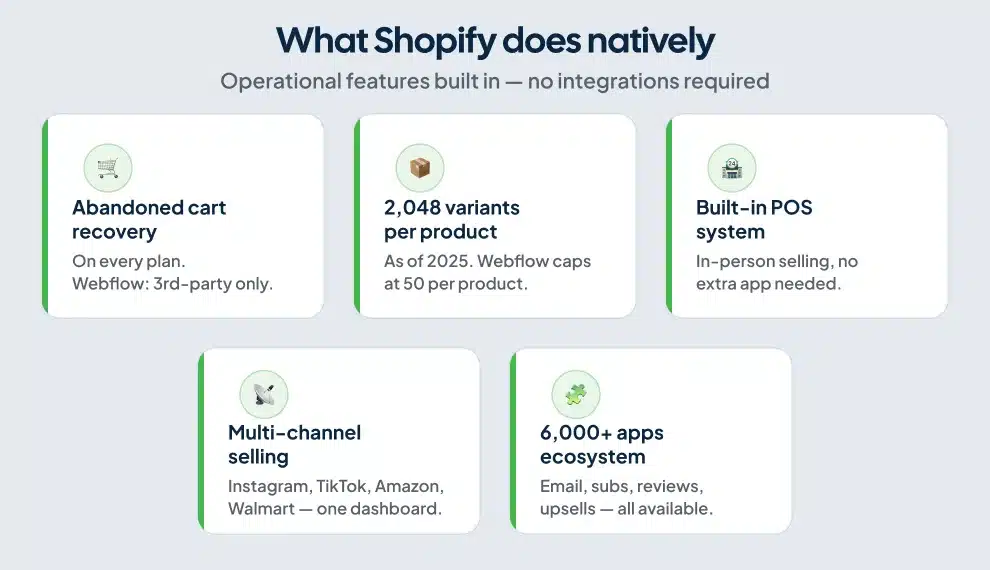
Abandoned cart recovery comes on every Shopify plan. You can review incomplete checkouts, identify patterns, and send automated follow-up emails with a link to the customer’s cart. Webflow has no native abandoned cart recovery, though third-party tools like Monto can bridge the gap.
As of 2025, Shopify supports up to 2,048 product variants per product, per Shopify’s own updated product documentation. Webflow caps variants at 50. For a clothing brand selling a jacket in five colors and eight sizes, Webflow runs out of room. Shopify handles it without a workaround.
Shopify also includes a built-in POS system for in-person sales, a mobile app for managing the store from anywhere, and multi-channel selling through Instagram, Facebook, TikTok, Amazon, and Walmart from a single dashboard. Webflow has none of those natively.
For stores with complex shipping rules, discount stacking, subscription products, or international markets, Shopify handles those through native tools or a mature app ecosystem with over 6,000 options. Webflow handles them through custom integrations and, in some cases, developer work.
Webflow’s ecommerce strengths
Webflow’s ecommerce works well for focused catalogs with strong brand identity and a content strategy driving most of the traffic. You get full control over cart design, checkout styling, and transactional emails. Product pages can be built to any layout. Nothing is locked behind a higher-tier plan.
The limitation shows on the operational side. Managing high order volumes across multiple variants through Webflow’s dashboard takes more effort than the same workflow in Shopify. The platform wasn’t designed for high-volume fulfillment, and that shows in the back-end experience.
Webflow caps product listings by plan: 500 items on Standard, 5,000 on Plus, and 15,000 on Advanced. Shopify has no product limit.
If you’re evaluating Webflow specifically for ecommerce SEO, the product schema markup differences between Webflow and Shopify matter more than most comparison articles acknowledge, particularly for product-heavy sites trying to earn rich results.
Pricing: What You Actually Pay
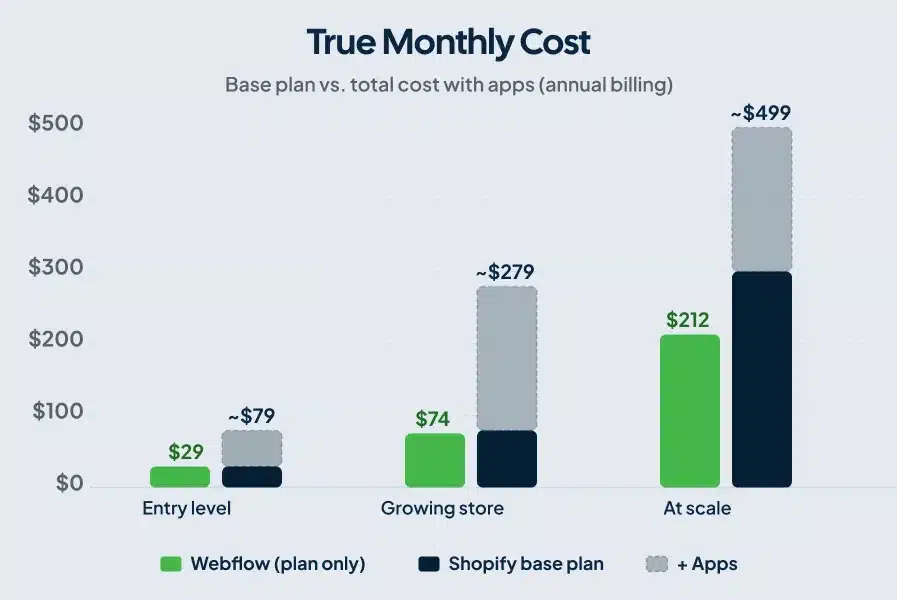
Both platforms start at the same monthly rate on annual billing. Total costs diverge as you scale.
Webflow ecommerce pricing (billed annually)
- Standard: $29/month. Up to 500 products, 2% transaction fee, $50k annual sales cap.
- Plus: $74/month. Up to 5,000 products, no Webflow transaction fee, $200k annual sales cap.
- Advanced: $212/month. Up to 15,000 products, no cap on annual sales.
Webflow’s pricing includes hosting. Most stores don’t need to add many apps because design, CMS, and content management are built into the platform.
Shopify pricing (billed annually)
- Basic: $29/month. Two staff accounts, basic reports, 2% transaction fee with third-party processors.
- Shopify: $79/month. Improved reporting, more staff accounts, 1% transaction fee.
- Advanced: $299/month. Custom reports, 0.5% transaction fee.
- Shopify Plus: $2,300/month for enterprise-scale operations.
Both platforms start at $29/month on annual billing, so the decision shouldn’t hinge on entry-level pricing. The real divergence happens at scale. Growing Shopify stores typically spend $100 to $500 per month on apps for email marketing, subscriptions, reviews, and upsells, per ecommerce.folio3.com’s cost analysis. A store on the $79/month Shopify plan can easily reach $400/month in total costs once you add the tools most active businesses need. The base subscription is the floor, not the ceiling.
Webflow’s cost structure is more predictable. You pay for the plan, and the platform covers most of the functionality. The tradeoff is that Webflow design and setup requires more upfront work, and many businesses hire a Webflow designer or agency to build the site properly. That’s an upfront investment, not a recurring one.
The Combined Approach: Webflow + Shopify
Some brands run both. The marketing site and blog live in Webflow. Shopify handles the checkout backend, connected through tools like Udesly or Shopify Buy Buttons.
You get Webflow’s design and SEO advantages on the front end with Shopify’s checkout infrastructure on the back end. For a direct-to-consumer brand with a focused product line and a content-first growth strategy, this setup produces strong results across both dimensions.
The downside is managing two platforms and their integration. For businesses with large product catalogs or operational complexity, one platform used well produces better results than a hybrid setup stretched across two.
How Webflow vs Shopify Compares to Other Platforms
If you’re still in the research phase and comparing multiple tools, the same SEO-first framework applies across other comparisons. Webflow holds its own against Framer in an SEO context and also stacks up differently against Squarespace when organic search is the priority. The pattern holds: Webflow’s design and content architecture advantages show up most clearly for businesses where the website is the primary marketing channel.
Who Should Use Webflow
Webflow fits your business if the site itself is the primary marketing asset. Service businesses, SaaS companies, creative agencies, and content-driven brands that also sell products all land here. If you plan to grow through organic search, if brand differentiation matters in your category, and if your product catalog stays manageable (a few hundred products or fewer, with simple variants), Webflow gives you the infrastructure to execute that strategy.
Budget for a Webflow designer or agency if you’re going this route. A well-built Webflow site compounds over time through SEO and brand differentiation. A poorly configured site on any platform underperforms, regardless of which features it has access to.
Who Should Use Shopify
Shopify fits your business if selling is the primary goal and operations need to scale. You have a real product catalog, you need abandoned cart recovery, you want multi-channel selling and POS functionality, and you need order management tools that don’t require patching together integrations.
Shopify also fits businesses new to ecommerce who want the support infrastructure behind the most widely used ecommerce platform available. The app ecosystem, documentation, and community are unmatched. You can get a store live and selling in two days. That speed of execution matters when you’re testing a product market or moving fast on a seasonal opportunity.
Frequently Asked Questions
Can I use Webflow for ecommerce?
Yes. Webflow supports selling physical and digital products and accepts payments through Stripe, PayPal, Apple Pay, and Google Pay. The platform works well for stores with focused catalogs and strong content strategies. Limitations appear with large inventories (Standard plan caps at 500 products, up to 15,000 on Advanced), complex variant structures (50 variants per product), and operations that require native abandoned cart recovery or multi-channel selling.
Does Webflow have better SEO than Shopify?
Webflow gives you more SEO control. You can build custom URL structures, control semantic HTML, and create content-rich CMS collections that support deep topic clusters. Shopify’s fixed URL patterns for products and collections limit your architectural options. Both platforms can rank well, but Webflow has a structural advantage for businesses that treat content and organic search as a primary growth channel.
Is Shopify easier to use than Webflow?
Shopify has a shorter learning curve for the ecommerce side. You can add products, configure a theme, and start accepting orders within a day or two. Webflow requires more design knowledge upfront, particularly for users without any design or front-end background. Shopify was built for merchants. Webflow was built for designers who want control over the full web experience.
Can you use Webflow and Shopify together?
Yes. You can design your storefront in Webflow and connect Shopify’s checkout backend through tools like Udesly or Shopify Buy Buttons. You get Webflow’s design and SEO advantages with Shopify’s checkout infrastructure. Managing two platforms adds complexity, and the integration works best for stores with a simpler product catalog rather than large inventories or complex fulfillment needs.
How do Webflow and Shopify costs compare over time?
Both start at $29/month on annual billing for ecommerce. Webflow’s costs are more predictable because most functionality comes built in. Shopify’s base price matches Webflow’s at entry level, but growing stores spend $100 to $500/month on apps, pushing total costs well above the base subscription. At mid-scale, a fully equipped Shopify store typically costs more per month than a comparable Webflow plan once the app stack is included.
The Bottom Line
Pick Shopify if selling products at scale is the goal and you need the operational infrastructure to do it. Pick Webflow if your site is the growth engine and you’re building compounding visibility through content, design, and search.
The question to answer first is where growth comes from for your business. If organic content and brand differentiation drive it, Webflow gives you the infrastructure to execute. If product discovery and repeat purchase drive it, Shopify does that better than anything else at this price point.
If you want a Webflow site built with SEO and conversion in mind, our team at ClearBrand builds Webflow sites designed to rank and convert.